> ## Documentation Index
> Fetch the complete documentation index at: https://unkey.com/docs/llms.txt
> Use this file to discover all available pages before exploring further.
# Overview
> Track every change to your API keys, permissions, and workspace configuration with Unkey audit logs. Filter by actor, event type, and time.
Audit logs capture every mutation in your workspace — key creation, permission changes, revocations, and more. They're essential for security compliance, debugging, and understanding who changed what and when.
## Why audit logs matter
When something goes wrong, trace exactly what happened and who was
responsible.
SOC 2, HIPAA, and other frameworks require audit trails for sensitive
operations.
Know when team members create, modify, or revoke keys — especially in shared
workspaces.
Figure out why a key stopped working or when a permission was changed.
## What's captured
Every mutation is logged automatically:
| Category | Events |
| --------------- | ------------------------------------------------------ |
| **Keys** | Create, update, revoke, delete, verify (failures) |
| **APIs** | Create, update, delete |
| **Permissions** | Create, update, delete, attach to key, remove from key |
| **Roles** | Create, update, delete, assign, unassign |
| **Rate limits** | Create namespace, update limits, set overrides |
| **Workspace** | Member added, member removed, settings changed |
## Accessing audit logs
1. Sign into the [Dashboard](https://app.unkey.com/audit)
2. Click **Audit Logs** in the left navigation
 ## Reading the log
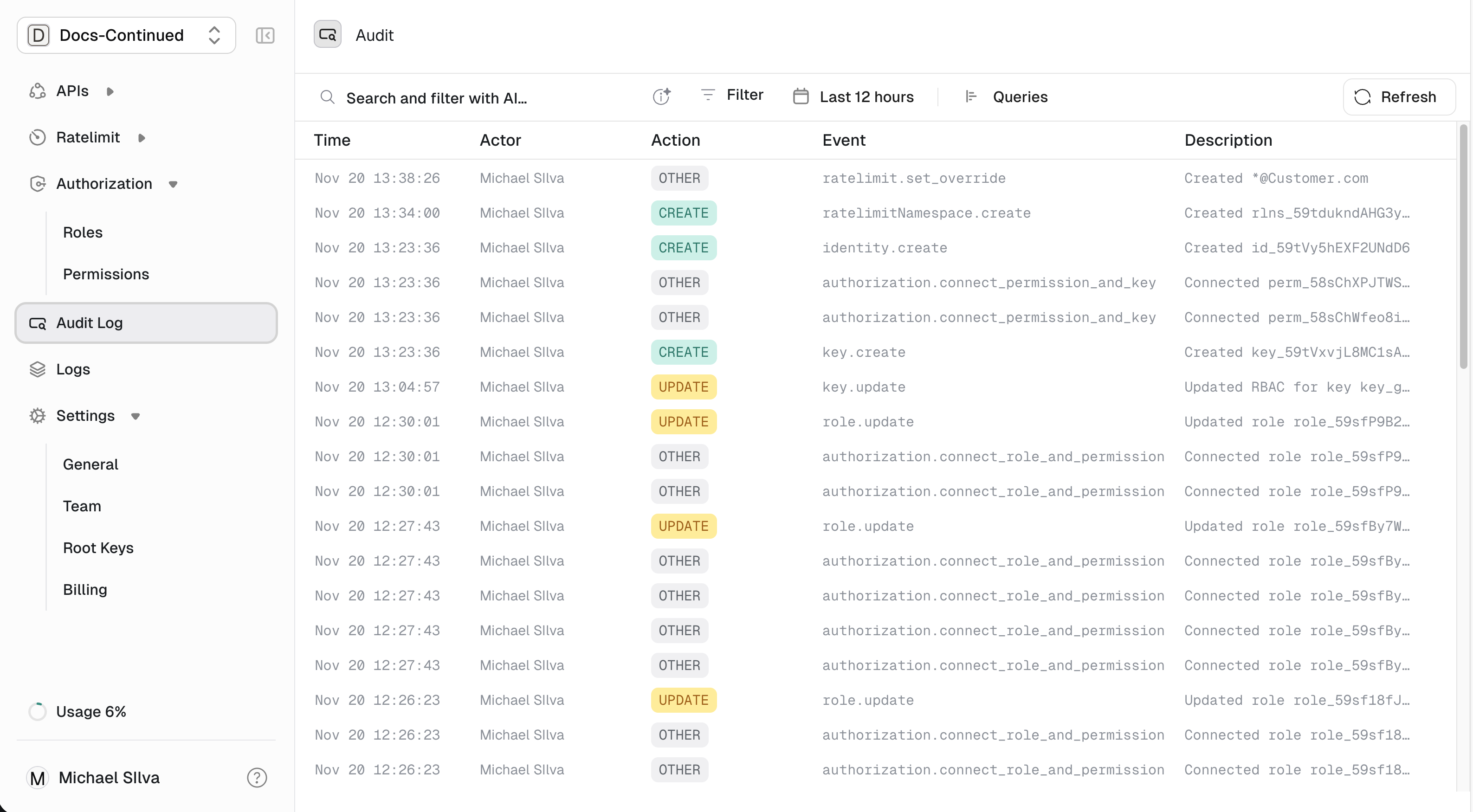
Each entry shows:
| Field | Description |
| --------------- | ---------------------------------------------------------- |
| **Time** | When the change occurred |
| **Actor** | Who made the change — a user (dashboard) or root key (API) |
| **Action** | The operation: `Create`, `Update`, `Delete`, etc. |
| **Event** | What was affected: key, permission, API, etc. |
| **Description** | Human-readable summary |
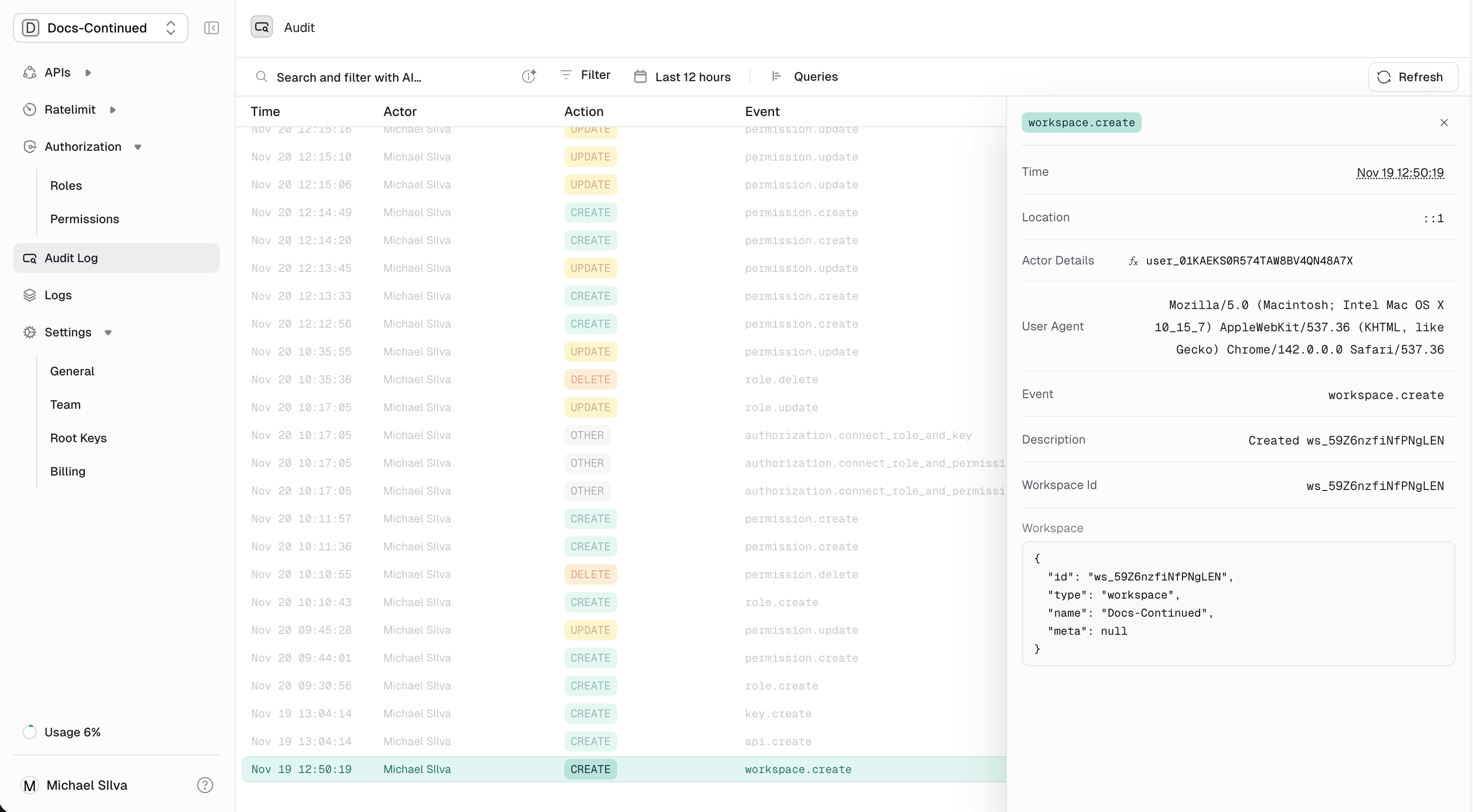
Click any row to see full details, including the complete request/response payloads:
## Reading the log
Each entry shows:
| Field | Description |
| --------------- | ---------------------------------------------------------- |
| **Time** | When the change occurred |
| **Actor** | Who made the change — a user (dashboard) or root key (API) |
| **Action** | The operation: `Create`, `Update`, `Delete`, etc. |
| **Event** | What was affected: key, permission, API, etc. |
| **Description** | Human-readable summary |
Click any row to see full details, including the complete request/response payloads:
 ## Filtering logs
Use the filters at the top of the audit log page to narrow down:
* **Event type** — Show only key events, permission events, etc.
* **Actor** — Filter by specific user or root key
* **Time range** — Focus on a specific period
## Retention
Audit logs are retained based on your plan:
| Plan | Retention |
| ---------- | ------------------------ |
| Free | 7 days |
| Pro | 90 days |
| Enterprise | Custom (up to unlimited) |
Need longer retention? [Contact us](mailto:support@unkey.com) about enterprise options.
## Next steps
Full list of audited events and their payloads
How Unkey protects your data
## Filtering logs
Use the filters at the top of the audit log page to narrow down:
* **Event type** — Show only key events, permission events, etc.
* **Actor** — Filter by specific user or root key
* **Time range** — Focus on a specific period
## Retention
Audit logs are retained based on your plan:
| Plan | Retention |
| ---------- | ------------------------ |
| Free | 7 days |
| Pro | 90 days |
| Enterprise | Custom (up to unlimited) |
Need longer retention? [Contact us](mailto:support@unkey.com) about enterprise options.
## Next steps
Full list of audited events and their payloads
How Unkey protects your data