> ## Documentation Index
> Fetch the complete documentation index at: https://unkey.com/docs/llms.txt
> Use this file to discover all available pages before exploring further.
# Migrate keys to Unkey
> Follow this step-by-step guide to import existing API keys into an Unkey keyspace. Migrate pre-hashed keys from any provider while keeping them valid.
This guide walks you through migrating existing API keys to Unkey.
## Prerequisites
Sign up at [app.unkey.com](https://app.unkey.com/auth/sign-up)
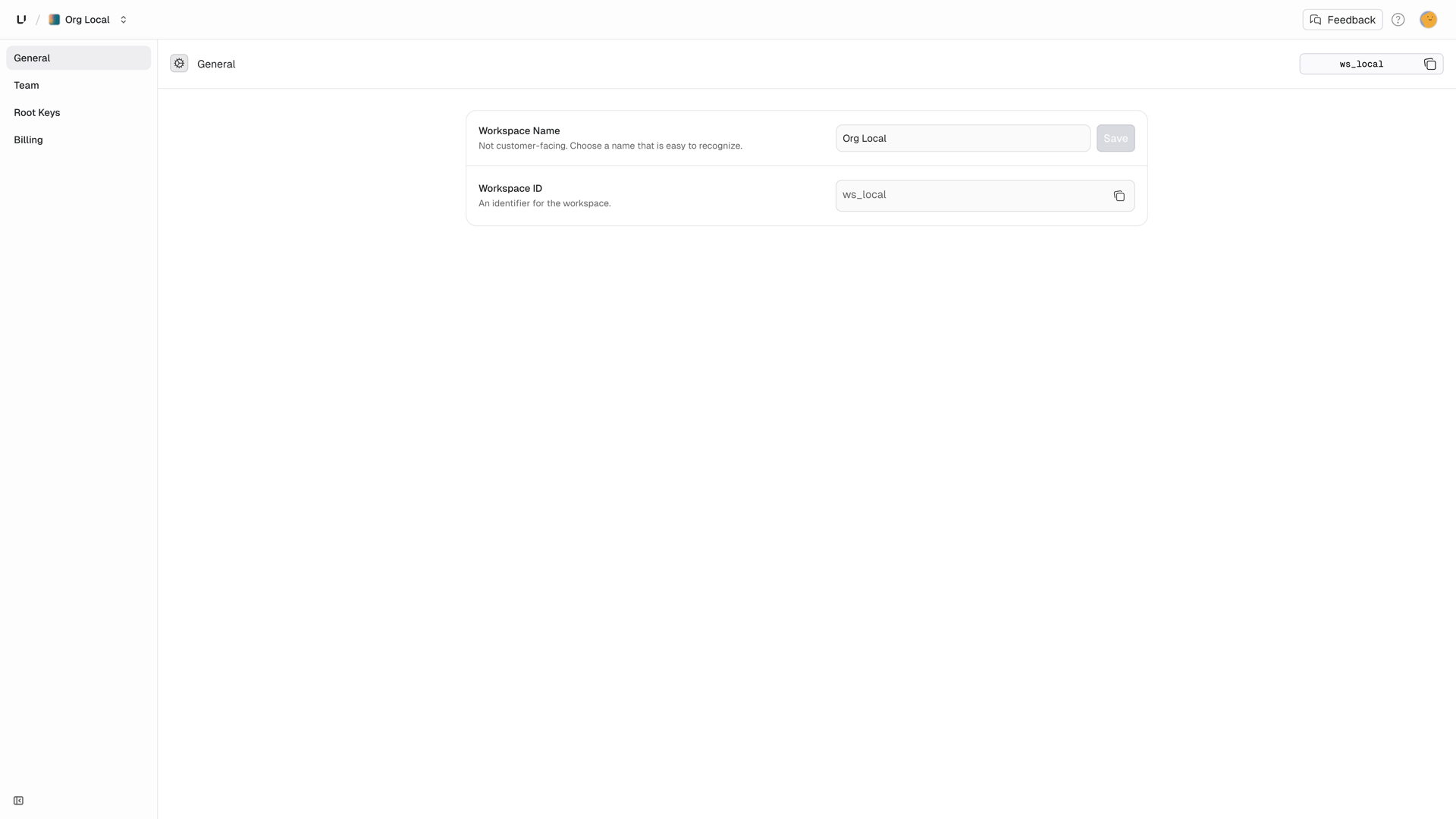
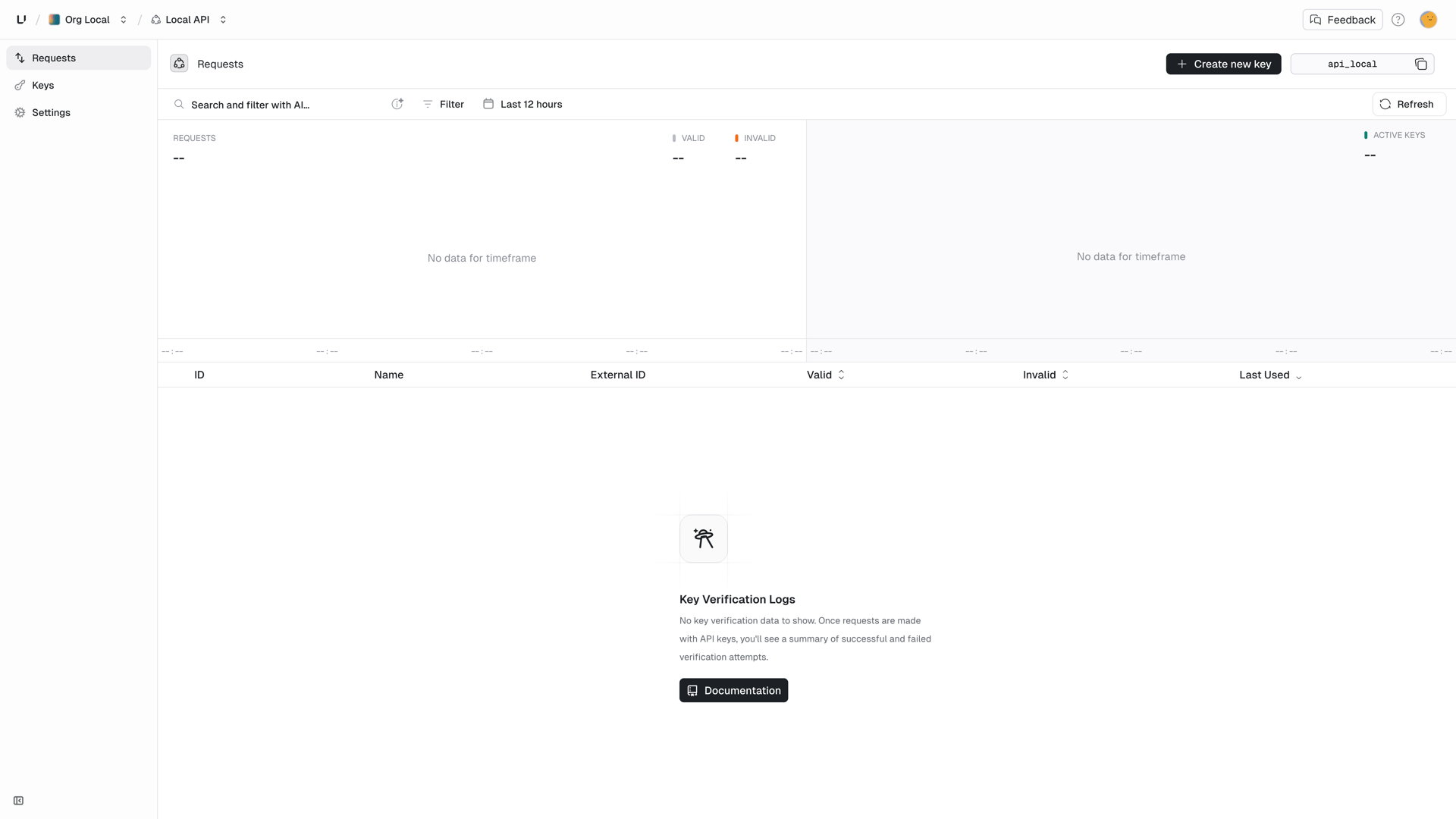
Note your `workspaceId` and `apiId`: - **Workspace ID**: Settings → General
(upper right corner)
 * **API ID**: Keyspaces → Your keyspace (upper right corner)
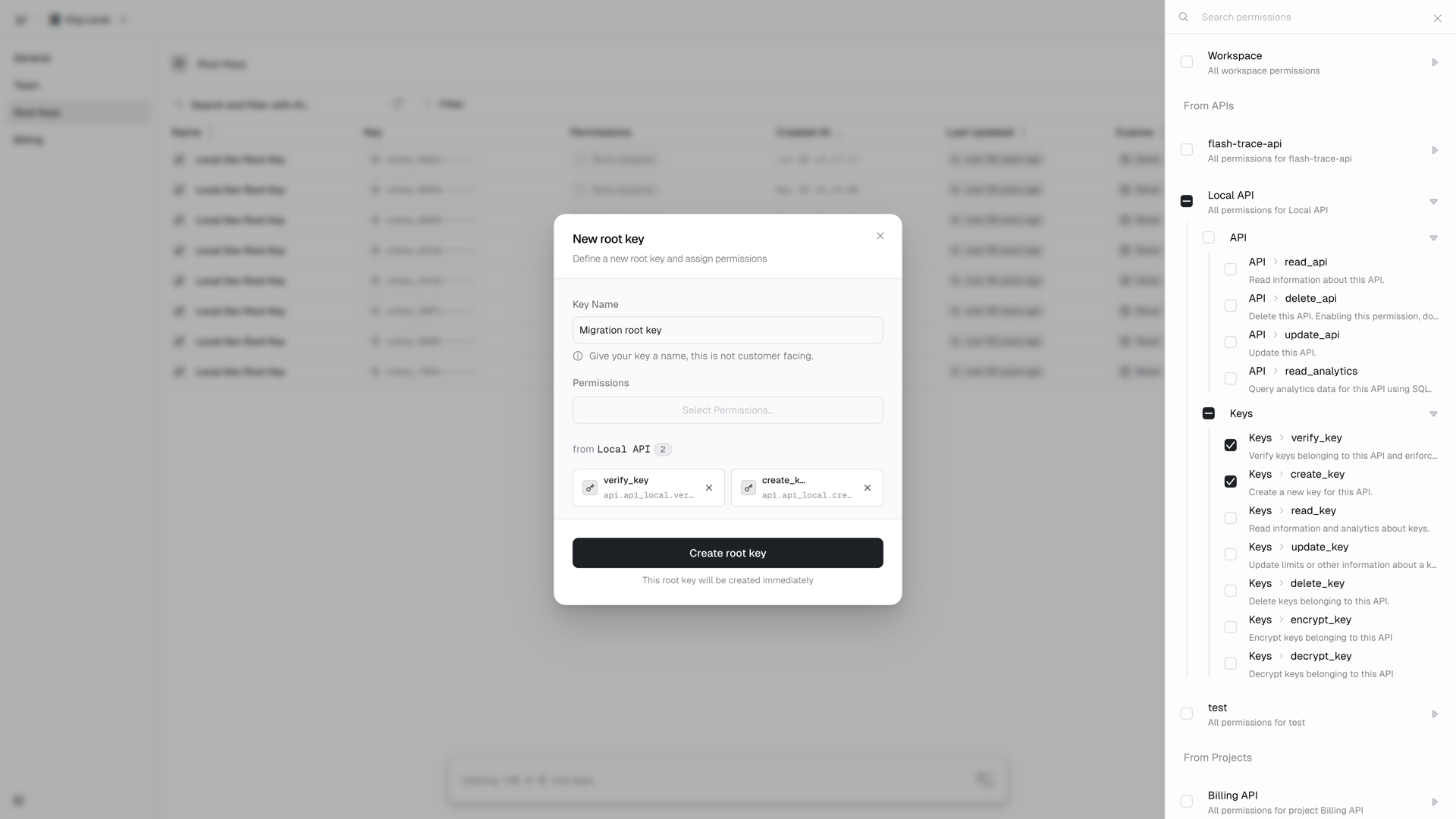
 Go to Settings → Root Keys and create one with `api.*.create_key` and
`api.*.verify_key` permissions.
Go to Settings → Root Keys and create one with `api.*.create_key` and
`api.*.verify_key` permissions.
 Email [support@unkey.com](mailto:support@unkey.com) with: - Your workspace
ID - Source system (PostgreSQL, Auth0, etc.) - Hash algorithm used We'll
send you a `migrationId`.
## Supported hash formats
| Variant | Description |
| --------------- | ----------------------- |
| `sha256_base64` | SHA-256, base64 encoded |
| `sha256_hex` | SHA-256, hex encoded |
| `bcrypt` | bcrypt hash |
Need a different hash format? Contact us, we can add support for your
algorithm.
## Export your keys
Extract key hashes from your current system. **Never include plaintext keys.**
### Example: PostgreSQL
```sql theme={"theme":"kanagawa-wave"}
SELECT
key_hash,
user_id,
created_at,
metadata
FROM api_keys
WHERE revoked = false;
```
### Example: MongoDB
```javascript theme={"theme":"kanagawa-wave"}
db.apiKeys.find({ revoked: false }, { hash: 1, userId: 1, metadata: 1 });
```
## Hash your keys (if not already hashed)
If you have plaintext keys, hash them before migration:
```javascript theme={"theme":"kanagawa-wave"}
const { createHash } = require("node:crypto");
function hashKey(plaintext) {
return {
value: createHash("sha256").update(plaintext).digest("base64"),
variant: "sha256_base64",
};
}
```
## Migrate to Unkey
Use the migration API to import your keys:
```javascript theme={"theme":"kanagawa-wave"}
const UNKEY_ROOT_KEY = process.env.UNKEY_ROOT_KEY;
const MIGRATION_ID = "mig_..."; // From support
const API_ID = "api_...";
// Your exported keys
const keysToMigrate = [
{
hash: {
value: "abc123...", // The hash value
variant: "sha256_base64",
},
externalId: "user_123", // Link to your user
meta: {
plan: "pro",
migratedFrom: "legacy-system",
},
ratelimits: [
{
name: "requests",
limit: 1000,
duration: 60000,
},
],
},
// ... more keys
];
const response = await fetch("https://api.unkey.com/v2/keys.migrateKeys", {
method: "POST",
headers: {
"Content-Type": "application/json",
Authorization: `Bearer ${UNKEY_ROOT_KEY}`,
},
body: JSON.stringify({
migrationId: MIGRATION_ID,
apiId: API_ID,
keys: keysToMigrate,
}),
});
const result = await response.json();
if (!response.ok) {
console.error(
"Migration failed:",
result?.error || `HTTP ${response.status}`,
);
return;
}
if (!result?.data) {
console.error("Migration response missing data");
return;
}
console.log("Migrated:", result.data.migrated.length);
console.log("Failed:", result.data.failed.length);
```
## Response
```json theme={"theme":"kanagawa-wave"}
{
"meta": { "requestId": "req_..." },
"data": {
"migrated": [
{
"hash": "abc123...",
"keyId": "key_..."
}
],
"failed": [
{
"hash": "xyz789...",
"error": "Key already exists"
}
]
}
}
```
## Key configuration options
Each key in the migration can include:
| Field | Description |
| ------------- | ---------------------------------------------------- |
| `hash` | Required. The hash object with `value` and `variant` |
| `prefix` | Key prefix (for display only, not verified) |
| `name` | Human-readable name |
| `externalId` | Link to your user/identity |
| `meta` | Custom JSON metadata |
| `roles` | Array of role names |
| `permissions` | Array of permission names |
| `ratelimits` | Rate limit configuration |
| `credits` | Usage limit configuration |
| `expires` | Expiration timestamp (Unix ms) |
| `enabled` | Whether key is active (default: true) |
## Batch migrations
For large migrations, batch your requests:
```javascript theme={"theme":"kanagawa-wave"}
const BATCH_SIZE = 100;
async function migrateAll(allKeys) {
const results = { migrated: 0, failed: 0 };
for (let i = 0; i < allKeys.length; i += BATCH_SIZE) {
const batch = allKeys.slice(i, i + BATCH_SIZE);
const response = await fetch("https://api.unkey.com/v2/keys.migrateKeys", {
method: "POST",
headers: {
"Content-Type": "application/json",
Authorization: `Bearer ${UNKEY_ROOT_KEY}`,
},
body: JSON.stringify({
migrationId: MIGRATION_ID,
apiId: API_ID,
keys: batch,
}),
});
const result = await response.json();
const batchNum = Math.floor(i / BATCH_SIZE) + 1;
if (!response.ok) {
console.error(
`Batch ${batchNum} failed:`,
result?.error || `HTTP ${response.status}`,
);
results.failed += batch.length;
continue;
}
if (!result?.data) {
console.error(`Batch ${batchNum} missing data`);
results.failed += batch.length;
continue;
}
results.migrated += result.data.migrated.length;
results.failed += result.data.failed.length;
console.log(`Batch ${batchNum}: ${result.data.migrated.length} migrated`);
}
return results;
}
```
## Update your verification
After migration, update your API to verify keys with Unkey:
```javascript theme={"theme":"kanagawa-wave"}
// Before: Custom verification
const isValid = await myDatabase.verifyKey(apiKey);
// After: Unkey verification
const response = await fetch("https://api.unkey.com/v2/keys.verifyKey", {
method: "POST",
headers: {
"Content-Type": "application/json",
Authorization: "Bearer " + process.env.UNKEY_ROOT_KEY,
},
body: JSON.stringify({ key: apiKey }),
});
const result = await response.json();
if (!response.ok || !result?.data) {
// Handle error appropriately
return { valid: false, error: result?.error || "Verification failed" };
}
const isValid = result.data.valid;
```
## Rollback plan
Keep your old verification system running in parallel during migration:
```javascript theme={"theme":"kanagawa-wave"}
async function verifyKey(apiKey) {
// Try Unkey first
const unkeyResult = await verifyWithUnkey(apiKey);
if (unkeyResult.valid) {
return unkeyResult;
}
// Fall back to legacy system (temporary)
const legacyResult = await verifyWithLegacy(apiKey);
if (legacyResult.valid) {
const maskedKey = apiKey.slice(0, 5) + "..." + apiKey.slice(-5);
console.log("Key found in legacy, not yet migrated:", maskedKey);
}
return legacyResult;
}
```
Remove the fallback once migration is complete and verified.
## Need help?
We'll help you plan and execute your migration safely.
Email [support@unkey.com](mailto:support@unkey.com) with: - Your workspace
ID - Source system (PostgreSQL, Auth0, etc.) - Hash algorithm used We'll
send you a `migrationId`.
## Supported hash formats
| Variant | Description |
| --------------- | ----------------------- |
| `sha256_base64` | SHA-256, base64 encoded |
| `sha256_hex` | SHA-256, hex encoded |
| `bcrypt` | bcrypt hash |
Need a different hash format? Contact us, we can add support for your
algorithm.
## Export your keys
Extract key hashes from your current system. **Never include plaintext keys.**
### Example: PostgreSQL
```sql theme={"theme":"kanagawa-wave"}
SELECT
key_hash,
user_id,
created_at,
metadata
FROM api_keys
WHERE revoked = false;
```
### Example: MongoDB
```javascript theme={"theme":"kanagawa-wave"}
db.apiKeys.find({ revoked: false }, { hash: 1, userId: 1, metadata: 1 });
```
## Hash your keys (if not already hashed)
If you have plaintext keys, hash them before migration:
```javascript theme={"theme":"kanagawa-wave"}
const { createHash } = require("node:crypto");
function hashKey(plaintext) {
return {
value: createHash("sha256").update(plaintext).digest("base64"),
variant: "sha256_base64",
};
}
```
## Migrate to Unkey
Use the migration API to import your keys:
```javascript theme={"theme":"kanagawa-wave"}
const UNKEY_ROOT_KEY = process.env.UNKEY_ROOT_KEY;
const MIGRATION_ID = "mig_..."; // From support
const API_ID = "api_...";
// Your exported keys
const keysToMigrate = [
{
hash: {
value: "abc123...", // The hash value
variant: "sha256_base64",
},
externalId: "user_123", // Link to your user
meta: {
plan: "pro",
migratedFrom: "legacy-system",
},
ratelimits: [
{
name: "requests",
limit: 1000,
duration: 60000,
},
],
},
// ... more keys
];
const response = await fetch("https://api.unkey.com/v2/keys.migrateKeys", {
method: "POST",
headers: {
"Content-Type": "application/json",
Authorization: `Bearer ${UNKEY_ROOT_KEY}`,
},
body: JSON.stringify({
migrationId: MIGRATION_ID,
apiId: API_ID,
keys: keysToMigrate,
}),
});
const result = await response.json();
if (!response.ok) {
console.error(
"Migration failed:",
result?.error || `HTTP ${response.status}`,
);
return;
}
if (!result?.data) {
console.error("Migration response missing data");
return;
}
console.log("Migrated:", result.data.migrated.length);
console.log("Failed:", result.data.failed.length);
```
## Response
```json theme={"theme":"kanagawa-wave"}
{
"meta": { "requestId": "req_..." },
"data": {
"migrated": [
{
"hash": "abc123...",
"keyId": "key_..."
}
],
"failed": [
{
"hash": "xyz789...",
"error": "Key already exists"
}
]
}
}
```
## Key configuration options
Each key in the migration can include:
| Field | Description |
| ------------- | ---------------------------------------------------- |
| `hash` | Required. The hash object with `value` and `variant` |
| `prefix` | Key prefix (for display only, not verified) |
| `name` | Human-readable name |
| `externalId` | Link to your user/identity |
| `meta` | Custom JSON metadata |
| `roles` | Array of role names |
| `permissions` | Array of permission names |
| `ratelimits` | Rate limit configuration |
| `credits` | Usage limit configuration |
| `expires` | Expiration timestamp (Unix ms) |
| `enabled` | Whether key is active (default: true) |
## Batch migrations
For large migrations, batch your requests:
```javascript theme={"theme":"kanagawa-wave"}
const BATCH_SIZE = 100;
async function migrateAll(allKeys) {
const results = { migrated: 0, failed: 0 };
for (let i = 0; i < allKeys.length; i += BATCH_SIZE) {
const batch = allKeys.slice(i, i + BATCH_SIZE);
const response = await fetch("https://api.unkey.com/v2/keys.migrateKeys", {
method: "POST",
headers: {
"Content-Type": "application/json",
Authorization: `Bearer ${UNKEY_ROOT_KEY}`,
},
body: JSON.stringify({
migrationId: MIGRATION_ID,
apiId: API_ID,
keys: batch,
}),
});
const result = await response.json();
const batchNum = Math.floor(i / BATCH_SIZE) + 1;
if (!response.ok) {
console.error(
`Batch ${batchNum} failed:`,
result?.error || `HTTP ${response.status}`,
);
results.failed += batch.length;
continue;
}
if (!result?.data) {
console.error(`Batch ${batchNum} missing data`);
results.failed += batch.length;
continue;
}
results.migrated += result.data.migrated.length;
results.failed += result.data.failed.length;
console.log(`Batch ${batchNum}: ${result.data.migrated.length} migrated`);
}
return results;
}
```
## Update your verification
After migration, update your API to verify keys with Unkey:
```javascript theme={"theme":"kanagawa-wave"}
// Before: Custom verification
const isValid = await myDatabase.verifyKey(apiKey);
// After: Unkey verification
const response = await fetch("https://api.unkey.com/v2/keys.verifyKey", {
method: "POST",
headers: {
"Content-Type": "application/json",
Authorization: "Bearer " + process.env.UNKEY_ROOT_KEY,
},
body: JSON.stringify({ key: apiKey }),
});
const result = await response.json();
if (!response.ok || !result?.data) {
// Handle error appropriately
return { valid: false, error: result?.error || "Verification failed" };
}
const isValid = result.data.valid;
```
## Rollback plan
Keep your old verification system running in parallel during migration:
```javascript theme={"theme":"kanagawa-wave"}
async function verifyKey(apiKey) {
// Try Unkey first
const unkeyResult = await verifyWithUnkey(apiKey);
if (unkeyResult.valid) {
return unkeyResult;
}
// Fall back to legacy system (temporary)
const legacyResult = await verifyWithLegacy(apiKey);
if (legacyResult.valid) {
const maskedKey = apiKey.slice(0, 5) + "..." + apiKey.slice(-5);
console.log("Key found in legacy, not yet migrated:", maskedKey);
}
return legacyResult;
}
```
Remove the fallback once migration is complete and verified.
## Need help?
We'll help you plan and execute your migration safely.