> ## Documentation Index
> Fetch the complete documentation index at: https://unkey.com/docs/llms.txt
> Use this file to discover all available pages before exploring further.
# Custom Overrides
> Create custom rate limit overrides for specific users or identifiers in Unkey. Grant higher or lower limits without changing your code.
Override default rate limits for specific identifiers directly from the dashboard. No code changes or deploys needed, changes roll out globally in seconds.
## When to use this
Enterprise customers need higher limits than your default tier.
Integration partners building on your API need room to grow.
Reduce limits for suspicious users without blocking entirely.
Temporarily increase limits for specific test accounts.
## How it works
1. You define default limits in your code
2. Create overrides in the dashboard for specific identifiers
3. When that identifier is rate limited, Unkey uses the override instead of the default
**Override priority:** Exact matches > Wildcard matches > Default limits
## Create an override
Click **Ratelimit** in the sidebar → select your namespace → **Overrides** tab.
If you don't have a namespace yet, create one first.
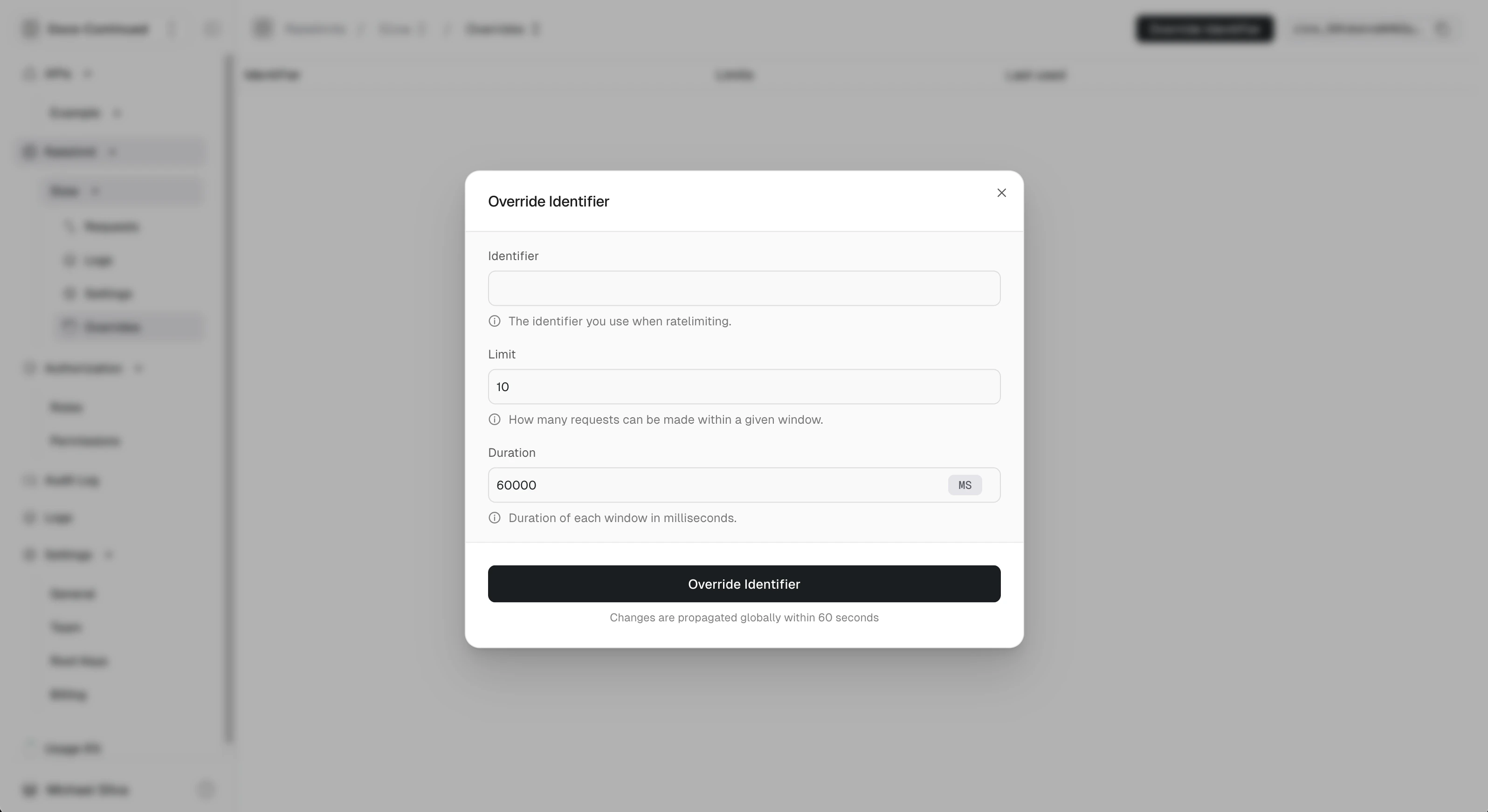 Enter:
* **Identifier**: The exact identifier or wildcard pattern
* **Limit**: Custom request limit
* **Duration**: Time window for the limit
Click **Override Identifier**. Changes propagate globally within \~60 seconds
(usually much faster).
## Example: Enterprise customer
Your default limit is 100 requests/minute. Acme Corp needs 10,000/minute.
| Identifier | Limit | Duration |
| ----------- | ----- | -------- |
| `acme-corp` | 10000 | 60s |
Now when `acme-corp` hits your API, they get 10,000/min instead of 100/min.
## Wildcard patterns
Use `*` to match multiple identifiers at once.
### Examples
| Pattern | Matches |
| -------------- | ------------------------------------------------------ |
| `*@acme.com` | `alice@acme.com`, `bob@acme.com`, `api@acme.com` |
| `enterprise:*` | `enterprise:123`, `enterprise:acme`, `enterprise:test` |
| `user_*_prod` | `user_123_prod`, `user_abc_prod` |
### Priority
Exact matches always win over wildcards:
| Override | Limit |
| -------------- | --------- |
| `*@acme.com` | 500/min |
| `ceo@acme.com` | 10000/min |
**Result:**
* `ceo@acme.com` → 10,000/min (exact match)
* `anyone-else@acme.com` → 500/min (wildcard match)
* `user@other.com` → default limit
Enter:
* **Identifier**: The exact identifier or wildcard pattern
* **Limit**: Custom request limit
* **Duration**: Time window for the limit
Click **Override Identifier**. Changes propagate globally within \~60 seconds
(usually much faster).
## Example: Enterprise customer
Your default limit is 100 requests/minute. Acme Corp needs 10,000/minute.
| Identifier | Limit | Duration |
| ----------- | ----- | -------- |
| `acme-corp` | 10000 | 60s |
Now when `acme-corp` hits your API, they get 10,000/min instead of 100/min.
## Wildcard patterns
Use `*` to match multiple identifiers at once.
### Examples
| Pattern | Matches |
| -------------- | ------------------------------------------------------ |
| `*@acme.com` | `alice@acme.com`, `bob@acme.com`, `api@acme.com` |
| `enterprise:*` | `enterprise:123`, `enterprise:acme`, `enterprise:test` |
| `user_*_prod` | `user_123_prod`, `user_abc_prod` |
### Priority
Exact matches always win over wildcards:
| Override | Limit |
| -------------- | --------- |
| `*@acme.com` | 500/min |
| `ceo@acme.com` | 10000/min |
**Result:**
* `ceo@acme.com` → 10,000/min (exact match)
* `anyone-else@acme.com` → 500/min (wildcard match)
* `user@other.com` → default limit
 ## Managing overrides via API
Create overrides programmatically:
```bash theme={"theme":"kanagawa-wave"}
curl -X POST https://api.unkey.com/v2/ratelimits.setOverride \
-H "Authorization: Bearer $UNKEY_ROOT_KEY" \
-H "Content-Type: application/json" \
-d '{
"namespaceId": "rl_...",
"identifier": "enterprise:acme",
"limit": 10000,
"duration": 60000
}'
```
This enables workflows like:
* Automatically increasing limits when users upgrade
* Syncing limits from your billing system
* Temporary increases during promotions
## Common patterns
### Tier-based limits
```text theme={"theme":"kanagawa-wave"}
free:* → 100/min
pro:* → 1000/min
enterprise:* → 10000/min
```
Use prefixed identifiers in your code: `${plan}:${userId}`
### Domain-based limits
```text theme={"theme":"kanagawa-wave"}
*@bigcustomer.com → 5000/min
*@partner.io → 2000/min
```
### Temporary boost
Need to give someone extra capacity for a demo or migration? Add an override, then remove it when done. No code changes needed.
## Removing overrides
Delete an override from the dashboard or API. The identifier immediately falls back to default limits (or the next matching wildcard).
## Next steps
Understand rate limiting architecture
Configure multiple limits per key
## Managing overrides via API
Create overrides programmatically:
```bash theme={"theme":"kanagawa-wave"}
curl -X POST https://api.unkey.com/v2/ratelimits.setOverride \
-H "Authorization: Bearer $UNKEY_ROOT_KEY" \
-H "Content-Type: application/json" \
-d '{
"namespaceId": "rl_...",
"identifier": "enterprise:acme",
"limit": 10000,
"duration": 60000
}'
```
This enables workflows like:
* Automatically increasing limits when users upgrade
* Syncing limits from your billing system
* Temporary increases during promotions
## Common patterns
### Tier-based limits
```text theme={"theme":"kanagawa-wave"}
free:* → 100/min
pro:* → 1000/min
enterprise:* → 10000/min
```
Use prefixed identifiers in your code: `${plan}:${userId}`
### Domain-based limits
```text theme={"theme":"kanagawa-wave"}
*@bigcustomer.com → 5000/min
*@partner.io → 2000/min
```
### Temporary boost
Need to give someone extra capacity for a demo or migration? Add an override, then remove it when done. No code changes needed.
## Removing overrides
Delete an override from the dashboard or API. The identifier immediately falls back to default limits (or the next matching wildcard).
## Next steps
Understand rate limiting architecture
Configure multiple limits per key