> ## Documentation Index
> Fetch the complete documentation index at: https://unkey.com/docs/llms.txt
> Use this file to discover all available pages before exploring further.
# Delete Protection
> Enable delete protection on Unkey resources to prevent accidental deletion. Protected resources require you to disable protection before removal.
# Delete Protection
Delete Protection is a safety feature that prevents accidental deletion of a resource. When enabled, it blocks all deletion attempts through both the dashboard and API.
## Overview
**Delete Protection** adds an extra layer of security by:
* Preventing accidental deletion of critical resources
* Requiring explicit confirmation to disable protection
* Blocking deletion attempts through both UI and API
## Supported Resources
Currently, Delete Protection is available for:
* Keyspaces: Protect your keyspace configurations and settings from accidental deletion
More resources will be added in future updates.
## Enabling Keyspace Delete Protection
1. Navigate to your Keyspace Settings in the dashboard
2. Click "Enable Delete Protection"
3. Type the keyspace name to confirm
4. Click "Enable Keyspace Delete Protection" to add protection
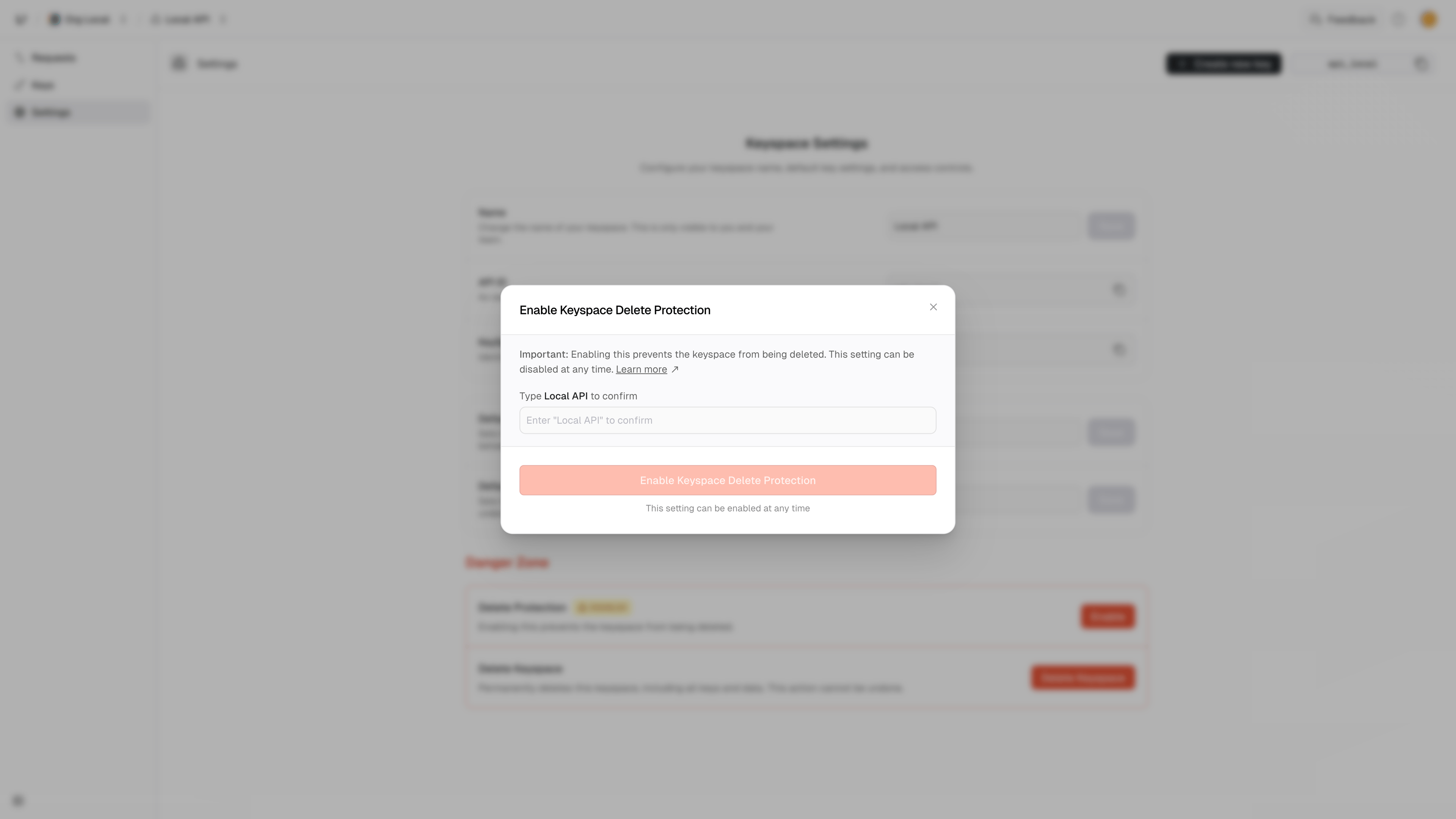 Once enabled, the keyspace cannot be deleted until protection is explicitly disabled.
## Disabling Keyspace Delete Protection
1. Navigate to your Keyspace Settings in the dashboard
2. Click "Disable Delete Protection"
3. Type the keyspace name to confirm
4. Click "Disable Keyspace Delete Protection" to remove protection
## Resource Behavior
When Delete Protection is enabled:
* All deletion attempts are blocked
* The resource returns a `DELETE_PROTECTED` error
* The error includes a link to this documentation
### Example API Error Response
```json theme={"theme":"kanagawa-wave"}
{
"error": {
"code": "DELETE_PROTECTED",
"docs": "https://unkey.com/docs/api-reference/errors/code/DELETE_PROTECTED",
"message": "api [apiId] is protected from deletions",
"requestId": "req_1234"
}
}
```
## Best Practices
1. **Enable for Production resources**: Always enable Delete Protection for resources in production
2. **Use for Critical resources**: Protect resources that contain important data or configurations
3. **Regular Review**: Periodically review protection status of your resources
4. **Team Communication**: Inform team members about protected resources
5. **Documentation**: Document which resources are protected and why
## Limitations
* Delete Protection only prevents deletion of the resource
* It does not prevent modifications to the resource
* It does not prevent deletion of children of a resource, like keys or ratelimits that belong to a protected resource
* Protection can be disabled by any user with appropriate permissions
## Related Errors
* [DELETE\_PROTECTED](https://www.unkey.com/docs/api-reference/errors/code/DELETE_PROTECTED) - Returned when attempting to delete a protected API
Once enabled, the keyspace cannot be deleted until protection is explicitly disabled.
## Disabling Keyspace Delete Protection
1. Navigate to your Keyspace Settings in the dashboard
2. Click "Disable Delete Protection"
3. Type the keyspace name to confirm
4. Click "Disable Keyspace Delete Protection" to remove protection
## Resource Behavior
When Delete Protection is enabled:
* All deletion attempts are blocked
* The resource returns a `DELETE_PROTECTED` error
* The error includes a link to this documentation
### Example API Error Response
```json theme={"theme":"kanagawa-wave"}
{
"error": {
"code": "DELETE_PROTECTED",
"docs": "https://unkey.com/docs/api-reference/errors/code/DELETE_PROTECTED",
"message": "api [apiId] is protected from deletions",
"requestId": "req_1234"
}
}
```
## Best Practices
1. **Enable for Production resources**: Always enable Delete Protection for resources in production
2. **Use for Critical resources**: Protect resources that contain important data or configurations
3. **Regular Review**: Periodically review protection status of your resources
4. **Team Communication**: Inform team members about protected resources
5. **Documentation**: Document which resources are protected and why
## Limitations
* Delete Protection only prevents deletion of the resource
* It does not prevent modifications to the resource
* It does not prevent deletion of children of a resource, like keys or ratelimits that belong to a protected resource
* Protection can be disabled by any user with appropriate permissions
## Related Errors
* [DELETE\_PROTECTED](https://www.unkey.com/docs/api-reference/errors/code/DELETE_PROTECTED) - Returned when attempting to delete a protected API