unkey
  • BlogRead product updates and insights
  • Case studiesPractical results from real deployments
  • ChangelogTrack what shipped, improved, and fixed
  • GlossaryClear definitions for API terms
PricingDocs
DiscordGitHub5.3k
LoginSign Up
  • BlogRead product updates and insights
  • Case studiesPractical results from real deployments
  • ChangelogTrack what shipped, improved, and fixed
  • GlossaryClear definitions for API terms
PricingDocsDiscordGitHub5.3k
LoginSign Up

ChangelogPage 2

We are constantly improving our product, fixing bugs and introducing features.Here you can find the latest updates and changes to Unkey.

Follow us onTwitterandGitHub

All changelog posts

MAR 27, 2026

product

March 27, 2026

New features

Unkey CLI

A new command-line interface gives you direct access to the full Unkey API from your terminal. Manage API keys, configure rate limits, set permissions, query analytics, and more, all without leaving the command line.

Authenticate once with unkey auth login, and all subsequent commands use your stored credentials automatically. You can also pass a root key per-command or via the UNKEY_ROOT_KEY environment variable.

# Authenticate
unkey auth login

# Create an API and issue a key
unkey api apis create-api --name=payment-service
unkey api keys create-key --api-id=api_1234 --name="Production Key"

# Verify a key
unkey api keys verify-key --key=sk_1234abcdef

Every command supports --output=json for scripting and piping to tools like jq. See the CLI documentation for the full command reference.

Key last-used tracking

You can now see when each API key was last used for verification. A new lastUsedAt field is returned by the keys.getKey, keys.whoami, and apis.listKeys v2 API endpoints as a Unix timestamp in milliseconds. The value is approximate, accurate to within a few minutes. Use it to identify stale keys and clean up unused credentials.

Build-time environment variables

Your environment variables are now available during Docker image builds. Variables configured in your deployment settings are decrypted and mounted securely as BuildKit secrets, so you can reference them in your Dockerfile without exposing them in the image layer history. This is useful for installing private packages or pulling credentials needed at build time.

To use a build-time variable, mount it as a secret in your RUN instruction:

# syntax=docker/dockerfile:1
FROM node:20-alpine

# Mount NPM_TOKEN as a secret during install, it won't appear in the image layers
RUN --mount=type=secret,id=NPM_TOKEN \
    NPM_TOKEN=$(cat /run/secrets/NPM_TOKEN) \
    npm install --registry https://registry.npmjs.org/

COPY . .
RUN npm run build
CMD ["node", "dist/index.js"]

The secret ID must match the environment variable key you configured in your deployment settings. Secrets are only available during the build stage where they are mounted.

OpenAPI diff viewer

A new OpenAPI Diff page lets you compare the OpenAPI spec between any two deployments. Select two deployments side-by-side to see added, removed, and changed endpoints with method-specific badges. Changes are categorized by severity, breaking, warning, or informational, so you can quickly identify regressions before promoting a deployment.

To enable the diff viewer, set the path to your OpenAPI spec file (for example, /openapi.yaml) in your project's environment settings. Once configured, the project overview shows a compact diff indicator between your current and latest preview deployment, with a link to the full comparison page.

Configurable production branch

You can now choose which Git branch triggers production deployments. Navigate to your project's deployment settings to find the new Production branch setting. Select any branch from your connected repository, pushes to that branch deploy to the production environment, while all other branches deploy to preview.

Previously, production deployments were always triggered by the repository's default branch. Now you can set it to any branch, such as release or stable, to match your team's workflow.

Deployment approval for external contributors

Deployments triggered by non-collaborators (such as fork-based pull requests) now require explicit approval from a project member before they proceed. A GitHub Check Run appears on the PR, and you can approve or dismiss the deployment directly from the Unkey dashboard.

Watch paths

You can now configure glob patterns (e.g., src/**, **/*.go) in your deployment settings to control which file changes trigger builds. When no files in a push match your watch paths, the deployment is skipped, and the dashboard shows a dedicated skipped view explaining why.

On-demand deployments

You can now trigger a deployment manually from the dashboard by selecting a branch and commit SHA from your connected repository. This is useful when you need to redeploy without pushing a new commit.

Environment selector for on-demand deployments

When triggering a deployment manually from the dashboard, you can now choose which environment to deploy to. A dropdown lets you select the target environment, such as production, staging, or preview, instead of always deploying to the default. This gives you more control when redeploying or testing changes across environments.

Deployment status on GitHub PRs

Deployment progress is now reported directly to GitHub. You'll see status updates on your commits via the GitHub Deployments API, and a summary comment is posted to your pull request with a table showing the status of each app and environment.

Idle deployment status

Deployments that are scaled to zero now show an "idle" status in the dashboard instead of appearing as stopped or errored. This gives you a clearer picture of which deployments are still available but not actively running.

Delete projects

You can now delete projects from the dashboard. This removes the project and all associated apps, environments, and deployments.

Runtime environment variables for deployments

Your deployed workloads now have access to a set of automatically injected environment variables that provide context about the running deployment. Use these to add metadata to your logs, identify which instance is handling a request, or gate behavior based on the current environment.

VariableDescription
UNKEY_DEPLOYMENT_IDUnique identifier for the current deployment
UNKEY_ENVIRONMENT_SLUGSlug of the environment (e.g., production, staging)
UNKEY_REGIONRegion where the instance is running
UNKEY_INSTANCE_IDUnique identifier for the specific running instance (pod)
UNKEY_GIT_COMMIT_SHAGit commit SHA that triggered the deployment
UNKEY_GIT_BRANCHGit branch that triggered the deployment
UNKEY_GIT_REPOFull repository name (e.g., org/repo)
UNKEY_GIT_COMMIT_MESSAGECommit message of the deployed commit

Git-related variables are populated automatically when your deployment is connected to a GitHub repository. UNKEY_INSTANCE_ID is unique per running instance, so you can use it to distinguish between replicas.

// Example: structured logging with deployment context
app.use((req, res, next) => {
  console.log(
    JSON.stringify({
      deployment: process.env.UNKEY_DEPLOYMENT_ID,
      environment: process.env.UNKEY_ENVIRONMENT_SLUG,
      region: process.env.UNKEY_REGION,
      instance: process.env.UNKEY_INSTANCE_ID,
      commit: process.env.UNKEY_GIT_COMMIT_SHA,
      path: req.path,
    }),
  );
  next();
});

The previous UNKEY_WORKSPACE_ID, UNKEY_PROJECT_ID, and UNKEY_ENVIRONMENT_ID variables have been replaced by the new set listed above.

Updates

Improved keys overview table

The keys overview table in the dashboard now supports column sorting, keyboard navigation, and inline row selection. Click any row to open a details panel showing outcome distribution, roles, and permissions, without leaving the page. The table also loads faster with built-in skeleton states and a cleaner empty state.

Improved root keys table

The root keys settings page now uses a paginated, sortable table with keyboard navigation and improved loading states.

Smarter deployment triggers

Branch creation and deletion events no longer trigger unnecessary deployments. Pushes to your main branch are also auto-approved without requiring manual intervention, since GitHub already enforces write-access verification. Fork-based pull requests still require explicit approval before deploying.

Faster key last-used display

The keys table in the dashboard now loads last-used timestamps directly from the API response instead of making separate requests for each key. This means the "last used" column renders instantly without individual loading spinners.

Improved routing reliability

Deployments are now routed only to regions that have running instances. Previously, requests could be forwarded to a region where no instances were active, resulting in 503 errors. The routing layer now verifies instance availability before selecting a target region.

Dockerfile path autocomplete

The deployment settings UI now detects Dockerfiles in your connected repository and offers autocomplete suggestions. It also validates paths in real time and suggests corrections for case mismatches.

Friendlier build error messages

When a Docker build fails, the dashboard now shows a human-readable error message instead of raw BuildKit output. Common issues like empty Dockerfiles, missing files, and syntax errors include actionable guidance and a link to settings.

Custom domain prioritization

Custom domains now appear first in the deployment domains list. Verified custom domains take priority over platform-generated domains, making it easier to find your production URLs.

Environment variable improvements

Pasting environment variables now appends to your existing list instead of replacing it. You can also search through your variables by key name, and duplicate key validation now highlights all conflicting rows.

Consistent settings pages

The settings UI for billing, project, rate limiting, and API configuration now shares a unified layout. Danger and warning zones are visually consistent across all settings pages.

Bug fixes

  • The onboarding flow no longer closes unexpectedly when navigating away. If you've already connected GitHub, the setup wizard skips the connection step and takes you directly to repository selection.
  • Fixed a missing workspace slug in the key details panel link within the API requests view.
  • Deployment errors now return specific error codes instead of generic 502 responses.
  • Build and runtime settings (Dockerfile, port, command, healthcheck) now sync across all environments in a project.
  • The workspace switcher dropdown no longer takes up excessive space when you only have one workspace.
  • The CLI now correctly parses flags that appear after positional arguments (e.g., deploy nginx:latest --project=local).
  • Fixed several onboarding flow issues, including a regression where settings were being applied twice.
  • Concurrent requests to update key roles and permissions no longer cause race conditions or deadlocks.
  • You can now copy the external ID from the keys table actions menu and edit it from the dialog without errors.
  • Deployment details now reliably display git metadata (commit message, author, and timestamp) even when the information was not available at the time the deployment was created.
  • Fixed an overflow issue in the deployments list where long commit messages could break the table layout.
JAN 31, 2026

product

January Product Update

January was a busy month for the Unkey team. We shipped 47 pull requests across the codebase - from the core API to the dashboard you use every day. We fixed bugs, shipped new features, and shipped a few things we're pretty excited about.

We upgraded the dashboard to Next.js 16 and Zod v4, which significantly improves performance across each page and you should notice this next time you visit.

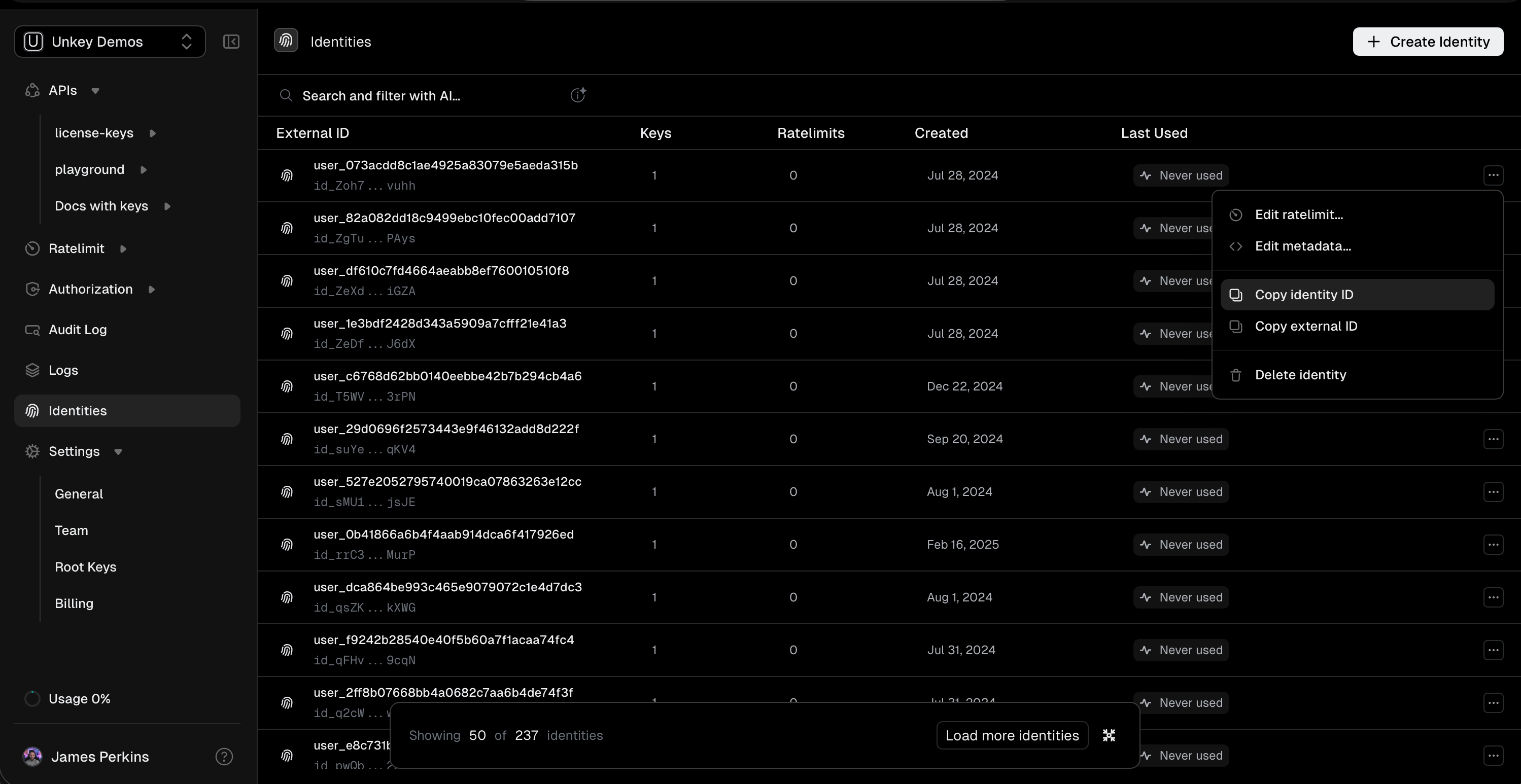
The identities page now allows you to manage identities just as easily as the API. You can create, update, and delete identities directly from the dashboard. We also removed it from a beta state, making it fully functional and accessible to all users.

identities

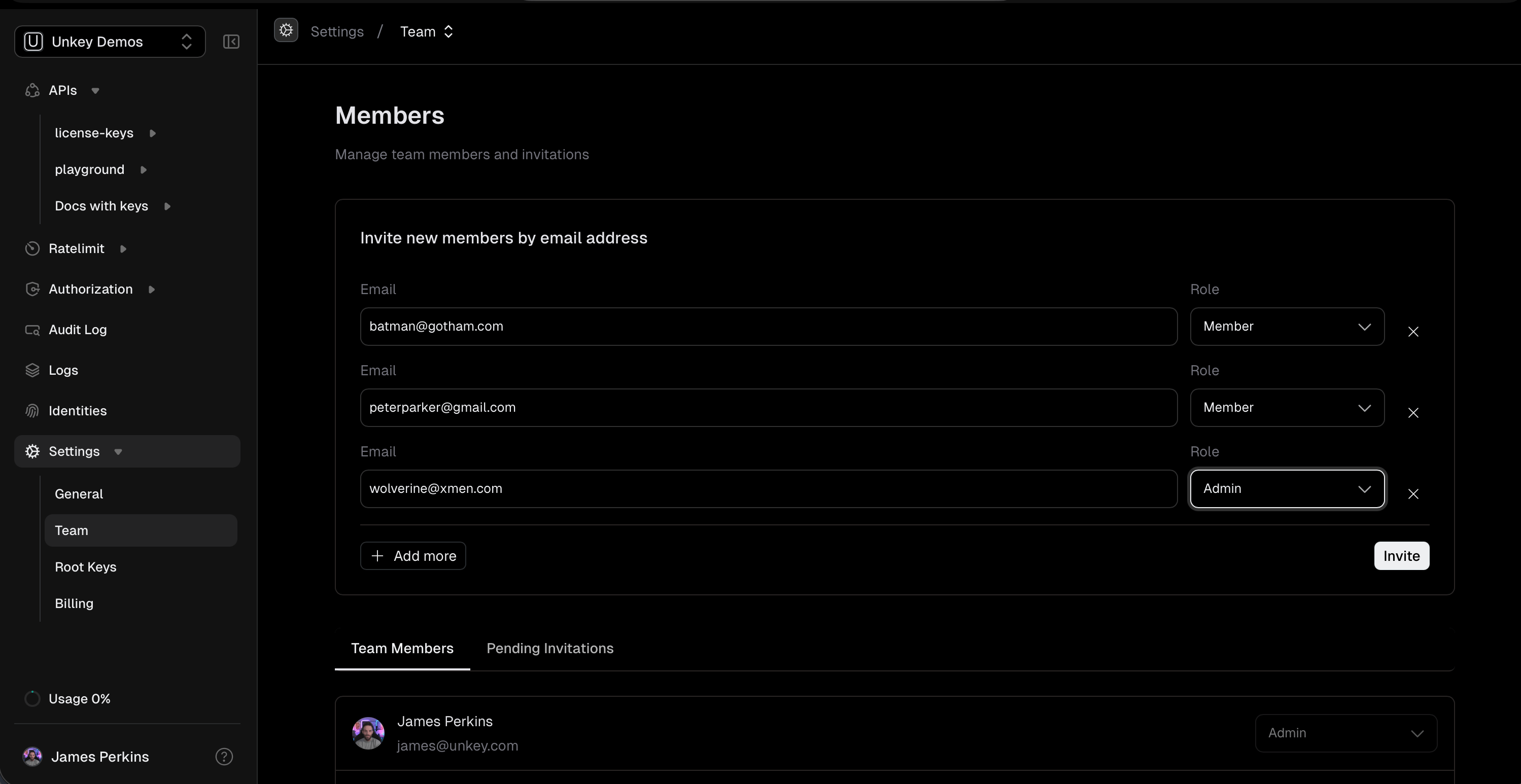
Finally we introduced a new members page, which allows you to invite as many members as you need, versus the previous modal which was limited to a single member.

Members Page

Below are the pull requests merged during this month:

Features & Enhancements

  • Enhanced Identity Details Page #4611 - Introduces a comprehensive identity details page for better visibility into identity configurations.
  • New Deployment APIs #4604, #4583 - Adds getDeployment and CreateDeployment to streamline deployment management.
  • Upload URL Generation #4601 - Introduces generateUploadUrl to simplify file upload workflows.
  • Vault as a Service #4555 - Implements vault as a service for improved secrets management and security.
  • Sentinel Secrets Management #4619 - Adds support for sentinel secrets to enhance security controls.
  • Dashboard Invitation Management #4817 - Restricts invitation management to admins for better access control.
  • Redesigned Team Settings #4783 - Redesigns team settings with tabs and invite form for improved user experience.
  • Enhanced Log Details #4774, #4793 - Redesigns log details with v2 improvements and deployment navigation enhancements.
  • Dashboard Alphabetical Sorting #4597 - Sorts log details alphabetically by key for easier navigation.
  • Sentry Integration Controls #4592, #4584 - Adds Sentry initialization controls and structured logging with error filtering.
  • Middleware Error Decoupling #4763 - Refactors middleware error handling for improved reliability and maintainability.
  • Authorization Schema Updates #4816 - Updates authorization schema validation limits for better consistency.
  • Virtualization Hook Updates #4819 - Updates virtualization hook usage for improved dashboard performance.

Bug Fixes

  • IP Logging Fix in API #4829 - Fixes IP logging in the API for accurate request tracking.
  • Roles Null Handling #4833 - Handles null updated_at_m in roles to prevent errors.

Performance Improvements

  • Optimized Key Count Queries #4762 - Optimizes API key count queries with proper COUNT aggregation for better performance.
  • ClickHouse Query Improvements #4609 - Adds configurable request timeout and fixes query issues in ClickHouse integration.

Documentation

  • Documentation Navigation Guide #4838 - Updates "where is stuff?" documentation for better navigation.
  • API Documentation Fixes #4733, #4732, #4731, #4729, #4728 - Fixes various documentation drift issues across multiple packages.
  • Doc Comments for Core Packages #4711, #4710, #4709, #4715, #4714, #4713, #4712 - Adds comprehensive doc comments to pkg/fault, internal/services/usagelimiter, cmd/, pkg/vault, pkg/system_errors, pkg/circuitbreaker, and pkg/proto exports.

OCT 31, 2025

product

October Product Update

October was another fantastic month for the Unkey team, with 47 pull requests merged, enhancing features, squashing bugs, and improving the user experience. We also demo'd our new Unkey deploy platform at All Things Open, this has been in the works for a while, and we cannot wait to share more details, and get it into your hands.

Below are the pull requests merged during this month:

Features & Enhancements

  • Context Aware DoWithResult Enhances Robustness #4137 - Introduces context-sensitive methods for improved responsiveness in operations. (Author: @ogzhanolguncu)
  • Unkey Builds for Better Image Building #4098 - Facilitates local and isolated image builds, enhancing the deployment process. (Author: @ogzhanolguncu)
  • Optimization of API Key Handling #4056 - Streamlines CLI interactions by intelligently inferring workspace IDs. (Author: @mcstepp)
  • UI Enhancements for Intuitive User Experience #4060 - Improves user interface elements and keyboard shortcuts. (Author: @ogzhanolguncu)

Bug Fixes

  • Rate Limit Key Enhancement for Accuracy #4200 - Revamps the key format in DurableRateLimiter to reduce errors. (Author: @chronark)
  • Proper IP Whitelist Validations #4063 - Optimizes IP whitelist handling by enhancing string conversion processes. (Author: @Akhileshait)
  • Resolved Identity Deletion Error #4103 - Fixes server error during the deletion of identities. (Author: @Flo4604)
  • Addressed Navigation and State Management in Onboarding #4085 - Reworks the onboarding wizard to prevent duplicate slugs. (Author: @chronark)

Performance Improvements

  • Optimized Rate Limit Counting for Efficiency #4080 - Implements atomic processing for rate limits to prevent incorrect counter adjustments. (Author: @chronark)

Documentation

  • Updated Broken Link in CONTRIBUTING.md #4122 - Fixes a critical 404 error affecting documentation navigation. (Author: @d02ev)

Internal Changes

  • From Keyring to Keyspace: Renaming for Clarity #4126 - Renames several core components to better reflect their functions. (Author: @mcstepp)
  • Container Version Updates Streamline Deployments #4146 - Standardizes container versions across the board for consistency. (Author: @imeyer)
  • GHA Workflows Transitioned to More Reliable Runners #4138 - Migrates GitHub Actions to depot.dev for enhanced operation. (Author: @imeyer)
  • Enhanced Seeder Function Usability #4110 - Refactors test seeder functions for improved type safety and reduced database calls. (Author: @mcstepp)

Testing

  • Comprehensive Testing for IP Whitelist Functionality #4069 - Augments IP whitelist testing to ensure accurate verification and functionality. (Author: @chronark)

Infrastructure

  • Migration of Runners to Depot.Dev #4138 - Shifts infrastructure to leverage new runner technology in deployments. (Author: @imeyer)
  • Infrastructure Overhaul via Removing Obsolete Components #4061 - Cleans out deprecated components to streamline operations. (Author: @chronark)
  • Deployment Application Enhancements #4051 - Focuses on refining deployment processes to elevate operational efficiency. (Author: @ogzhanolguncu)

Security

No security-specific changes were made

SEPT 30, 2025

product

September Product Update

Summary

September was a busy month for us! We rolled out a slew of new features aimed at Unkey deploy and fixes to enhance user experience and system performance. Key highlights include the introduction of slug routing for workspace scoped dashboard. Plus, we tackled several bugs that were affecting performance and usability. Overall, this month’s updates make the platform more robust and user-friendly, paving the way for future enhancements!

Features

  • New Authentication System: We implemented a simple API key authentication for both CLI and dashboard communication with the control service. #4010
  • Slug Routing: The dashboard now supports workspace-scoped navigation, enhancing user experience. #4009
  • Gateway Logs: Added Gateway Logs to the projects section, providing better insights into deployment activities. #3993
  • Dynamic Data for Demo API: We added dynamic data to the demo API to improve the demo experience. #4002
  • Improved Rate Limits Management: Users can now manage rate limits within the workspace context. #3782

Bug Fixes

  • Fixed Logdrain Crashes: Addressed issues with logdrain that were causing crashes due to changes in the logpush format. #4025
  • Resolved Timeouts: Added timeout handling to prevent unnecessary 500 errors. #4022
  • Corrected Logging Line Locations: Ensured that logging lines are accurately displayed. #3889
  • Fixed UI Inconsistencies: Resolved various UI issues, particularly in rollback dialogs. #3979

Performance Improvements

  • Enhanced Domain Rollbacks: Improved the rollback functionality for domain management, ensuring that users can revert to previous states more seamlessly. #3999
  • Optimized Clickhouse Image: Updated the ClickHouse Docker image to improve functionality and performance. #4033

Refactoring and Chores

  • Domain Refetching: Refactored the system to allow for domain refetching on live deployment changes. #4032
  • Removed Trials: Simplified the subscription system by removing the trial period. #3988
  • Updated Environment Variable Management: Cleaned up the environment variable section in project overviews for better future support. #3946

Documentation

  • Updated API Documentation Link: Corrected the link to the API documentation in the welcome email to ensure users access the latest resources. #3937

Miscellaneous

  • Improved UI for Project Details: A new UI for project details includes active deployment logs and an enhanced environment section. #3853
  • Refined User Experience: Various UI updates, including better button labels and handling of pointer events in components. #3880

Stay tuned for more updates as we continue to refine and enhance your experience with our platform!

AUG 30, 2025

product

August Product Update

In August 2025, our team has rolled out a series of improvements aimed at enhancing user experience and application performance. From new UI features for project management to important bug fixes that ensure smoother functionality, we’ve been busy! Key highlights include the launch of a new workspace slug, refined database schemas for demos, and improved error handling. We’re thrilled for you to explore these changes and are committed to making Unkey even better!

Features

  • Enhanced Project Management: A fresh new UI for managing projects and deployments has been introduced, making it easier to navigate and utilize #3797.
  • New Workspace Slug: We've implemented a new workspace slug feature that streamlines workspace identification and management #3849.
  • Improved Gateway Functionality: The gateway routes now utilize VM addresses for more efficient routing #3878.
  • Deployment-Centric API: We've added a new deployment-centric API along with a Get Deployment endpoint #3878.

Bug Fixes

  • Sidebar Improvements: The "load more" functionality has been fixed in the sidebar, allowing users to load additional projects smoothly #3833.
  • Pentest Remediation: Addressed vulnerabilities found during a penetration test, ensuring user roles and invites are securely managed #3885.
  • Curl Example Update: Updated the curl example to utilize the V2 endpoint #3832.
  • Key Redaction: Improved key redaction to ensure all keys are properly handled and redacted #3860.
  • Scrollability Fix: Fixed an issue where the workspace creation wizard was locked on smaller screens, now allowing scrollability #3843.
  • Workspace ID Query Fix: Resolved slow queries by ensuring that the workspace ID is correctly queried #3836.

Performance

  • Database Schema Enhancements: We’ve made database schema updates that enhance performance and efficiency for our demo environments #3878.
  • Redis Usage Limiting: Transitioned to a Redis-based usage limiter for improved latency and tracking #3800.

Documentation

  • Updated Docs: Documentation has been refreshed to reflect changes in API structures and endpoint versions, ensuring clarity for all users #3747 and #3712.
  • RFC for Let's Encrypt: Introduced an RFC outlining the architecture for issuing TLS certificates for custom domains #3754.

CI Improvements

  • Enhanced CI/CD Pipelines: Optimized CI workflows, including the removal of outdated steps, to streamline our continuous integration processes #3709.
  • Upgrade Scripts: Added utility scripts for environment migrations and improved configuration management #3748.

We hope these updates enhance your experience with Unkey. As always, your feedback is invaluable to us!

JUL 30, 2025

product

July Product Update

July was an action-packed month for Unkey, with a whopping 172 pull requests merged. Key highlights include significant improvements in API error handling, UI enhancements for permission management, and a streamlined deployment process. We also focused on performance tweaks, especially with our database interactions and CI workflows. With thorough documentation updates, our users can better navigate the new features and fixes. Dive in to see the highlights of what we achieved this month.

Features

  • Enhanced API Functionality

    feat: v2/keys.deleteKey - Introduced a new endpoint for deleting keys, expanding our API capabilities.

    feat: onboarding - Launched the first part of our new onboarding UI, making it easier for users to get started.

    feat: v2/keys.updateCredits - Added an endpoint to update credits, improving user experience.

  • UI Improvements

    feat: onboarding key creation - Introduced a new step in the onboarding process for key creation.

    feat: Initial implementation of Unkey Deploy - Launched core services for our deployment platform.

Bug Fixes

  • Critical Bug Fixes

    fix: calendar bug - Resolved an issue with date selection in the calendar UI, enhancing user experience.

    fix: merge issues - Fixed various merge conflicts that were causing issues in the codebase.

    fix: non null assertion linter issues - Addressed linter issues to improve code quality.

Performance

  • Optimized Performance

    perf: create root key being slow - Enhanced the performance of root key creation, reducing wait times.

    perf: use namespace_id as index - Improved database query performance by optimizing index usage.

Documentation

  • Documentation Updates

    fix: documentation manual ratelimit example missing fields - Updated documentation to ensure all fields are clearly defined.

    chore: reorganise engineering docs and add runbooks - Streamlined the documentation structure for better accessibility.

Chores

  • Maintenance and Refactoring

    chore: remove unused dependencies - Cleaned up the codebase by removing unnecessary dependencies.

    chore: use makefiles - Transitioned from Taskfiles to Makefiles for better build automation consistency.

    chore: delete unnecessary tests - Removed obsolete tests to maintain a cleaner codebase.

JUN 30, 2025

product

June Product Update

Major Enhancements and Fixes in June 2025

This month has been all about enhancements and refactoring! We've moved several components into the UI for better organization and streamlined workflows. The introduction of new features like optional permission slugs and encryption during key creation adds flexibility. Bug fixes have improved the overall stability of the application, addressing issues like Stripe integration and spacing inconsistencies. Our ongoing commitment to improving the user experience shines through this month's updates!

Features

  • New Enhancements
    • feat: root keys table actions - Merge after #3369: Added table actions for root keys.
    • feat: root keys filters - Merge after #3332: Introduced filters and LLM search for the root keys table.
    • feat: add db search to externalId: Enhanced externalId creation with database search functionality.
    • feat: rbac permissions: Refactored the /authorization/permissions page.
    • feat: rbac roles: Replaced the old roles page with a new enhanced version.
    • feat: add ratelimit and validation to llm search: Implemented stricter ratelimits and input checks for LLM.

Bug Fixes

  • Critical Fixes
    • fix: align margin for info icon and description text: Adjusted margins for a better visual layout.
    • fix: make GH actions run on non-draft only: Ensured GitHub Actions only run for non-draft PRs.
    • fix: correct semantic logic for delete protection setting text: Improved the clarity of delete protection messages.
    • fix: missing underline: Restored underlines for anchor tags affected by Tailwind's Preflight.
    • fix: List keys return enabled [merge after 3328]: Fixed logic to ensure enabled status is returned correctly.

Refactoring

  • Code Improvements
    • refactor: replace rsc with trpc: Removed RSC from /keys and /apis, improving code structure.
    • refactor: remove rsc from apis: Streamlined API calls by removing redundancy.
    • refactor: ui package style inconsistencies: Fixed inconsistencies in UI components, making them more reusable.

Chores

  • Organizational Tasks
    • chore: move control cloud to ui: Organized UI components for better management.
    • chore: comment out key creation vault encr: Temporarily disabled key creation encryption due to timeout issues.
    • chore: moved visual button to ui: Enhanced UI structure by moving components around.

Documentation

  • Updates and Maintenance
    • chore: Remove getVerifications from docs: Updated SDK documentation, removing outdated endpoints.

Dependencies

  • Updates
    • chore(deps): bump @clickhouse/client-web from 1.6.0 to 1.11.1: Updated the ClickHouse client library for improved performance.
    • chore(deps): bump base-x from 4.0.0 to 4.0.1: Updated base-x for better compatibility.

Thanks for your continued support and contributions! Let's keep building together!

APR 30, 2025

product

April Product Update

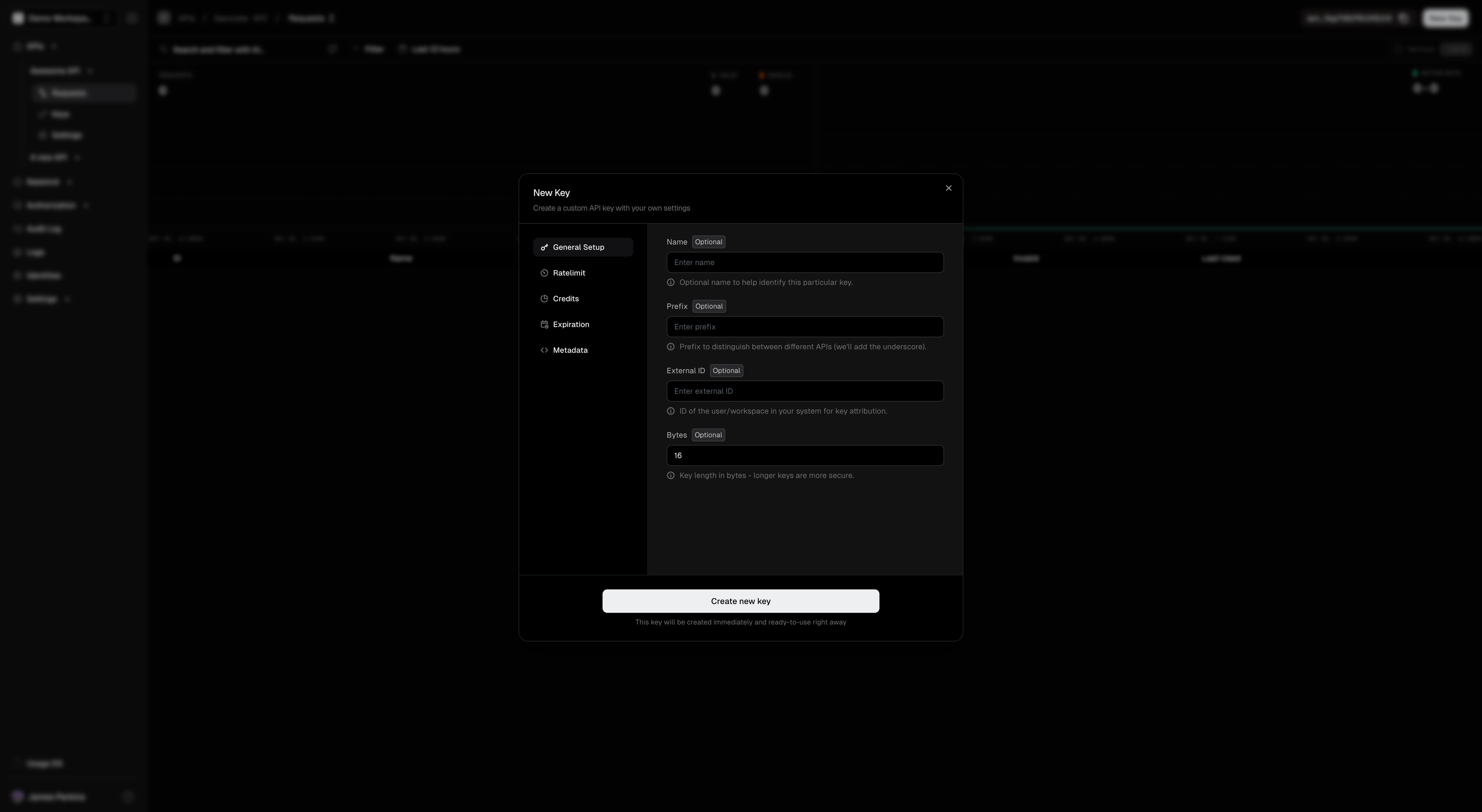
Create Key Wizard

Key Creation Wizard

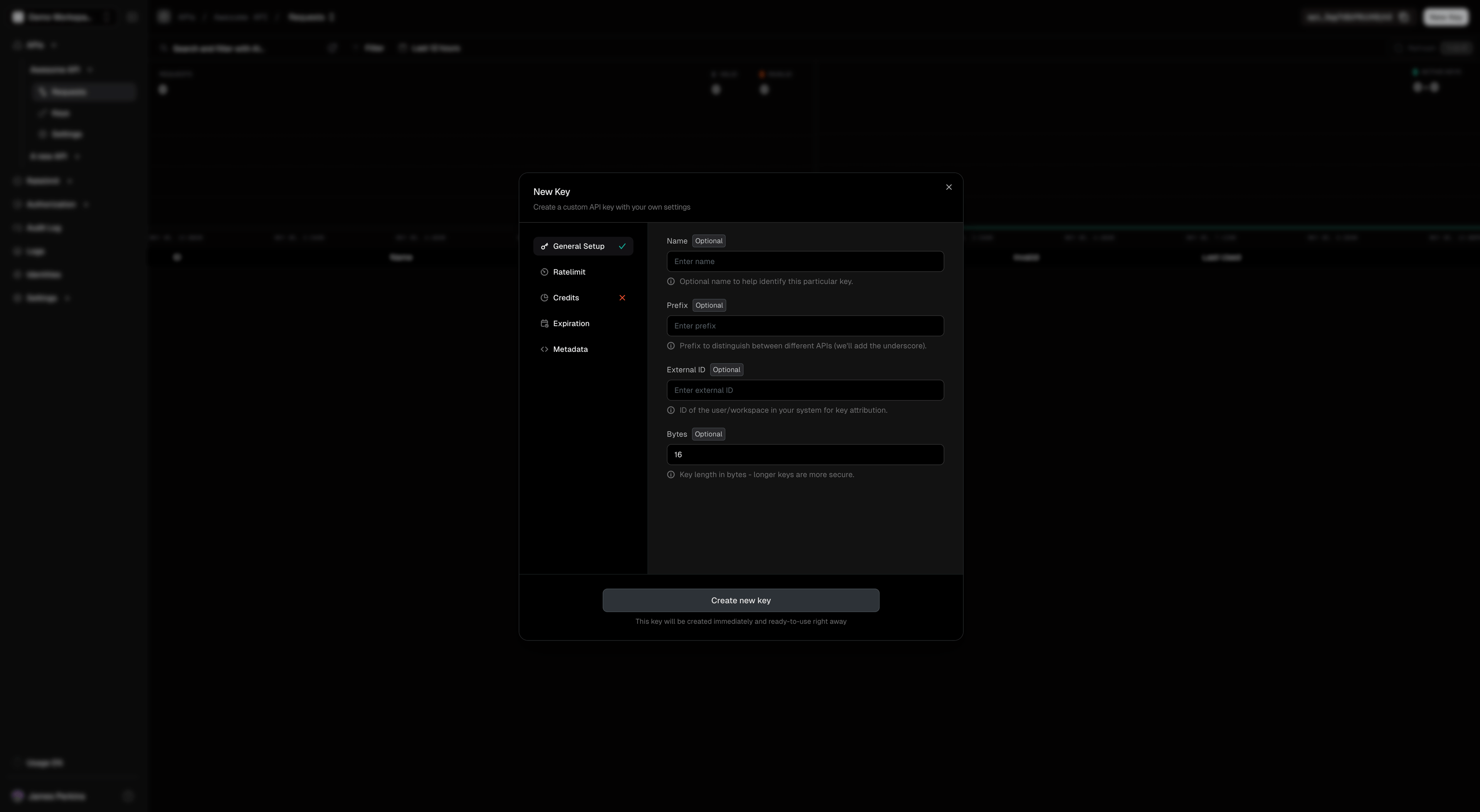
Our Create Key wizard just got better! Enjoy these new and improved features:

  • Instant feedback during key creation
  • Apply multiple rate limits per key
  • Easy-to-use JSON formatter for metadata
  • Clear warning about one-time key display
Key Creation Wizard with error

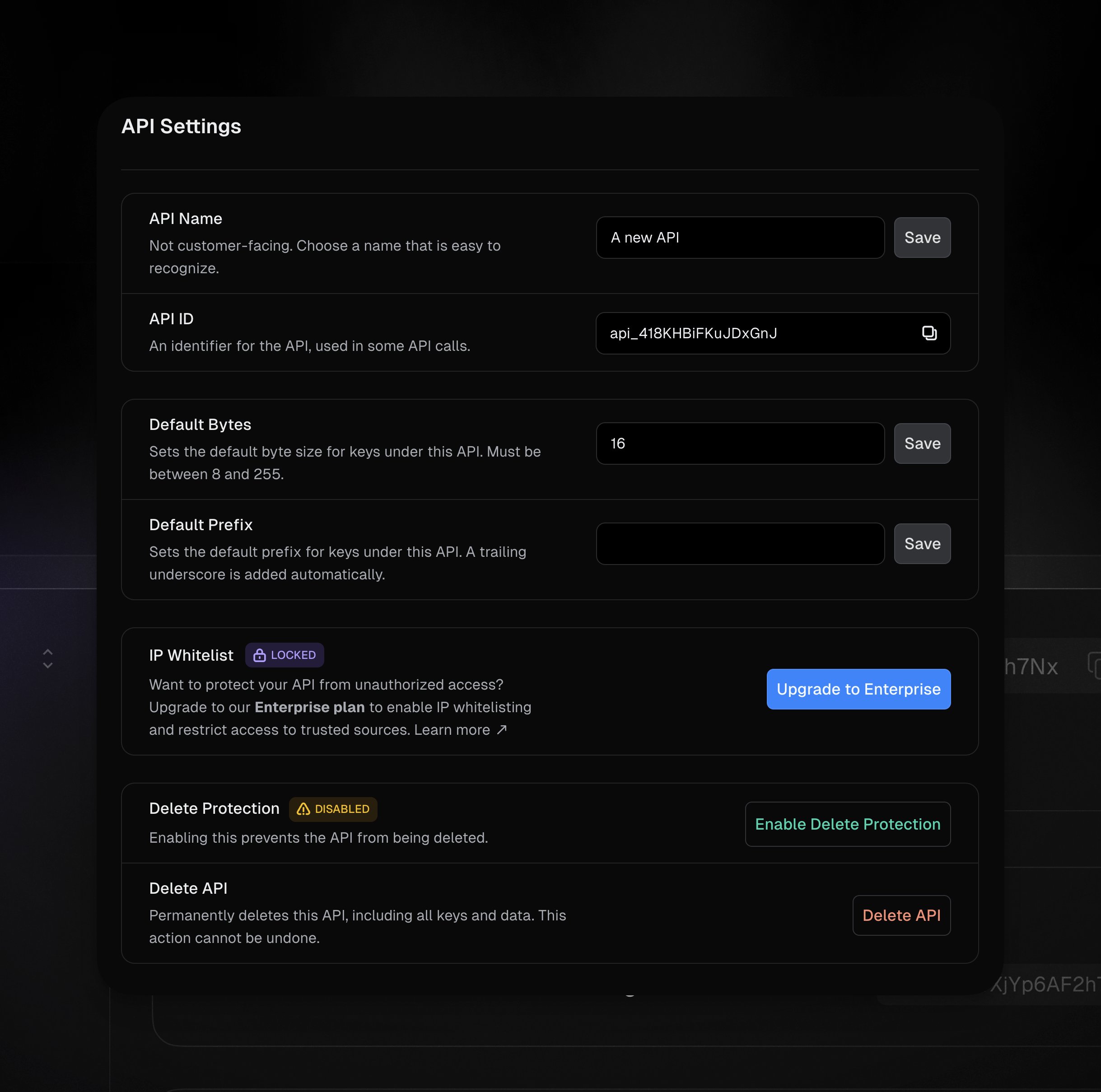
API Settings Update

Our new API Settings screen is designed for intuitive control over your API configurations. Adjust default bytes, prefixes, and manage security settings seamlessly.

API Settings

Roles Returned as Part of verifyKey

The /v1/keys.verifyKey endpoint has been updated to include a list of roles associated with the key in the verification response, enabling applications to easily determine the user's roles during key verification and make more informed authorization decisions. This simplifies role-based access control implementation and requires one less API request.

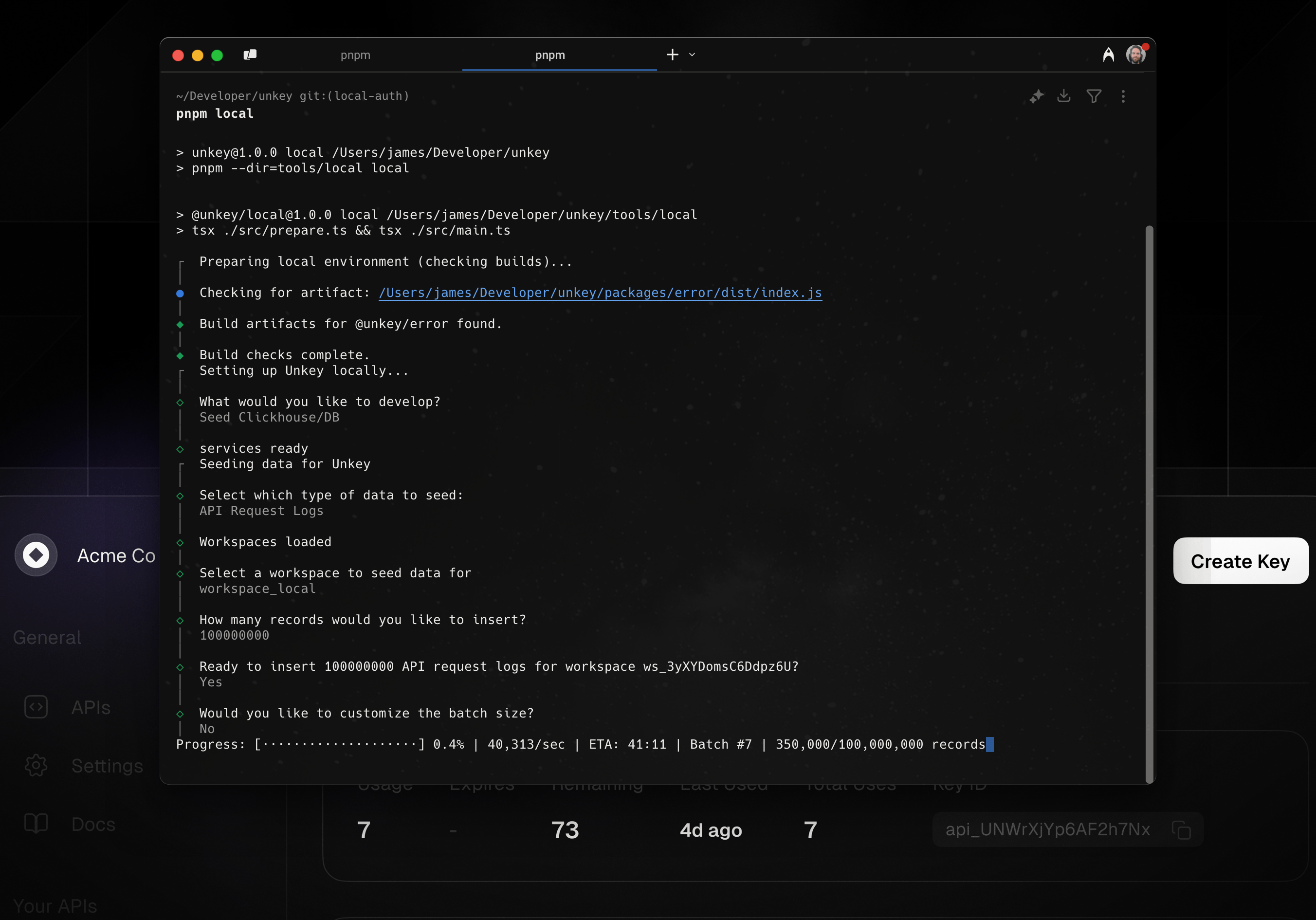
Seeding Local Development

We have introduced proper seeding for log pages and metrics, enhancing the ability to generate realistic test data and improving the development and testing experience. You can easily seed a workspace by running pnpm local and selecting Seed Clickhouse/DB. Our CLI will then ask a series of questions about what you would like to seed and how much test data you want.

Seed example

Other PRs

Bug Fixes

  • #3189: Tooltip now shows the correct time interval
  • #3115: Improve keyboard combinations
  • #3187: Ensure charts and logs data count match
  • #3157: Ensure username doesn't overflow sidebar
  • #3118: Show timestamp correctly on click
  • #3119: Usage chart colors and fix layout shift issue
  • #3104: Only allow access membership list fetching to current org context.
  • #3099: Prevent cancellations if the org has multiple members
  • #3094: Improve errors when using natural language searches
  • #3080: Make confirmation dialog trigger correctly on workspace members page.
  • #3079: Pagination issue and improve fetch logic
  • #3037: navbar-popover active state
  • #3055: Use only time as cursor
  • #3054: Query clickhouse by time

Documentation

  • #3173: Explain how delete protection works

Other Changes

  • #3191: Prevent revalidation of logs and charts to improve dashboard performance.

MAR 31, 2025

product

March Product Update

New Features

Pricing Updates

While this isn't a new feature, we've made some updates to our pricing plans to better serve everyone whether you are just starting out or scaling a project.

  • Larger Free Tier : We've significantly increased our free tier! You now get 150,000 requests per month completely free, up from the original 2,500. This allows you to thoroughly test Unkey and start scaling your project before entering your credit card.

  • Simplified Pricing : We've streamlined our pricing model to focus solely on requests. We've removed the separate charges for key verifications and standalone rate limit verifications, making it much simpler to understand and predict your costs.

  • Tiered Pricing : We're introducing tiered pricing starting at just $25. This gives you more flexibility to choose the plan that best fits your needs as you scale, we also reduced the price significantly, below is an example of 10M requests in a month on the new and old pricing:

Old PriceNew Price
$1010.00$250.00
  • No Overage Charges : We will no longer charge for overages. If you exceed your monthly request limit, we won't charge you but send you an email congratulating your success. If you continue to exceed the tier every month, we will ask you to upgrade to the next tier.

We believe these changes will make Unkey an even more attractive and accessible solution for developers of all sizes and allow you to scale without worrying about your bill.

Check out the updated pricing table on our pricing page here.

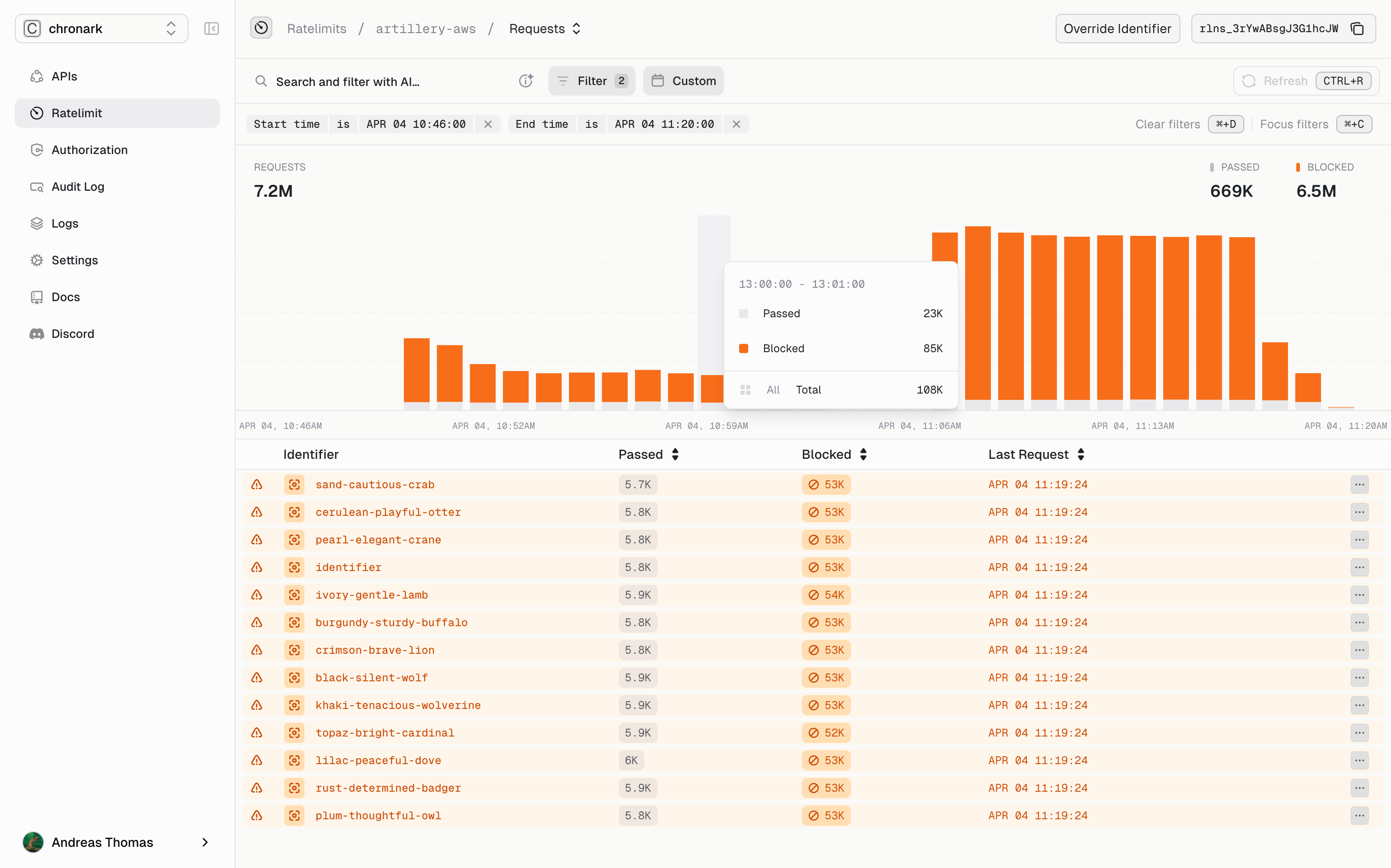
Ratelimit / API Overview overhaul

We have completely revamped our ratelimit and API overview page, making analytics the main focus of the page.

Ratelimit

You can see all the important details about a specific namespace, including:

  • Request count
  • Identifier
  • Passed / block requests
  • Last request
Ratelimits example

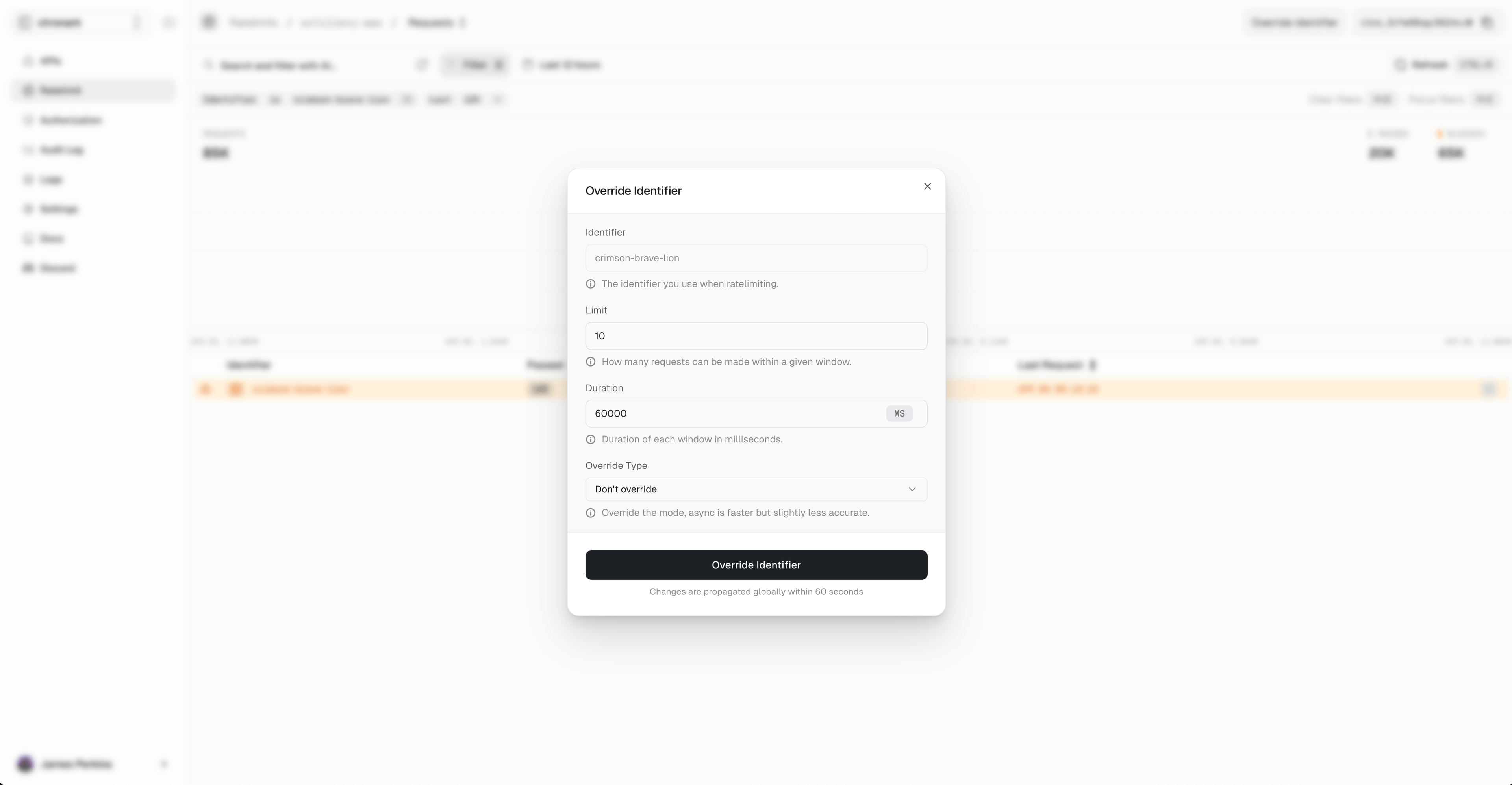
You can also override an identifier directly on the page to make blocking or allowing requests more easily.

Override example

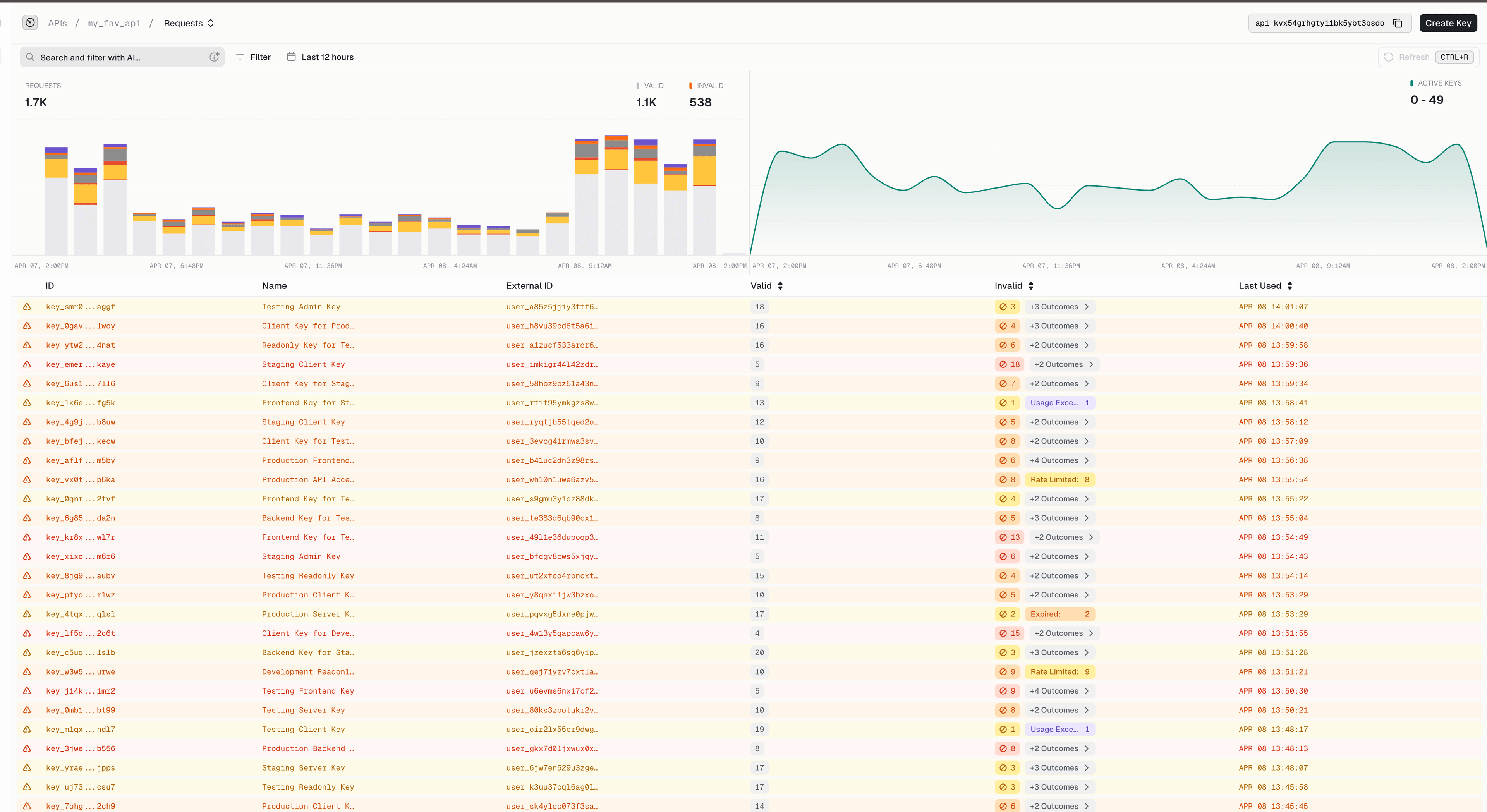
API

In the API overview, we provide all the important details about a specific API, including:

  • API request totals
  • Active key totals
  • Valid / Invalid requests counts and types
  • Last used details

We also include a natural language search and filter to allow you to quickly analyze and manage your API data.

API Overview example

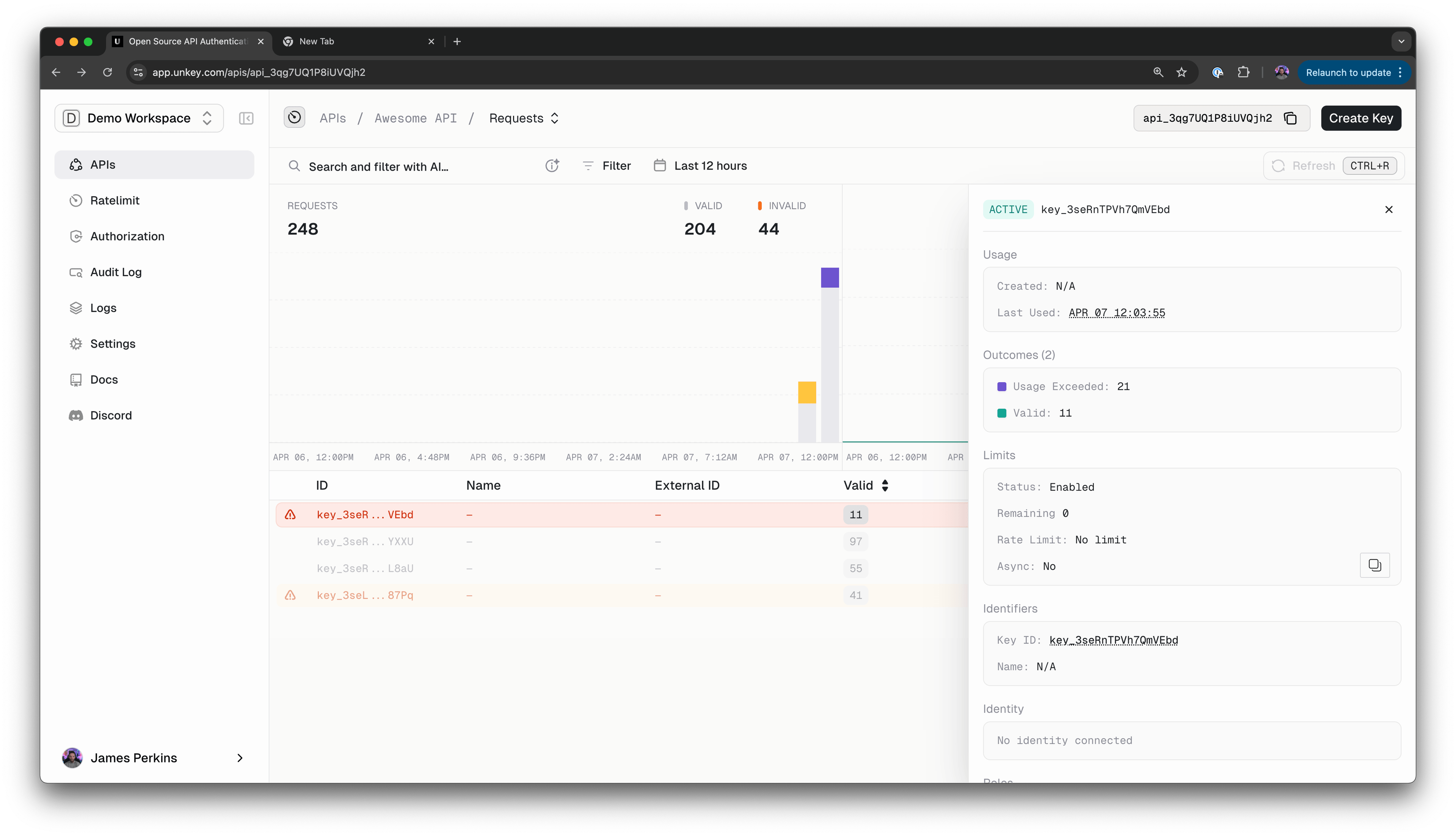
You can also see important details about a specific key, but clicking on the key will open a modal with more information.

Key Details example

Other PRs

Changed

  • Sidebar component added with improved UI and accessibility features.
  • Global baseUrl function created to infer Vercel URL for WorkOS redirect more reliably.
  • Sampling support for tracing allows specifying the rate via configurations.
  • Updated layout.tsx to improve URL structure and maintain consistency.

Removed

  • Removed outdated and redundant quota checks.
  • Unused files and code related to the unused banner component.

Fixed

  • OAuth extraction from URL to improve security.
  • Dark mode forced on the auth page to show correct colors on dialogs
  • Vercel redirection configuration for WorkOS fixed to handle edge cases.
  • Timestamp conversion for logs and related elements.
  • Layout shifts, missing props for UI components, and hydration issues addressed with dynamic imports and better coding practices.
  • Multiple minor bug fixes like navbar realignment, format issues, wrong environment variables, and outdated quota handling.

Security

  • Addresses a critical security vulnerability, CVE-2025-29927.

JAN 31, 2025

product

January Product Update

New Features

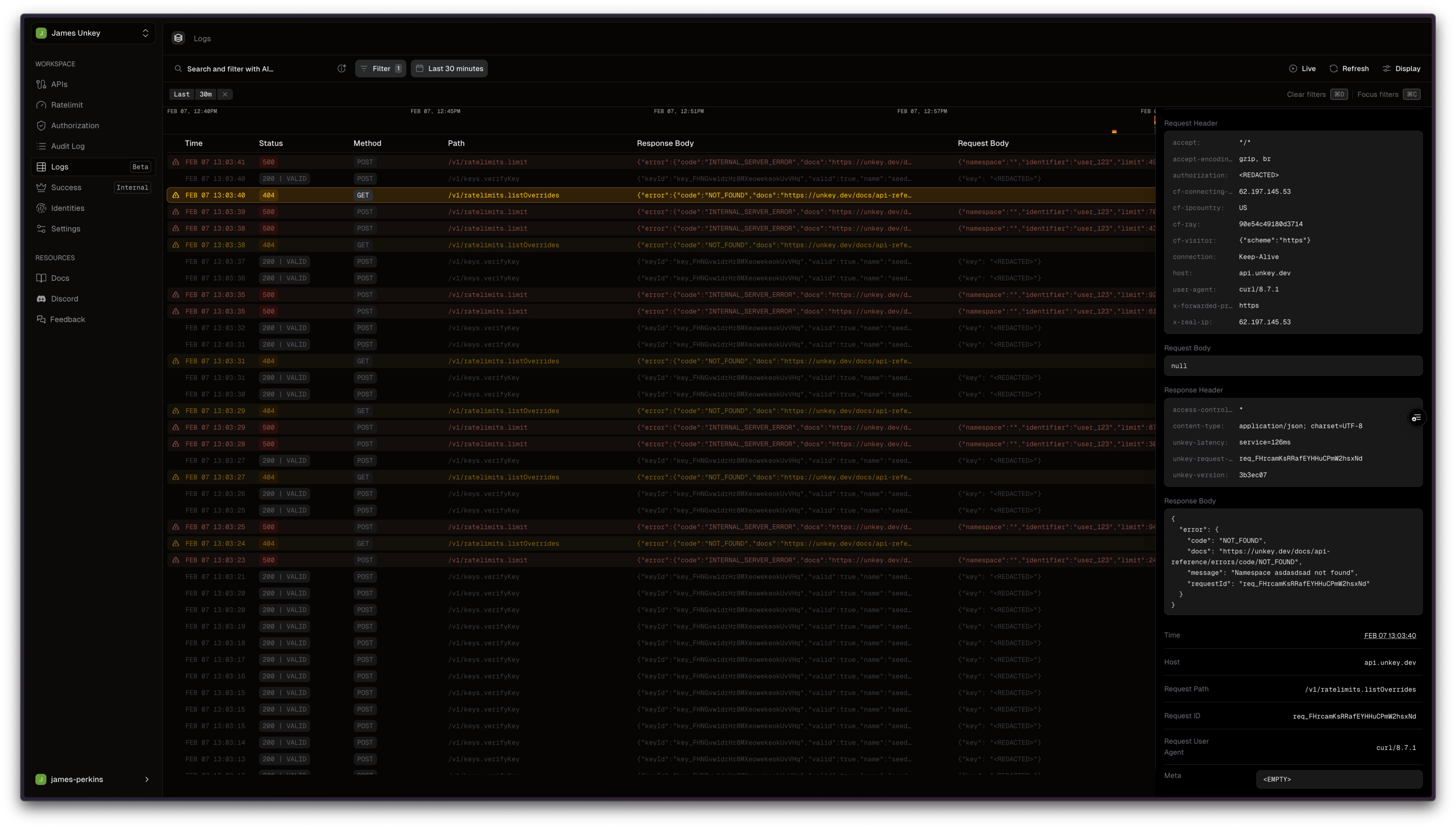
Logs (Beta)

Our new reques logs are designed to simplify your debugging experience. With comprehensive request filtering, real-time monitoring, and intuitive natural language processing, managing API requests has never been easier.

Logs example
  • Comprehensive Request Filtering: Now you can view all API requests, including those that encountered errors. Easily filter these requests by status code, method, and path to quickly identify and troubleshoot issues, ensuring a smoother development process.

  • Natural Language Filtering: Say goodbye to complex, time-consuming filtering! Our new natural language processing feature allows you to filter API requests using simple, conversational phrases. Just type what you’re looking for, and let our system do the rest!

  • Live Logs for Real-Time Monitoring: Turn on live logs to watch your logs in real time, making it easier to see if your latest deployment is working as expected.

  • Request IDs for Streamlined Support: Each API request provides you with a request ID. This enhancement simplifies the support process—just share the request ID with our support team, and we can quickly locate and address your concerns.

Improvements

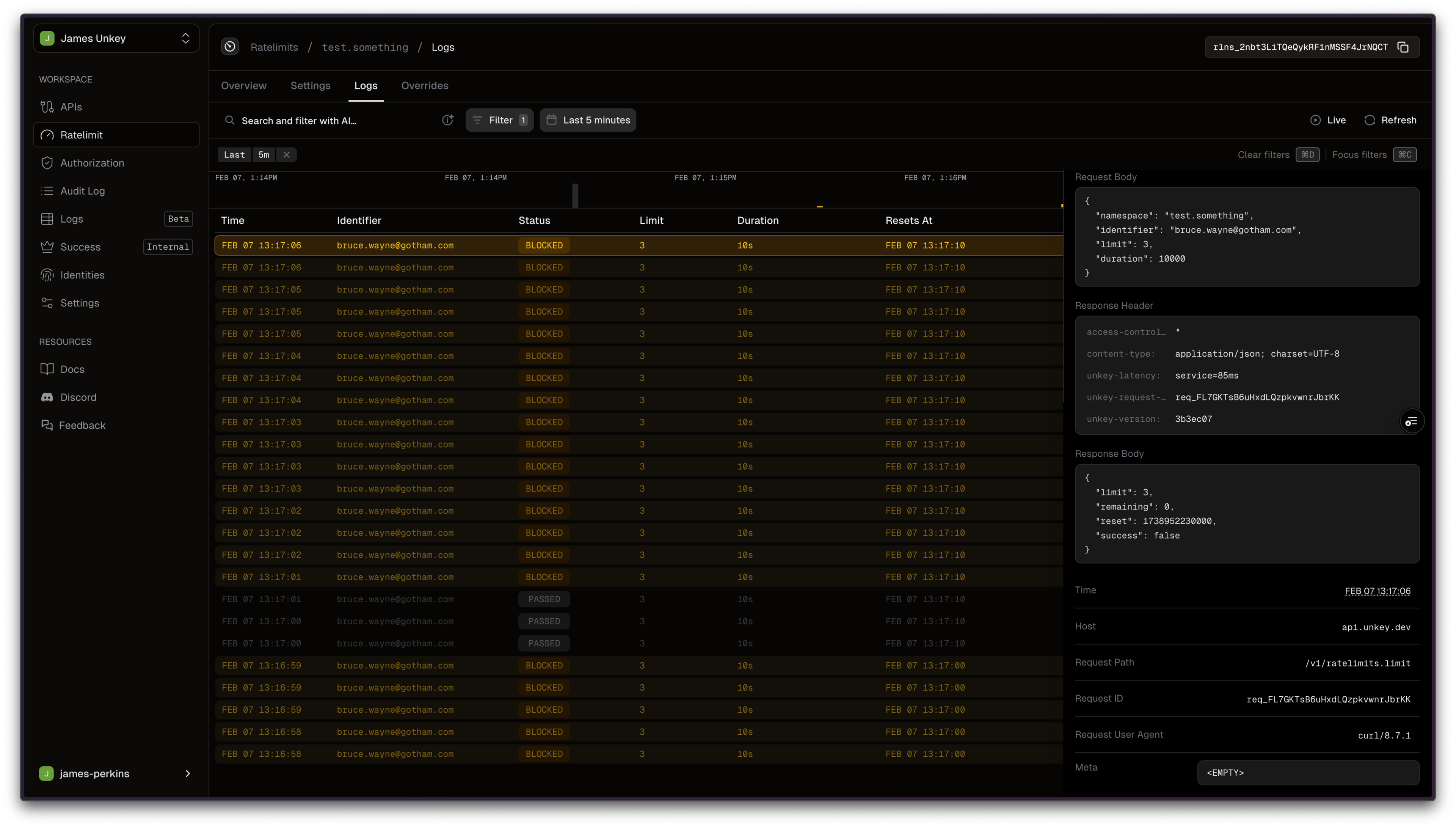
Standalone Rate Limit Logs: We took everything we built in the request logs and replaced the old rate limit logs, so you can see all the important details in one place, including the timestamp of the request, identifier, status, when the rate limit resets, and more.

Rate limit logs example

Migrating Keys Now Accepts an External ID: You can now migrate keys using the external ID ready to be used with our identity product; just pass in the external_id while migrating the key.

Permanent Key Deletion: You can now permanently delete a key. By default, Unkey has the ability to recover a key if requested, but by passing "permanent": true with your deletion request, you can bypass this recovery option.

Default Prefix and Bytes: The API will now use the default bytes and prefix set by the user if they aren't included when creating a key.

Top Bugs Crushed

  • Don't Retry on 4XXs - We stopped our TS SDK from retrying if a 4XX is returned from our API.
  • pnpm Local Command to Exit if DB Migration Fails - We now handle cases where one of our migrations fails when spinning up our local environment; prior to this, it would hang with zero user indication.
  • Remove Transaction Deadlock from Dashboard - We fixed an issue where, in the Unkey dashboard, our DB would be deadlocked, causing errors when operations were attempted.

DEC 5, 2024

product

December 5th Changelog

Official Python SDK

We now have an official Python SDK that is developer-friendly & type-safe, making it as easy as possible to start with your favorite language. You can get started right away by installing our package pip install unkey.py

Below is an example of how to create a key using the new SDK:

import os
import unkey
from unkey_py import Unkey

s = Unkey(
    bearer_auth=os.getenv("UNKEY_BEARER_AUTH", ""),
)

res = s.keys.create(request={
    "api_id": "api_123",
    "name": "my key",
    "external_id": "team_123",
    "meta": {
        "billingTier": "PRO",
        "trialEnds": "2023-06-16T17:16:37.161Z",
    },
    "roles": [
        "admin",
        "finance",
    ],
    "permissions": [
        "domains.create_record",
        "say_hello",
    ],
    "expires": 1623869797161,
    "remaining": 1000,
    "refill": {
        "interval": unkey.CreateKeyInterval.DAILY,
        "amount": 100,
    },
    "ratelimit": {
        "limit": 10,
        "type": unkey.CreateKeyType.FAST,
        "duration": 60000,
    },
    "enabled": False,
})

if res.object is not None:
    # handle response
    pass

I want to thank Jonxslays for his community SDK, which allowed developers to get started immediately and provided Unkey with the unkey.py name.

Identities

Until today, you had the option to assign an owner to your keys, allowing you to filter keys by a specific owner. This was useful for fetching keys by user or organization via the API, but it didn't provide any additional functionality.

With Identities, you can now group keys together and share metadata and rate limits across them.

For example, we have a company named ACME Corp, which has the enterprise tier and access to our GPT-4o wrapper, with a per-day token limit. So first, we create the identity with the limits:

curl --request POST \
  --url https://api.unkey.dev/v1/identities.createIdentity \
  --header 'Authorization: Bearer unkey_root_key' \
  --header 'Content-Type: application/json' \
  --data '{
  "ratelimits": [
    {
      "name": "enterprise_tier",
      "limit": 50000,
      "duration": 3600000
    },
    {
      "name": "tokens",
      "limit": 86400000,
      "duration": 10
    }
  ],
  "externalId": "acme_corp"
}'

Now we have an identity, we can attach it to one or many keys by referencing the external_id:

curl --request POST \
  --url https://api.unkey.dev/v1/keys.createKey \
  --header 'Authorization: Bearer unkey_root_key' \
  --header 'Content-Type: application/json' \
  --data '{
  "externalId": "acme_corp",
  "apiId": "api_123",
  "byteLength": 16
}'

Finally, when we verify a key, we will deny the request if one of the rate limits is exceeded. You can read more about the identity product and use cases in our documentation

WHOAMI

A new endpoint has been introduced to allow you to retrieve details about any API key when the key ID is unavailable. Users can send the actual API key to /v1/keys.whoami, which will return the associated data. This is a great way to verify remaining usage, current limits, or identities associated with a key.

curl --request POST \
  --url https://api.unkey.dev/v1/keys.whoami \
  --header 'Authorization: Bearer unkey_root_key' \
  --header 'Content-Type: application/json' \
  --data '{"key": "sk_123"}'

The API will return details about the key:

{
  "id": "key_123",
  "name": "API Key 1",
  "remaining": 1000,
  "identity": {
    "id": "id_123",
    "externalId": "ext123"
  },
  "meta": {
    "role": "admin",
    "plan": "premium"
  },
  "createdAt": 1620000000000,
  "enabled": true,
  "environment": "production"
}

Ratelimit Overrides

When we introduced standalone ratelimiting, we included a feature allowing custom overrides without needing to deploy user code. This feature was originally only available via the Unkey dashboard. This month, we introduced the ability to create, update, delete, and list overrides via our API; this unlocks the ability to integrate this into support tooling or back office tools.

curl --request POST \
  --url https://api.unkey.dev/v1/ratelimits.setOverride \
  --header 'Authorization: Bearer unkey-root-key' \
  --header 'Content-Type: application/json' \
  --data '{
    "namespaceName": "email.outbound",
    "identifier": "user_123",
    "limit": 10,
    "duration": 60000,
    "async": true
}'

You can see how to implement them into your tooling in our API reference.

Content

  • Learn by building - Michael Silva
  • Improve Authentication UX - James Perkins

JUL 26, 2024

product

July 26 2024 Changelog

For the past two weeks, the team has been laser-focused on tackling technical debt, improving our documentation, and crushing UI bugs.

Unkey Turso Cache store

We collaborated with the team at Turso to introduce a new cache-store. This cache store allows using embedded replicas or remote Turso DB. You can read about implementing your cache store in our documentation.

Documentation improvements

Our documentation has been getting some serious improvements in the past month. First, we introduced a new layout that provides a better way to find what you are looking for based on your use case.

We also introduced new getting started guides that can help you get started with ratelimiting or with identities

We also wrote a new guide on ratelimiting your One Time Passcodes for DDOS and bot protection.

Improvements

  • Double-clicking a root key now redirects to settings PR

  • Optimize all images on our landing page PR

  • Add flags to pnpm local PR

  • Removed contentlayer and added content collections PR

  • Root key details overhaul PR

Bug Fixes

  • Create role modal breaks if the permissions name is too long PR

  • Delete permission modal breaks if the permissions name is too long PR

JUL 14, 2024

product

July 14 2024 Changelog

After Accelerate our first-ever launch week, where we launched products like Toolbox, vault, and LLM caching. We are now working on improving infrastructure, usability, and our docs.

Permissions and Roles

We introduced Authorization into beta at the beginning of the year. This week we introduced them into the API to allow you to create and manage them easily.

Creating a role

You can create a role by passing the name and description, the name can be anything you want it to be, make sure your root key has rbac.*.create_role

curl --request POST \
  --url https://api.unkey.dev/v1/permissions.createRole \
  --header 'Authorization: Bearer <token>' \
  --header 'Content-Type: application/json' \
  --data '{
  "name": "dns.records.manager",
  "description": "dns.records.manager can read and write dns records for our domains."
}'

Creating a permission

You can create a permission by passing the name and description, the name can be anything you want it to be, make sure your root key has rbac.*.create_permission

curl --request POST \
  --url https://api.unkey.dev/v1/permissions.createPermission \
  --header 'Authorization: Bearer <token>' \
  --header 'Content-Type: application/json' \
  --data '{
  "name": "record.write",
  "description": "record.write can create new dns records for our domains."
}'

You can find the rest of the endpoints for managing roles and permissions in our documentation

Attaching permissions or roles to a key

You can attach a permission or roles via the API to do this you need to provide the permission or role id to the keys.addPermissions or keys.addRoles.

Add Permission

curl --request POST \
  --url https://api.unkey.dev/v1/keys.addPermissions \
  --header 'Authorization: Bearer <token>' \
  --header 'Content-Type: application/json' \
  --data '{
  "keyId": "<string>",
  "permissions": [
    {
      "id": "<string>"
    }
  ]
}'

Add Roles

curl --request POST \
  --url https://api.unkey.dev/v1/keys.addRoles \
  --header 'Authorization: Bearer <token>' \
  --header 'Content-Type: application/json' \
  --data '{
  "keyId": "<string>",
  "roles": [
    {
      "id": "<string>"
    }
  ]
}'

You can find the rest of the endpoints for managing roles and permissions on a key our documentation

You still need to attach your permissions to roles or directly to a key via the UI but we will add the endpoints in the coming weeks.

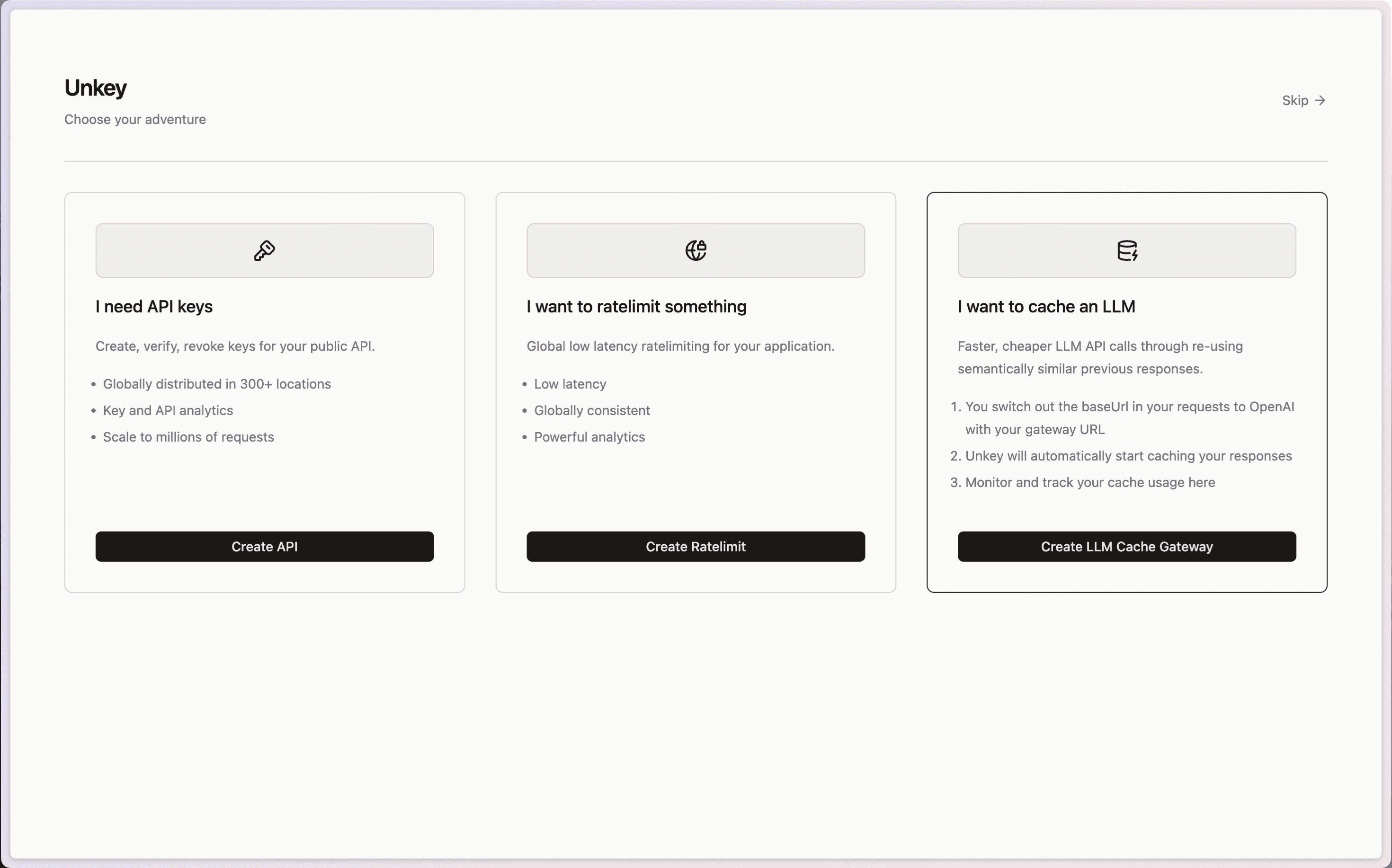
LLM Semantic Cache onboarding

If you are a fan of LLM's and want to use Unkey's Semantic caching when you sign up and create a gateway in a single click. This will allow you to save money and reduce latency for your users.

Onboarding

Bug fixes

  • Fix UI Caching issue when deleting keys Link to PR

  • Add missing permissions to root keys in the dashboard Link to PR

  • Filter out deleted keys from permissionsLink to PR

Docs improvements

  • Improved selfhosting docs for the agent link to docs

  • Reworked the entire layout for easier navigation link to docs

  • Added Hono quickstart guide link to docs

  • Updated Next.js quickstart guide link to docs

  • Updated Bun quickstart guide link to docs

  • Updated Express quickstart guide link to docs

MAY 1, 2024

documentation
community

May 2024 Changelog

Documentation refresh

We have updated our documentation to provide more detailed information on how to use Unkey. Our goal is to make it easier for you to get started and find the information you need. We hope you find the new documentation helpful. If you have any feedback or suggestions, please let us know.

Unkey Local Development

We have dramatically improved our local development experience. With Unkey Local Development, you can now develop and contribute to Unkey without the need for Planetscale and other dependencies. This feature is perfect for developers who want to contribute to Unkey.

Check out our documentation to learn more about Unkey Local Development.

Migrating to Unkey

We added a new API endpoint that allows you to migrate your existing keys to Unkey. This allows for zero down time migration and makes it easy to handle large key migrations. You can find more information in our documentation.

Go SDK

We now have official support for Go through out SDK, you can find all the documentation here.

Improvements

  • Added support to delete all keys in an API docs

Fixes

  • Fixed a bug where root keys were not being deleted properly PR
  • Fixed ratelimit property name PR
  • Added updatedAt property to keys PR

APR 1, 2024

product
company

April 2024 Changelog

A new look

Unkey has a new look! We have updated our website to provide a more modern and hand crafted feel. Our team spent countless hours designing and developing the new site. We hope you enjoy it as much as we do!

A new domain

With the launch of the new website, we have also moved to a new domain. You can now find us at unkey.com. We always wanted to have a .com domain, and we are excited to finally have it.

A new team member

We are excited to welcome a new team member to Unkey. Rodz has joined us as a design engineer. He will be working on new features and improving the dashboard to be more user friendly and intuitive.

Unlimited Keys on pro plan

When you upgrade to the pro plan, you now have unlimited keys. This means you can create as many keys as you need without worrying about hitting a limit. We hope this change makes it easier for you to manage your keys and use Unkey to its full potential.

Fixes

  • Fixed a bug where banners would overlap if more than one was displayed at the same time PR
  • Correctly display payment method on the dashboard PR

Content

  • Fixing serverless with $5 VPS

MAR 1, 2024

product

March 2024 Changelog

Standalone ratelimiting

We are introducing standalone ratelimiting. With this feature, you can rate limit anything while still leveraging the power of Unkey. Our ratelimiting feature works similarly to our keys, providing low global latency and detailed analytics. Moreover, you can configure overrides for specific identifiers, giving you more flexibility.

You can check out a demo that shows our synchronous and asynchronous implementation versus a Redis-based ratelimiter.

Bug fixes

  • Fixed a bug where the byte size was not correctly used when creating a key from the dashboard commit

Content

  • High requency real-time usage based billing
  • Introducing standalone ratelimiting

FEB 16, 2024

product

Authorization Alpha Release

Authorization through RBAC

We are excited to announce the Alpha release of our Authorization offering. This feature is opt-in and is available to all customers; while it is in Alpha, we advise keeping it to development environments.

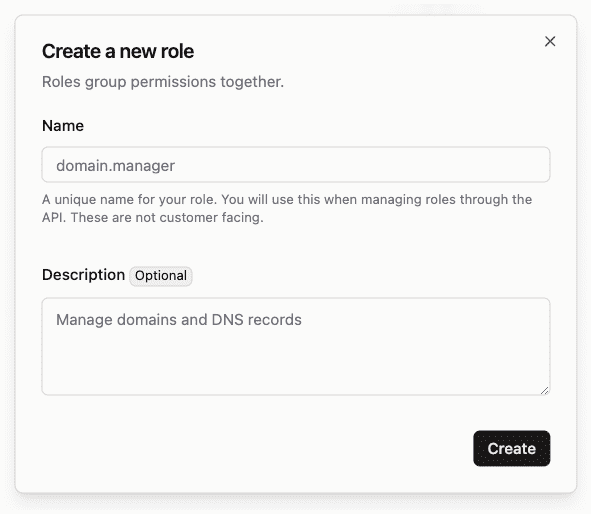
Create roles

When creating roles, we wanted to give you the ability to provide them with an intuitive name and a description. This allows others in your organization to understand the purpose of the role and also gives you the ability to match the systems you have in place.

Create Role

If you have permissions created already, you can assign them to your roles during the creation process. If you don't have permissions created yet, you can create them after creating your role and assign them later.

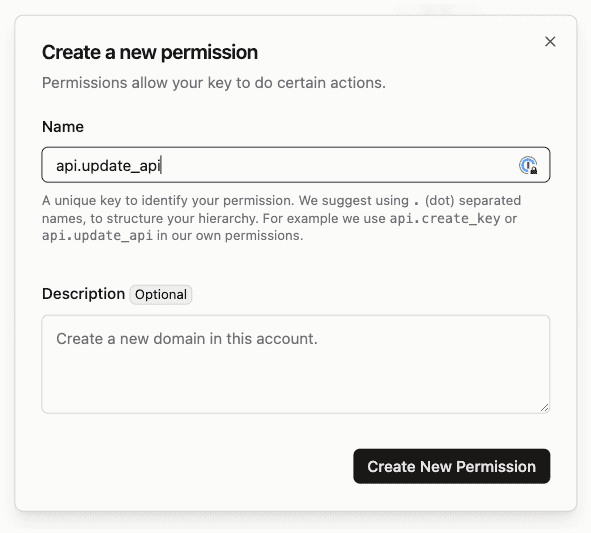
Creating permissions

Our permissions are designed to be flexible; you can create permissions specific to a single API or service, or you can create more general permissions that can be used across multiple roles. We also offer the ability to wild card your permissions for more flexibility.

Create Permission

After you have created your permissions, you can assign them to your roles.

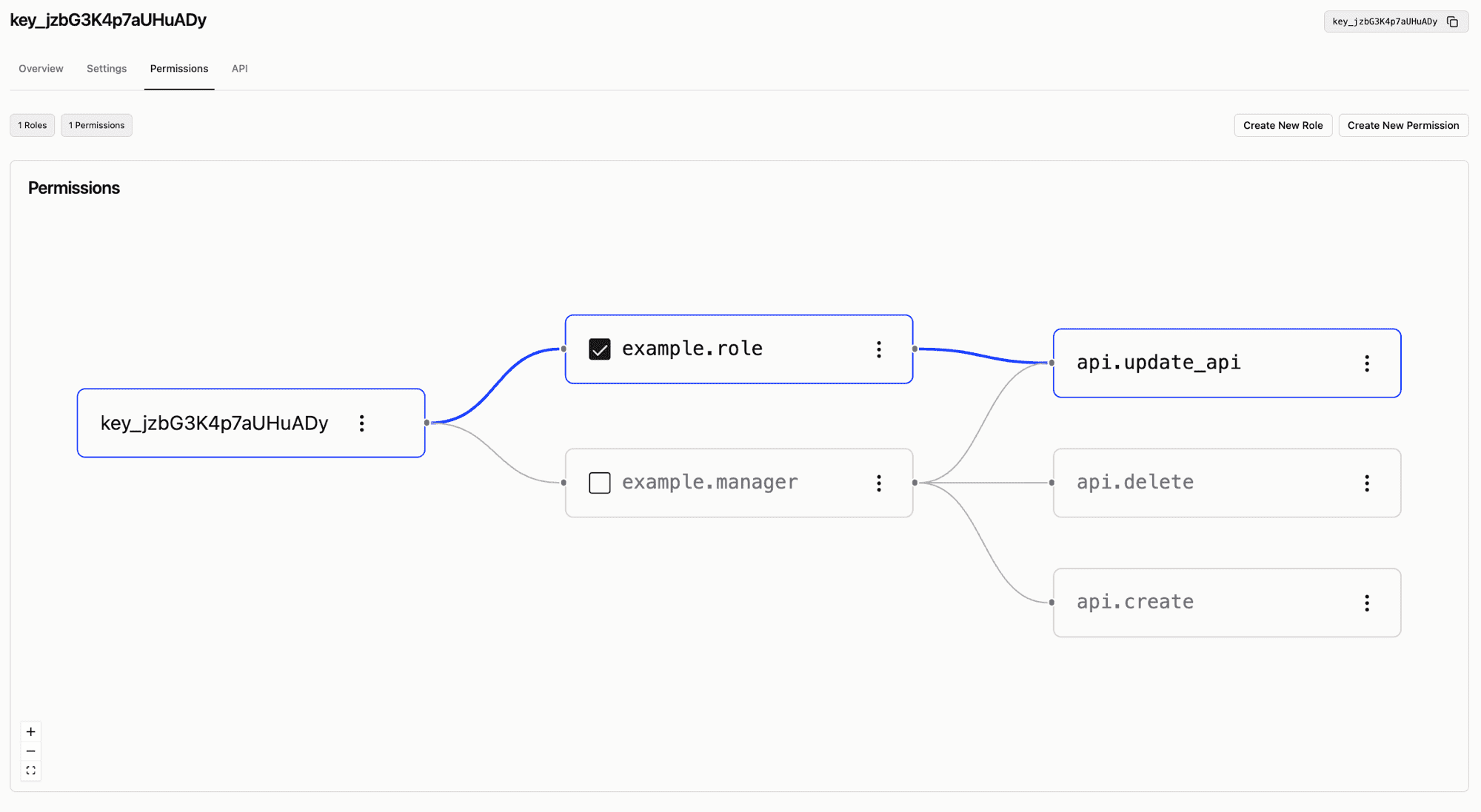
Visualizing roles and permissions

Unkey has always focused on making securing your APIs more accessible than ever. With the introduction of our Authorization offering, we wanted to simplify how you can see what roles and permissions are assigned to a key and update them as needed.

Roles and Permissions

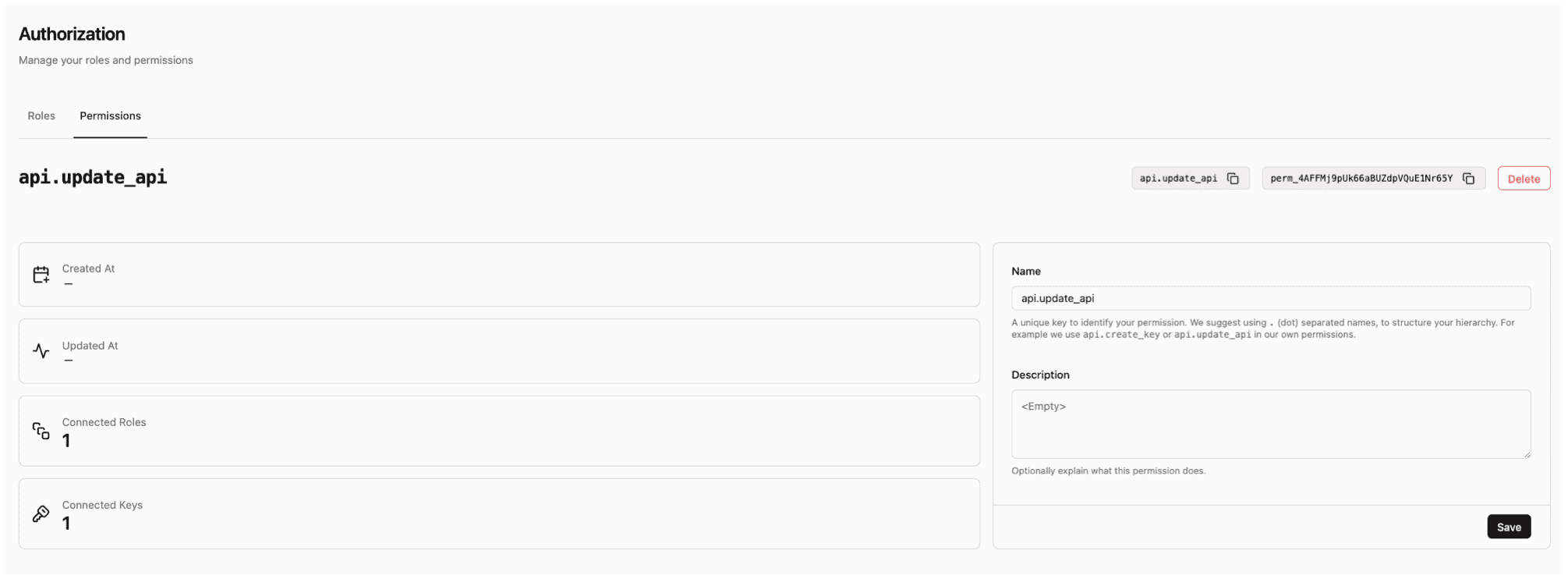
Permission details

If you want to understand which roles are using permission, when it was last used, what keys are attached, and when it was last updated, you can do so by clicking on the permission.

Permission Details

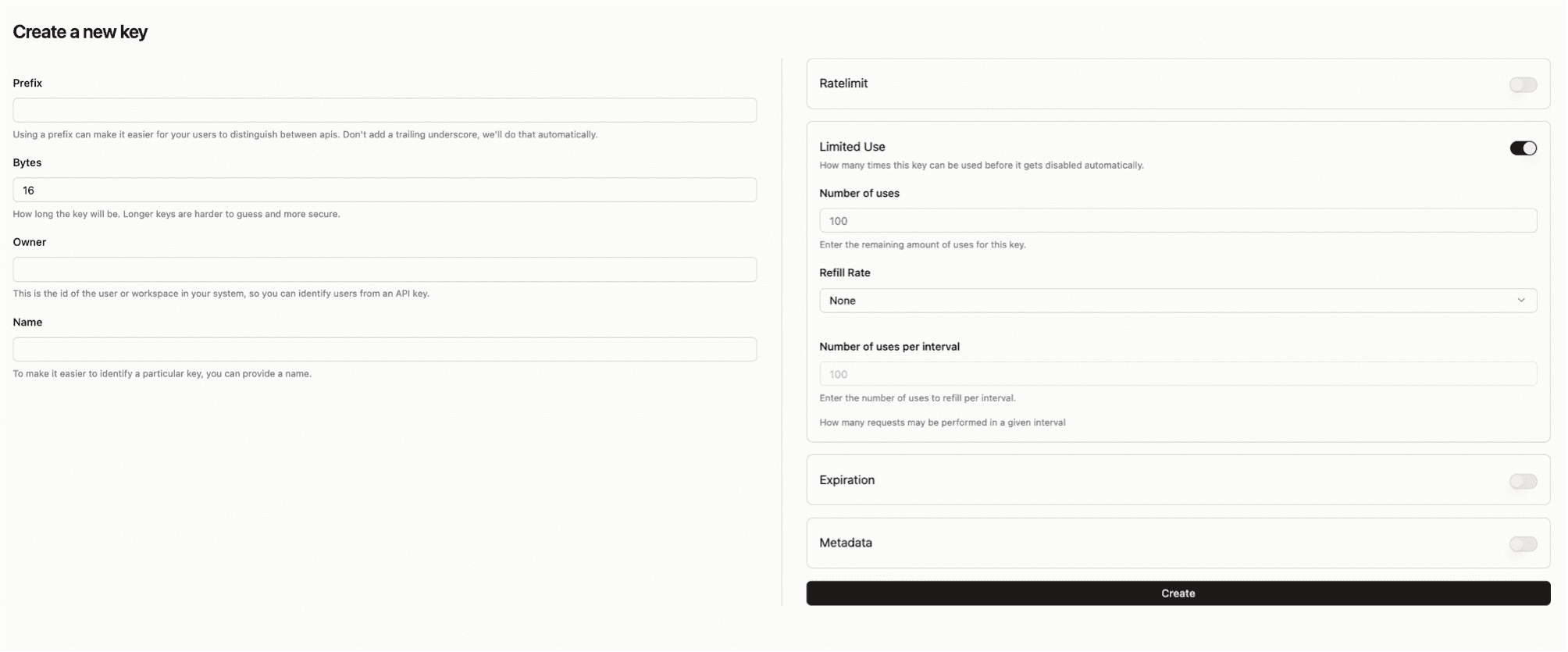
Create key UI updates

The team refined our create key UI to provide a better User experience. The new UI offers toggles for enabling features while ensuring you are provided with actionable feedback when there is an error.

Create Key UI example

Content Roundup

How to build and authenticate an AI API using Modal, Neon, and Unkey

If you want to learn how to use Neon Postgres and Modal to build, host, and deploy an OpenAI Whisper API - fully secured by Unkey. We collaborated with the team at Neon team to create a tutorial that walks you through the process. You can find the tutorial here.

Decoding CLI Auth

Command Line Interfaces (CLI) have become integral tools for developers looking to streamline their workflows, but how does CLI authentication work? In our latest blog post, we break down the process of authenticating a CLI tool and how Unkey can help. You can find the blog post here.

JAN 19, 2024

product

Audit logging, Next.js SDK, Disable Keys, and more

Audit logging (beta)

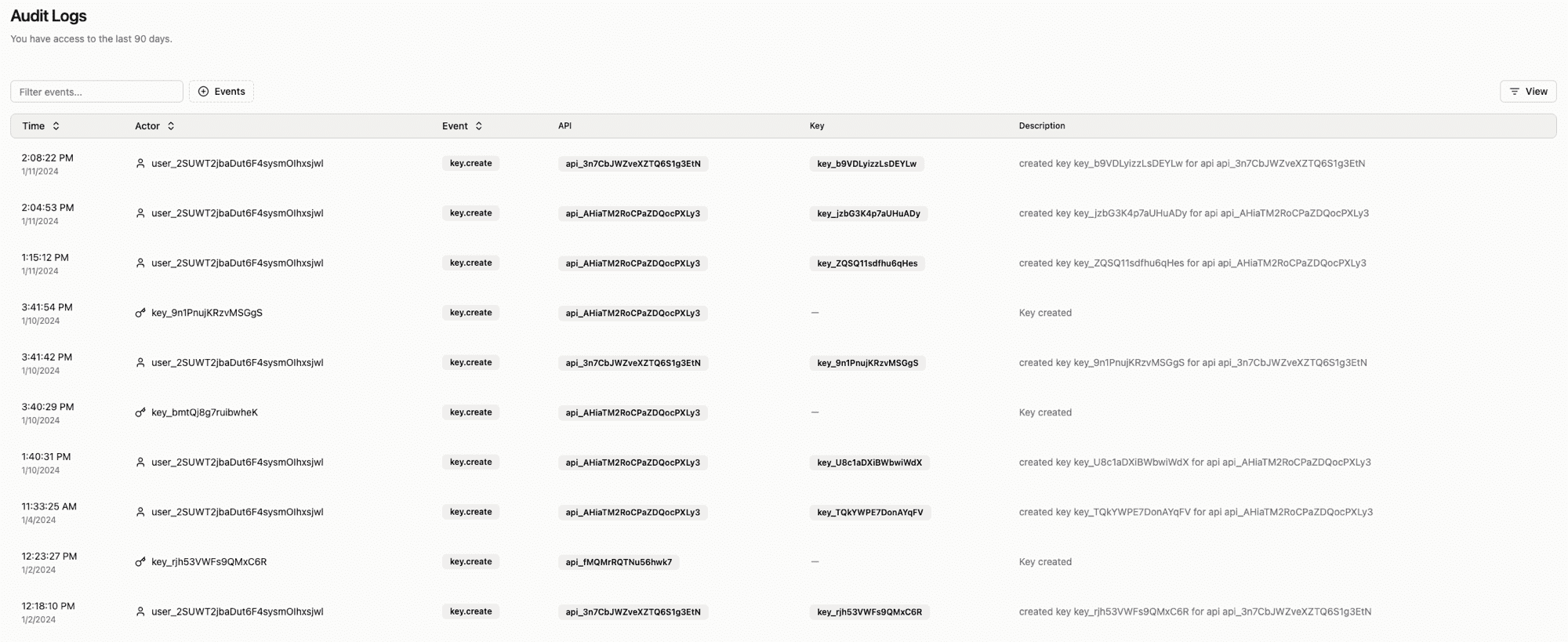
We are introducing audit logging for the following events to allow for better tracking of changes to your account:

  • Workspace (create, update, delete)
  • API (create, update, delete)
  • Key (create, update, delete)
  • Vercel integration (create, update, delete)

Audit Logs

The audit logs are in the dashboard under the Audit logs tab. To access the beta feature, please get in touch with us at support@unkey.com.

Next.js SDK

We are introducing a new SDK for Next.js. The SDK is available as a npm package and can be installed with:

 npm install @unkey/nextjs

The Next.js SDK gives you a type-safe way to verify API keys, below is an example of how to use the SDK:

import { NextRequestWithUnkeyContext, withUnkey } from '@unkey/nextjs';

export const POST = withUnkey(async (req) => {
  // Process the request here
  // You have access to the verification response using `req.unkey`
  console.log(req.unkey);

  return new Response('Your API key is valid!');
});

Disable Keys

You can now disable a key via the API or in the dashboard. While disabled, the key will act as an invalid key. Suppose you have a customer that has not paid their bill. You may not want to delete the key and wait for the account balance to be current. The key can be disabled temporarily, preventing access until it is enabled.

curl --request POST \
  --url https://api.unkey.dev/v1/keys.updateKey \
  --header 'Authorization: Bearer <token>' \
  --header 'Content-Type: application/json' \
  --data '{
  "enabled": false,
  "keyId": "<keyId>"
}'

Examples

We recently moved our examples into their dedicated repository. We have also added a few new examples.

AI Billing example

This example shows how to integrate Unkey and Stripe with an AI application. Below are all the features we included:

  • Code to set up Stripe for payment links
  • On payment, users are assigned an Unkey API key with the 'remaining' field set to 10, signifying ten credits
  • This API key is saved to a cookie (httpOnly, so not accessible via client-side Javascript)
  • This cookie is attached to requests to an API route in /api/openai; this API route verifies the key (decrementing remaining) and requests images from OpenAI.

Check it out on Github

CLI Authentication

Adding a CLI to your application is a great way to increase adoption. However, it can be challenging to authenticate users. This example shows you how to use Unkey to authenticate users in your CLI application.

Check it out on Github

Contribution Improvements

The team spent some time removing conflicting type versions and also introducing corepack. Corepack allows us to ensure that when you are contributing, you are using the same version of the dependencies as we are. This should make it easier to contribute to the project.

JAN 5, 2024

pricing
operations

New Year New Pricing

Happy New Year from the team at Unkey! Firstly, we would like to thank you for your support in 2023; we are excited by the growth and feedback we have received. We are looking forward to 2024 and the new features we have planned.

Pricing changes

I spent a lot of time thinking about how we can maximize the value we provide to users of Unkey. We want there to be two things that are true for all users of Unkey:

  1. API authentication is easy to implement
  2. It's accessible to everyone

We have decided to change our pricing model to help us achieve these goals. The free tier has stayed the same, and we will continue to gather feedback. Our pro tier stays the same price at $25 per month, but we are increasing what is included.

Old Pro Tier

  • 250 Monthly Active keys included *
  • 10,000 Verifications included *
  • Workspaces with team members
  • Priority Support
  • Data retention for 90 days
  • Additional active keys are billed at $0.10
  • Additional verifications are charged at $1 per 5000

New Pro Tier

  • 250 Monthly Active keys included *
  • 150,000 Successful Verifications included *
  • Workspaces with team members
  • Data retention for 90 days
  • Additional active keys are billed at $0.10
  • Additional verifications are charged at $10 per 100,000

The new pro tier is designed to be a better fit for scaling your API authentication. We have increased the number of verifications included by 15x and reduced the cost of additional verifications by half. To put this in perspective, below are the costs of 1 million verifications on the old and new pro tiers.

Old Pro TierNew Pro Tier
$223$110

This change will make it easier to scale your API authentication with Unkey. If you have any questions or feedback, please reach out to me at james@unkey.dev

Refillable Keys

When working with limited access APIs, for example, if you sell someone 1000 API calls per month, you need a way to refill the API key each month. In the past, developers created a cron job to refill the key each month. This is a lot of work and can be error-prone.

We have introduced refillable keys to make this process easier. You can now set a refill interval and increment on individual keys, and we take care of refilling a key on its set interval. Currently, we support daily and monthly refills. We will handle daily at midnight UTC and monthly on the first of each month.

Here is an example of creating a key with a daily refill of 100 daily uses.

curl --request POST \
  --url https://api.unkey.dev/v1/keys.createKey \
  --header 'Authorization: Bearer <UNKEY>' \
  --header 'Content-Type: application/json' \
  --data '{
  "apiId":"<API_ID>",
  "remaining": 100,
  "refill": {
      "interval": "daily",
      "amount": 100
  }
}'

A new team member

Dom is joining the Unkey team, bringing us to a total of 4! Dom comes with a wealth of knowledge from his time at Vercel. When we talked to Dom about joining Unkey, he spent a lot of time thinking and talking about how we can make Unkey easier to use and our vision for Unkey. Dom will be working on all aspects of the Unkey stack, and you will see his first project in the coming weeks.

DEC 15, 2023

analytics
engineering

Unkey is faster, we have improved analytics, and a new billing page

Welcome to the Unkey changelog for Decemeber 15th, 2023. The last two weeks have been busy with some core changes to the Unkey product.

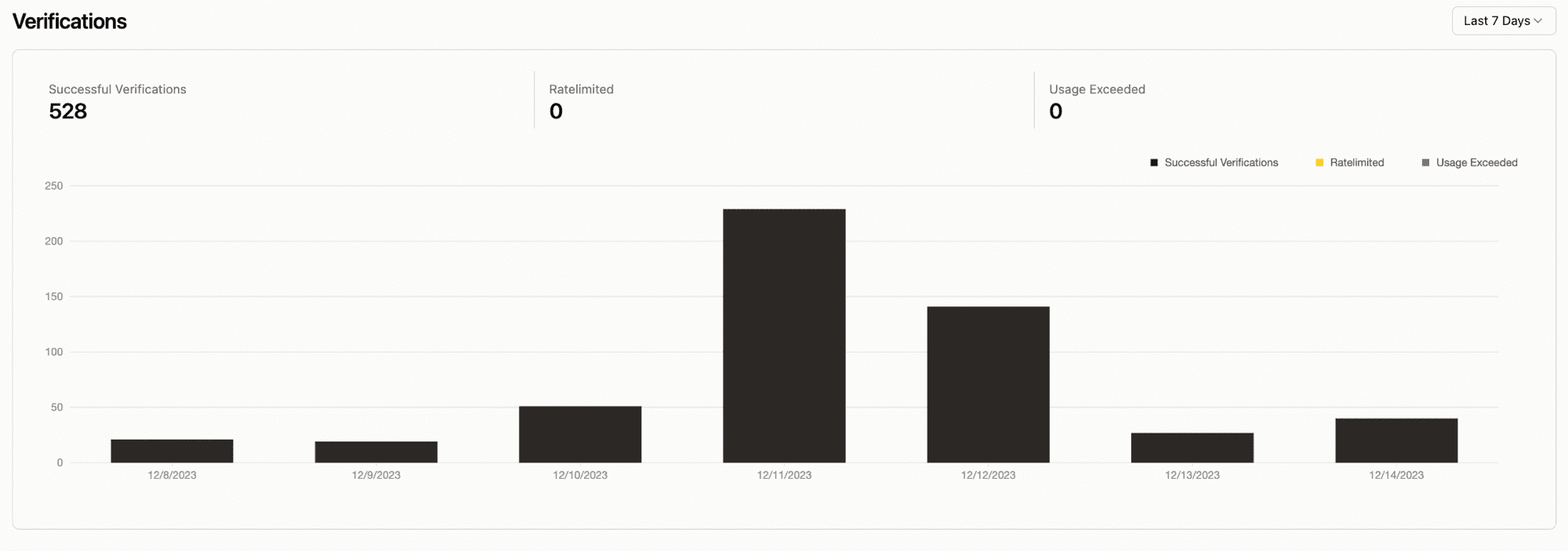
Improved Analytics

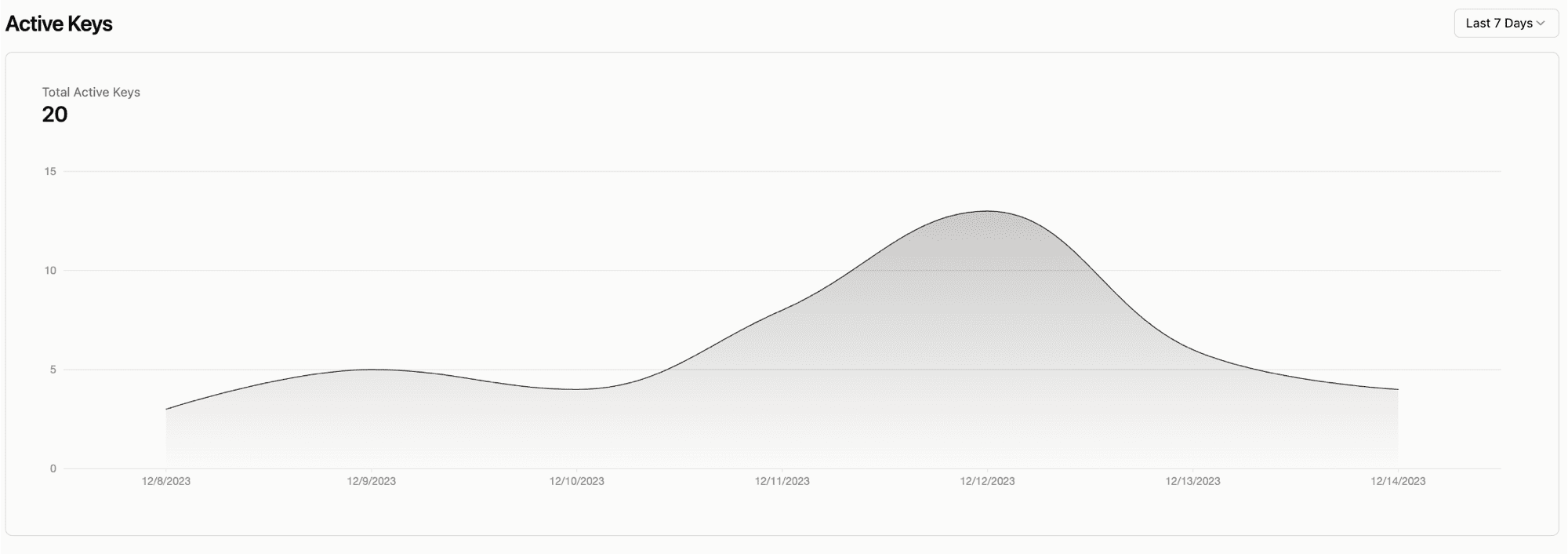
Analytics are now more detailed and easier to understand. We added a new chart that shows the number of active keys for your API and allows you to set a timeframe.

Analytics

Active keys

We moved to Cloudflare

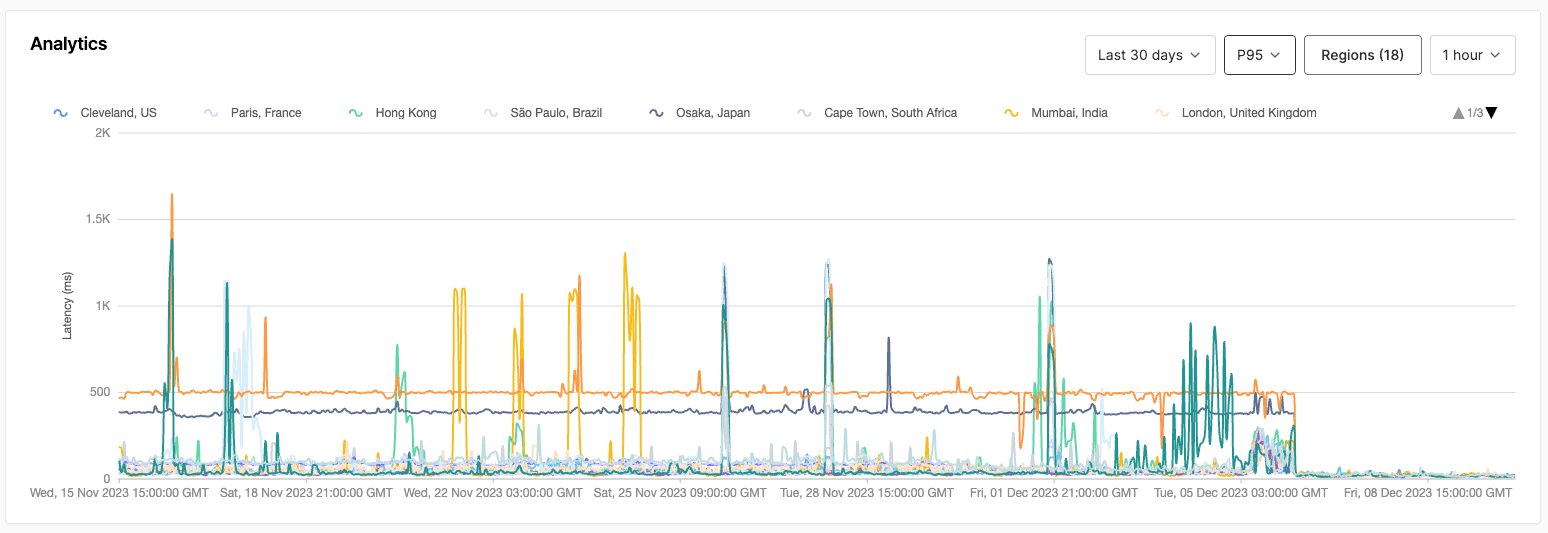
Unkey's API has been on Fly.io since we launched in June. We've been reasonably happy with its performance, but we wanted to move to a more reliable and faster platform. We decided to move to Cloudflare Workers, a serverless platform on Cloudflare's edge network. After this change, Unkey's API runs on 300+ data centers worldwide, making it faster and more reliable. You can check out the new API code in our repository to see how we made the changes from Go to Typescript using Hono

Below is a chart of our latency at P95. Can you tell when we moved to CF?

P95 results

New billing page

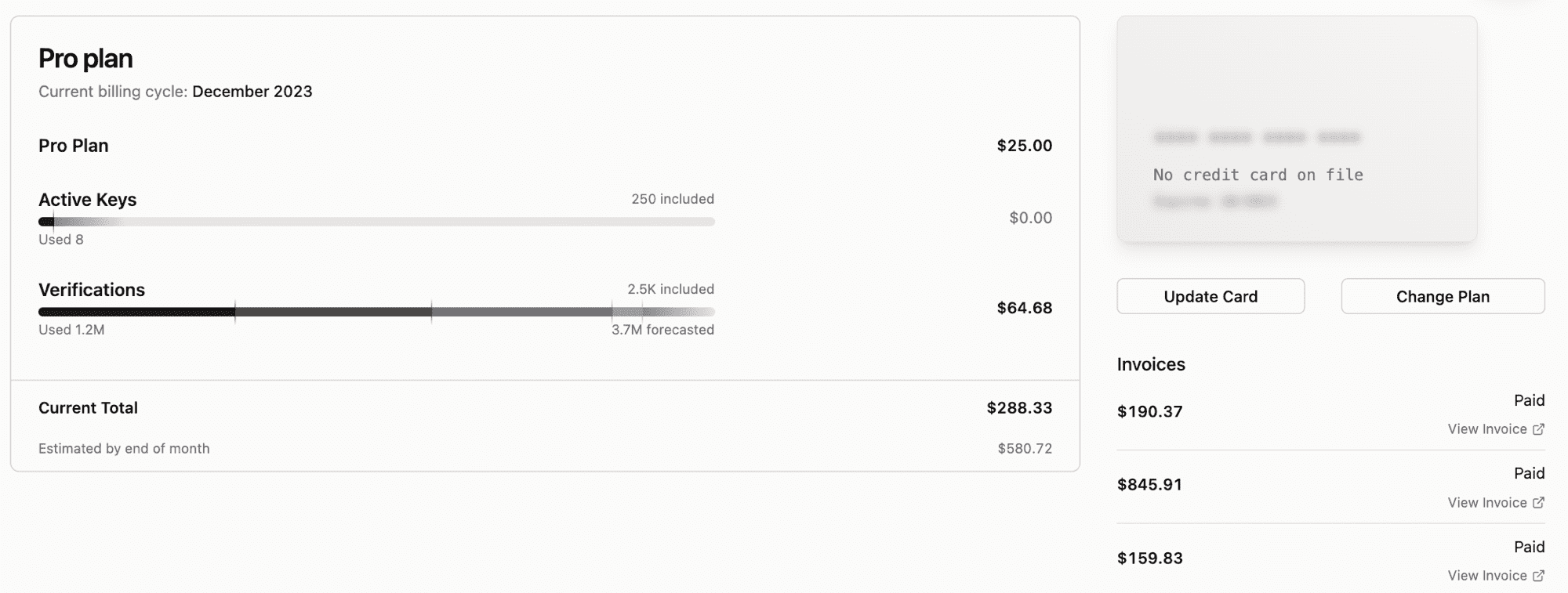
We added a brand new billing page to the dashboard. Previously, you could change your plan and see your current usage. Now, you can see your billing history, change your payment method, and see your current billing cycle. My favorite part is that you can now see a projected forecast of your usage for the month and a projected bill.

Billing page

RPC methods

With the move to Cloudflare workers, we decided to move to RPC methods. RPC makes it extremely easy to version our API and follow a standard.

Note: We will continue to support the old API for the next few months. We will send out a deprecation notice before we remove the old API.

All our RPC methods are now in the format:

https://api.unkey.dev/{version}/{service}.{method}

Below are a couple of examples of RPC methods: one is a GET request, and the other is a POST request.

curl "https://api.unkey.dev/v1/keys.getKey?keyId=key_123" \
  -H "Authorization: Bearer <ROOT_KEY>"

curl -XPOST "https://api.unkey.dev/v1/keys.createKey" \
  -H "Authorization: Bearer <ROOT_KEY>" \
  -H "Content-Type: application/json" \
  -d '{"apiId": "api_123", "name": "My Key"}'

Content you might have missed

UX of UUIDs: Andreas wrote an article on the UX of UUIDs and how some minor tweaks can make a big difference in the user experience.

See What's NewNewer posts
Explore the PastOlder posts
unkey

Build better APIs faster

© 2026 Unkey Inc. All rights reserved.

SOC 2 Type II Certified

Company

  • About
  • Careers
  • Source Code
  • Status Page
  • Roadmap

Resources

  • Blog
  • Case Studies
  • Changelog
  • Docs
  • Glossary
  • Feature Request

Connect

  • X (Twitter)
  • Discord
  • Book a Call

Legal

  • Terms of Service
  • Privacy Policy
  • Trust Center