unkey
  • BlogRead product updates and insights
  • Case studiesPractical results from real deployments
  • ChangelogTrack what shipped, improved, and fixed
  • GlossaryClear definitions for API terms
PricingDocs
DiscordGitHub5.3k
LoginSign Up
  • BlogRead product updates and insights
  • Case studiesPractical results from real deployments
  • ChangelogTrack what shipped, improved, and fixed
  • GlossaryClear definitions for API terms
PricingDocsDiscordGitHub5.3k
LoginSign Up

Changelog

We are constantly improving our product, fixing bugs and introducing features.Here you can find the latest updates and changes to Unkey.

Follow us onTwitterandGitHub

All changelog posts

OCT 16, 2026

product

Guided new-app flow, rebuilt app settings, and a new policies page

New features

A guided flow for new apps

Setting up a new app is now a guided flow instead of one long wizard. Start by picking a GitHub repository or a container image, and we'll walk you through the rest one step at a time.

Everything you need to configure is on one page, and we tell you what's left before you can deploy. You'll only see the options your plan includes, so there are no surprises halfway through.
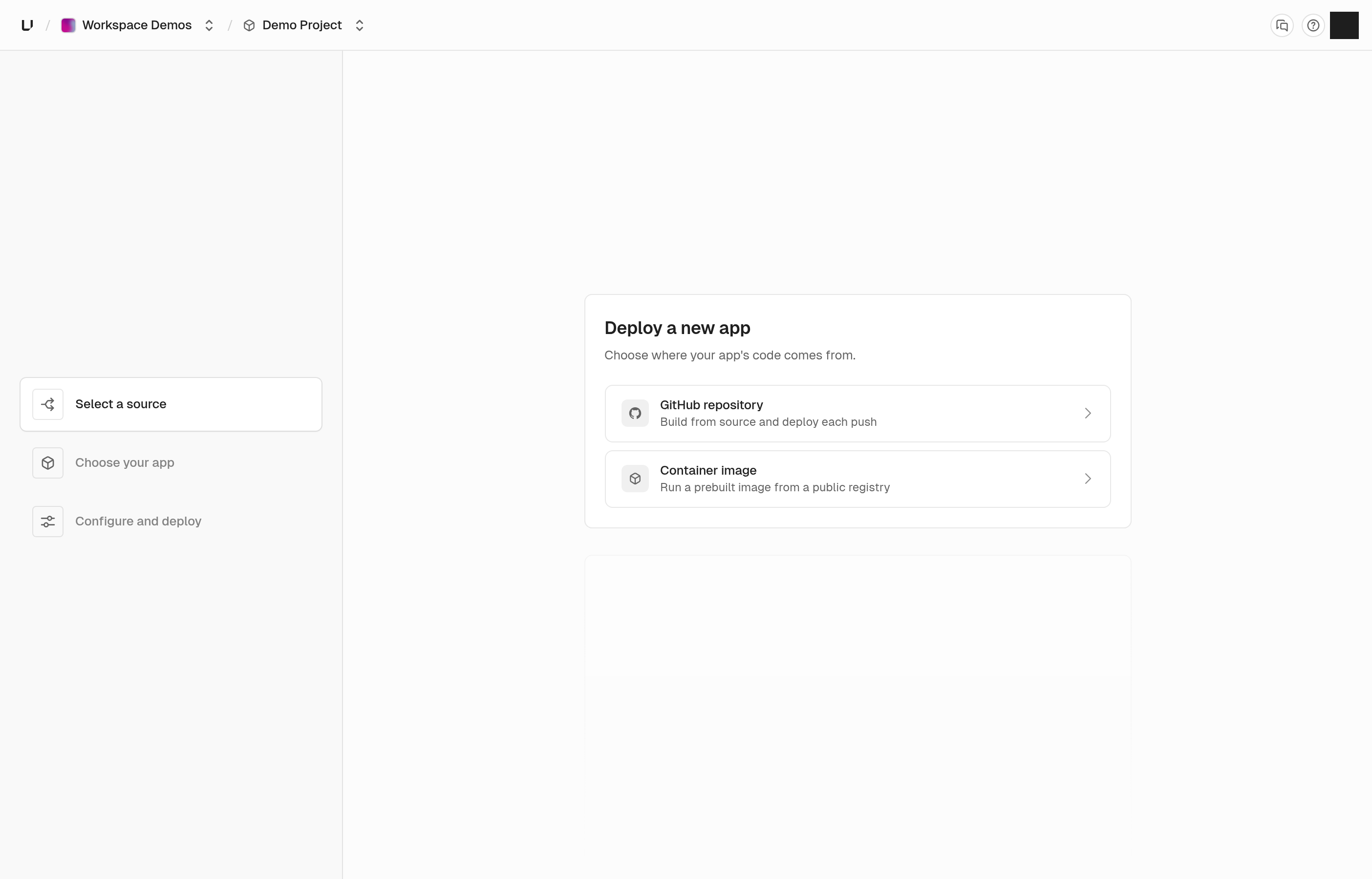
New app flow

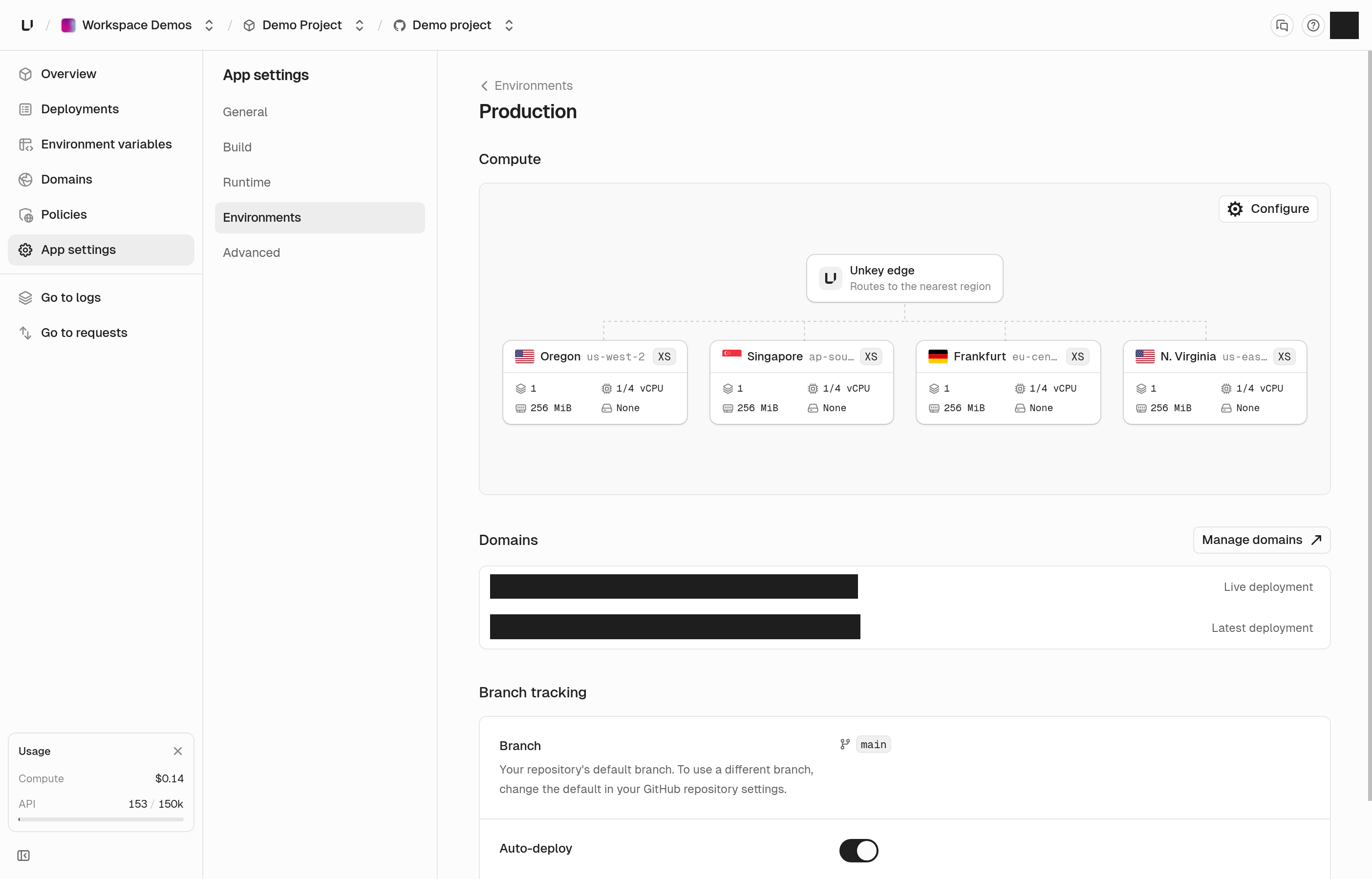
App settings, environments, and domains

App settings is easier to find your way around. Settings are split into a few clear sections, and each environment now has its own page, so you can see how production is set up without digging.

That page shows where your app runs and how big it is, the domains pointing at it, and which branch deploys to it. If your plan doesn't include a size, we tell you which plan does instead of letting you pick it and fail later.

Domains have their own page in each app too, with every domain in one list you can search.
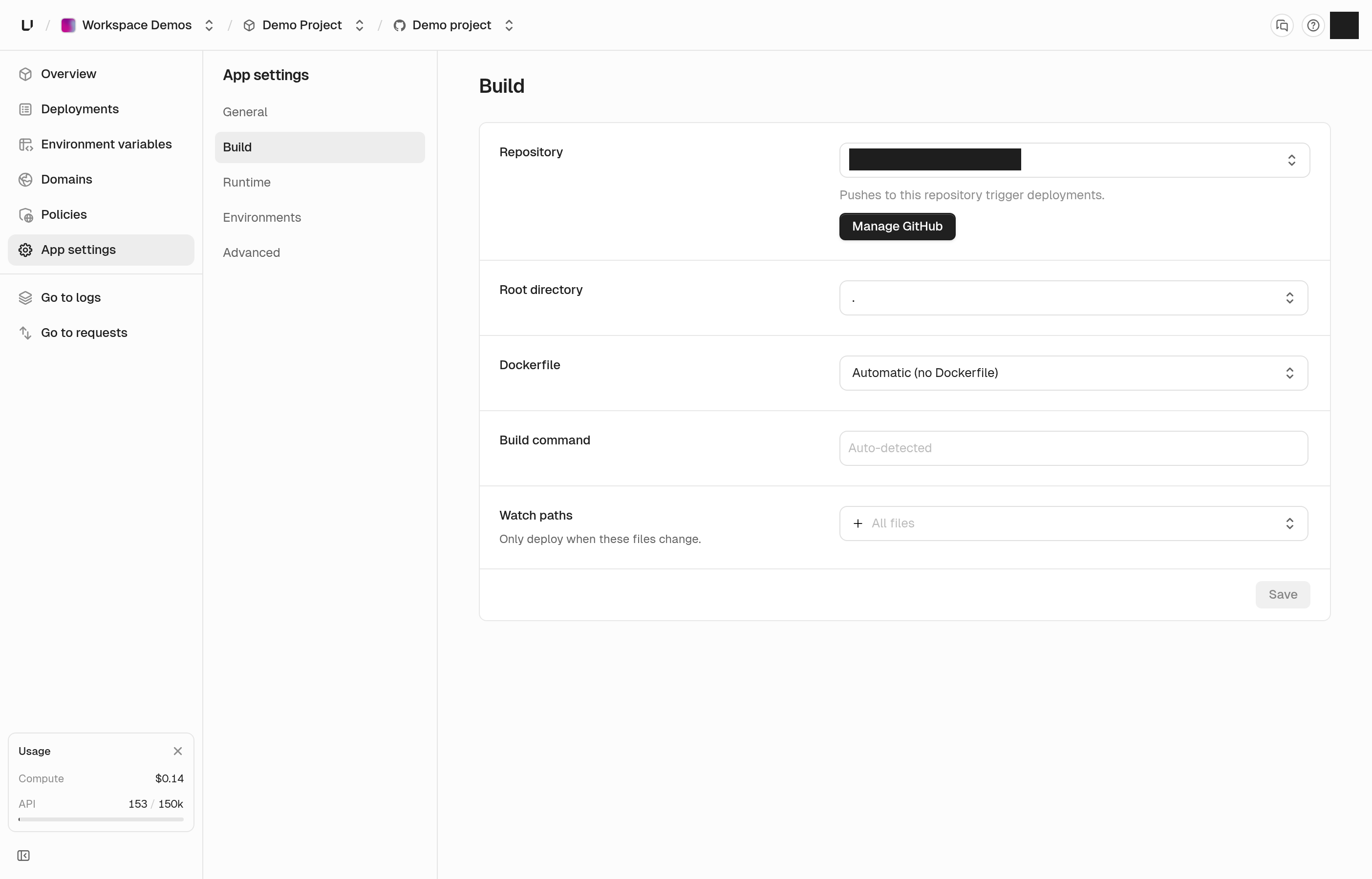
App settings rail

Environment page

Add environment variables in bulk

You no longer have to add variables one at a time. Paste the contents of a .env file or import the file itself, choose which environments it applies to, and save them all at once.

If a key already exists, we save nothing and show you which one clashes, so you never end up with half an import.
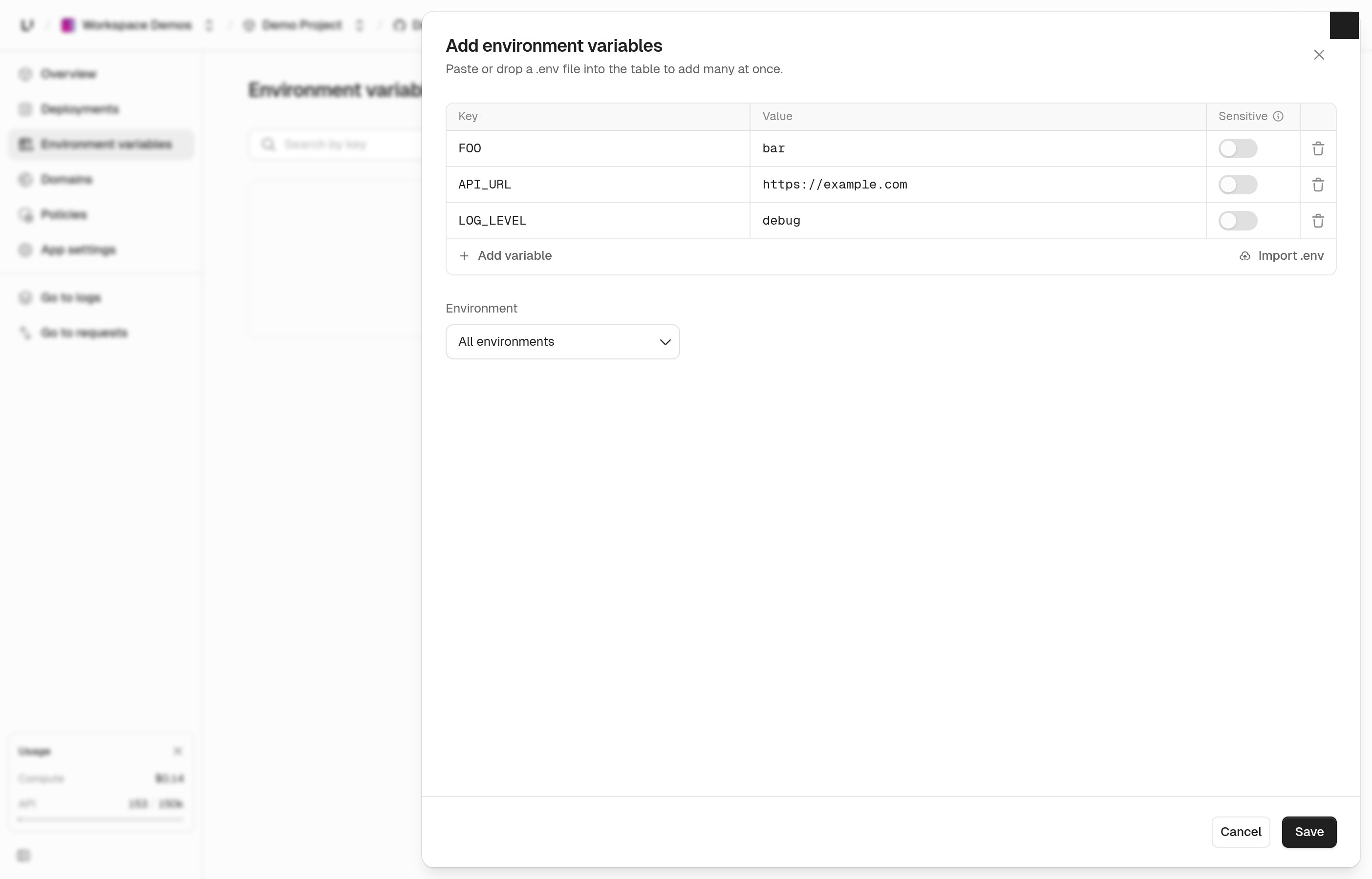
Add environment variables

A new policies page

Policies are simpler to write and easier to trust. Each one reads as a plain rule: if a request matches these conditions, do this. You can match on the path, method, headers, query parameters, or client IP, and a header or query parameter can now match when it's missing.

You decide which environments a policy runs in and can turn it off in one without touching the others. Policies run top to bottom, so you can drag them into the order you want, and the page explains how that order plays out.

See firewall policies.
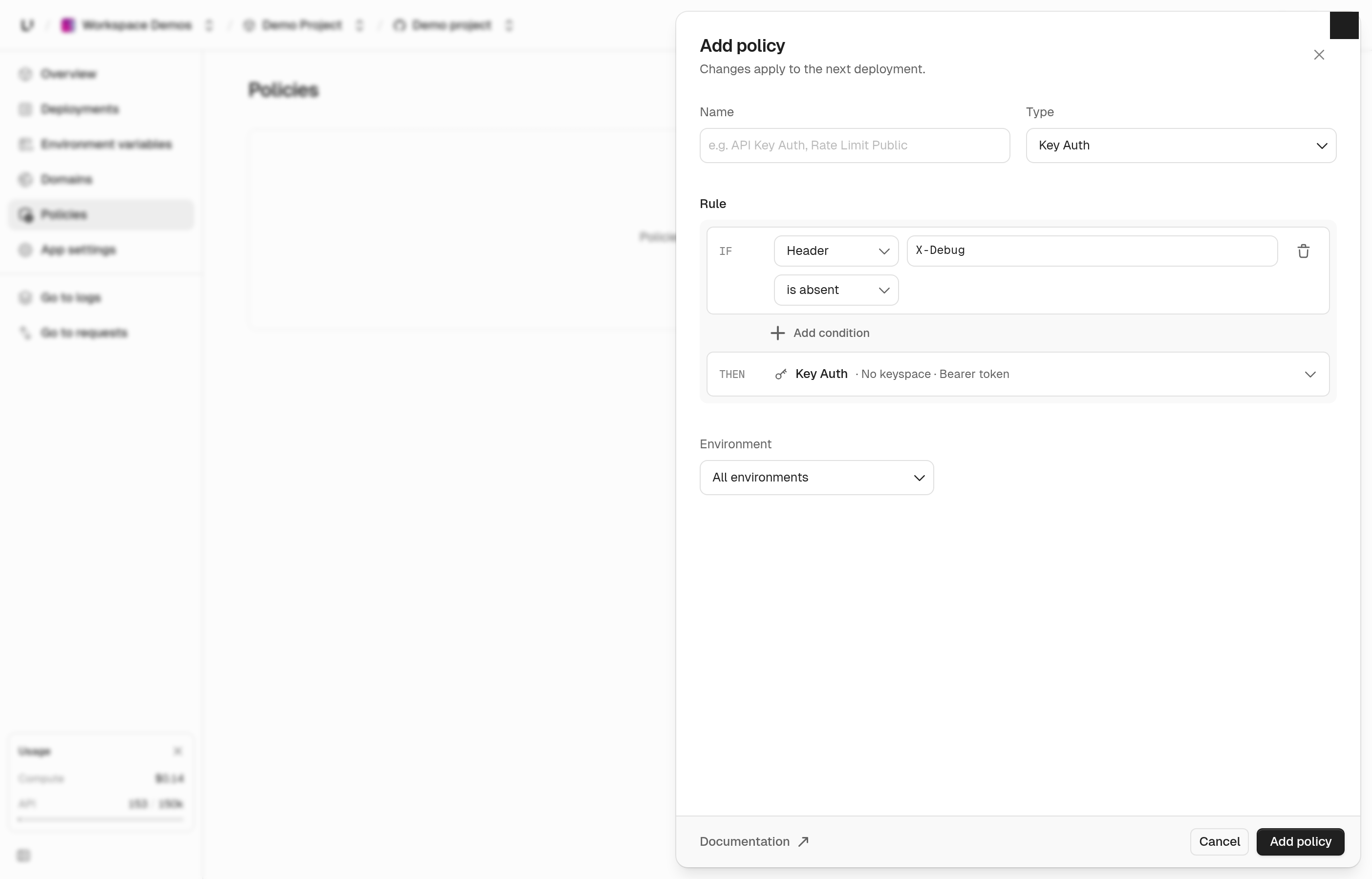
Policy panel

Updates

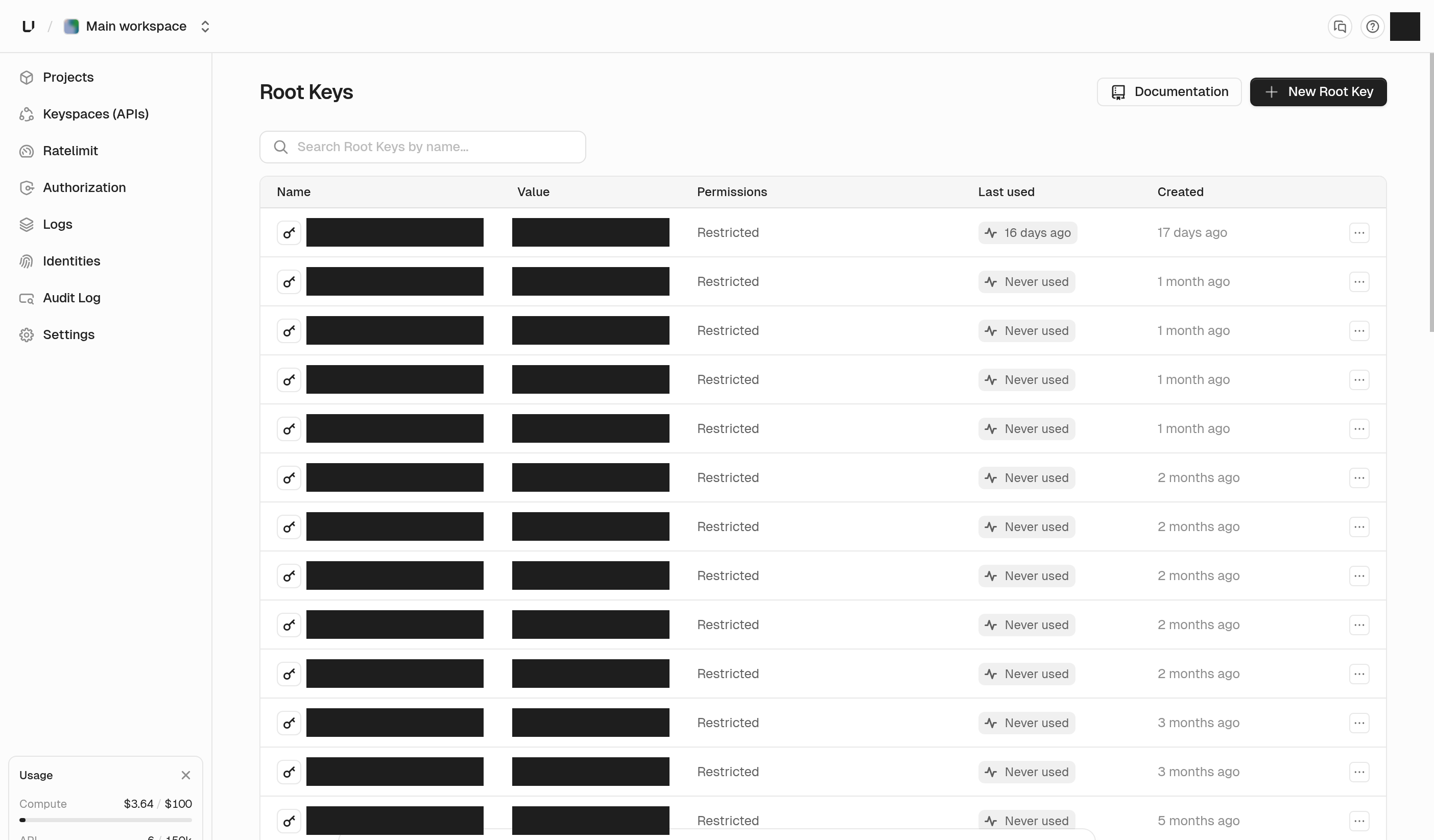
Root keys

Each permission group in the root key builder has checkboxes to grant read or write across the whole group in one click. Environments are grouped under their app, production first, and the closed picker shows a count.
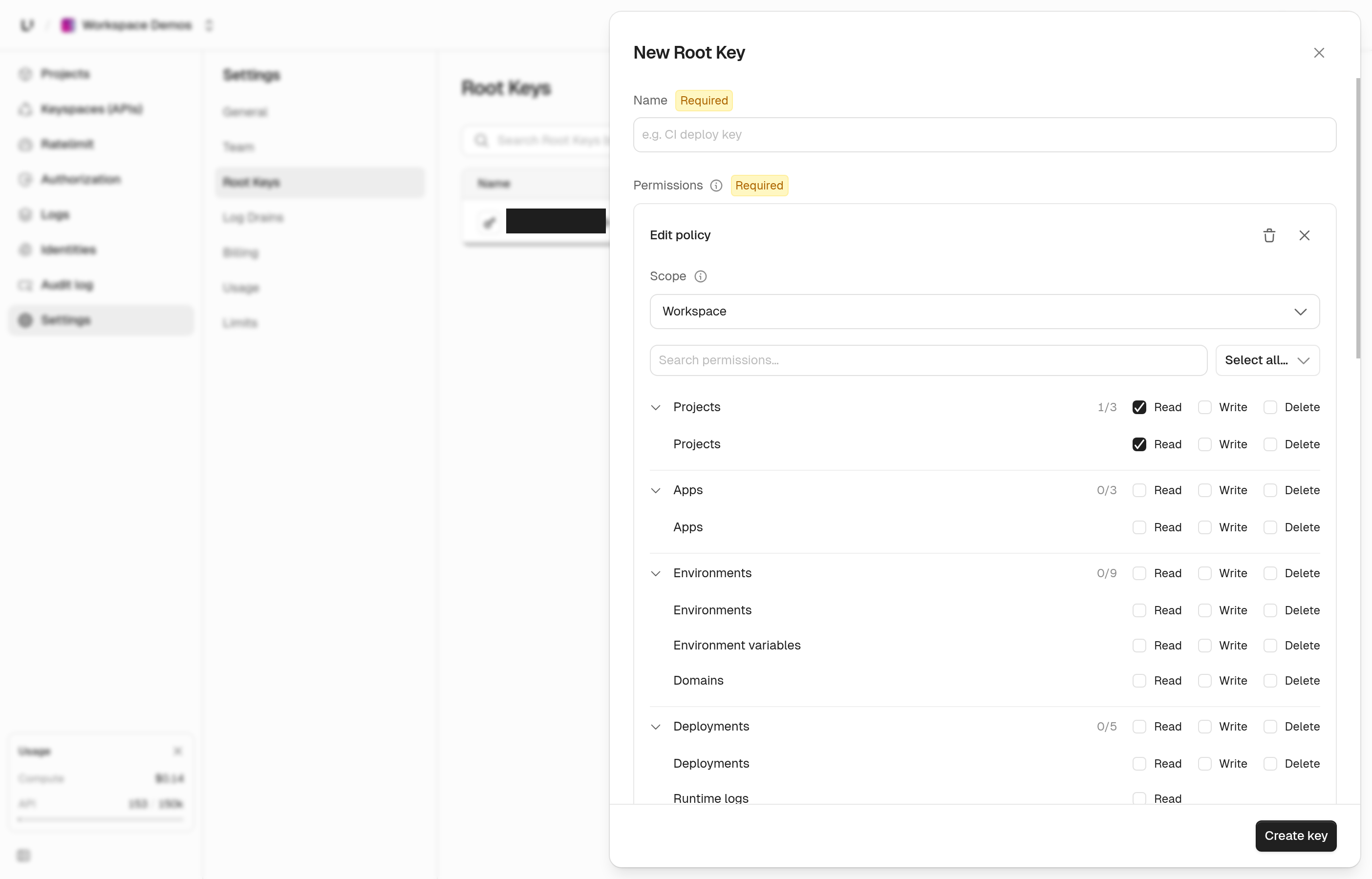
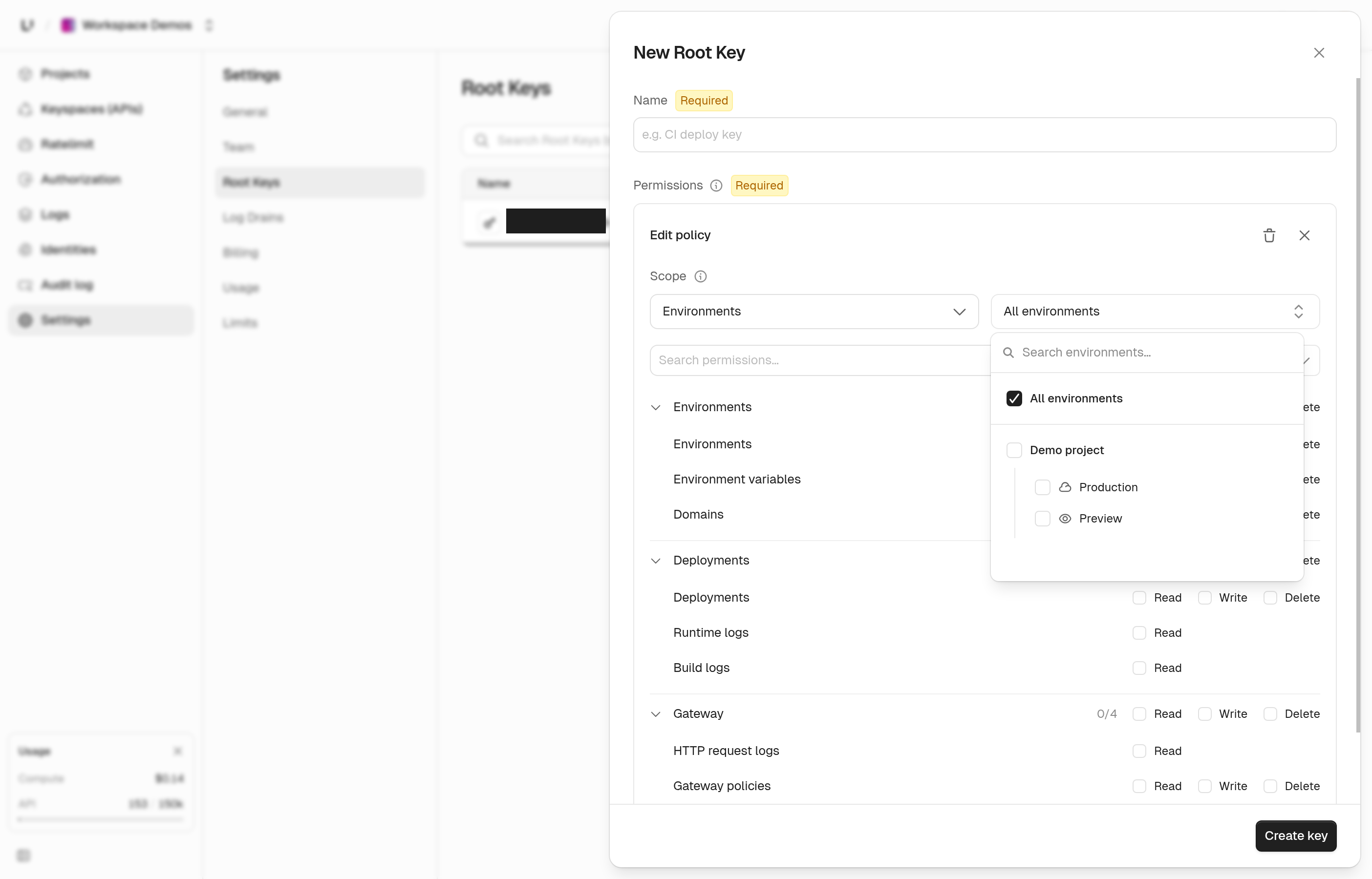
Root key group toggles

Environments grouped by app

Logs filters

Every logs filter now has a search box at the top, so typing "blocked" or "5xx" finds the right option. The audit log filter groups its events by resource with a select-all per group, and you can search events, users, root keys, and buckets.
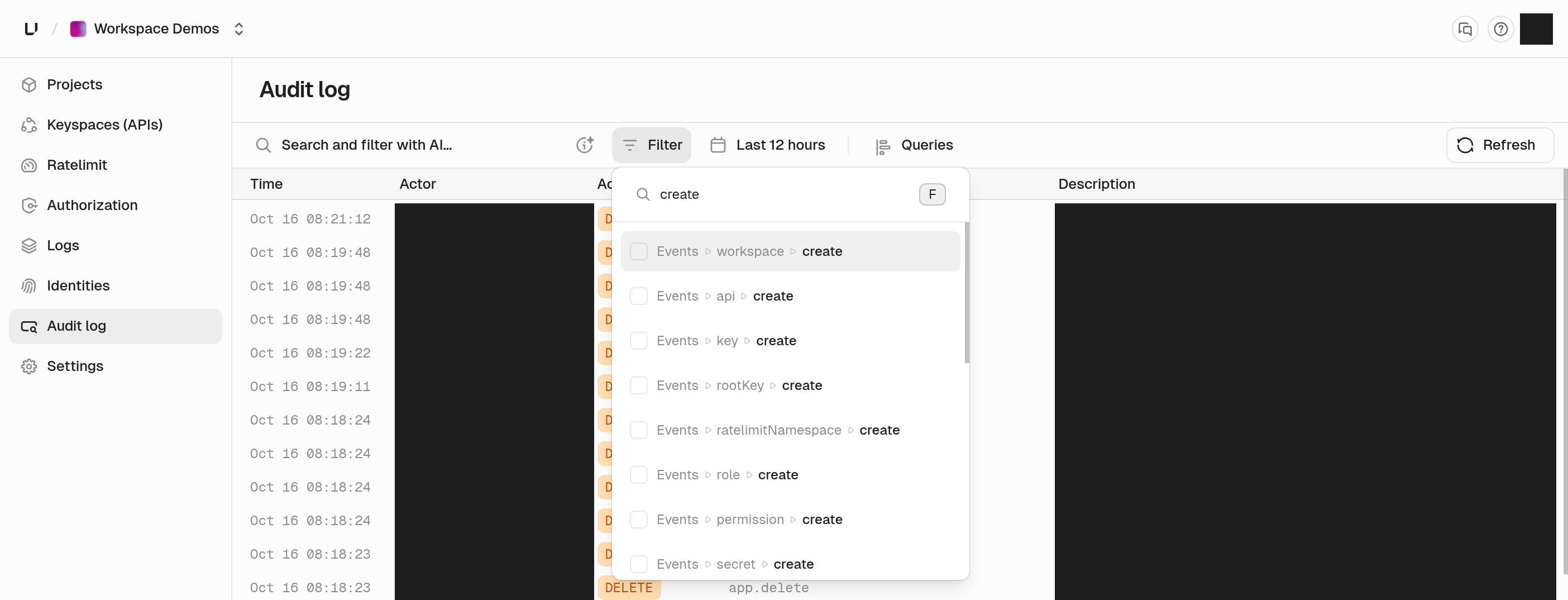
Audit log filter search

Usage and plans

The API usage card shows the billing period dates and how many days until it resets. It also has an Upgrade button, which turns primary once you pass 90% of your quota. New Compute customers get a one-time $5 credit when they add a card, and the plan picker shows what your first invoice will be.
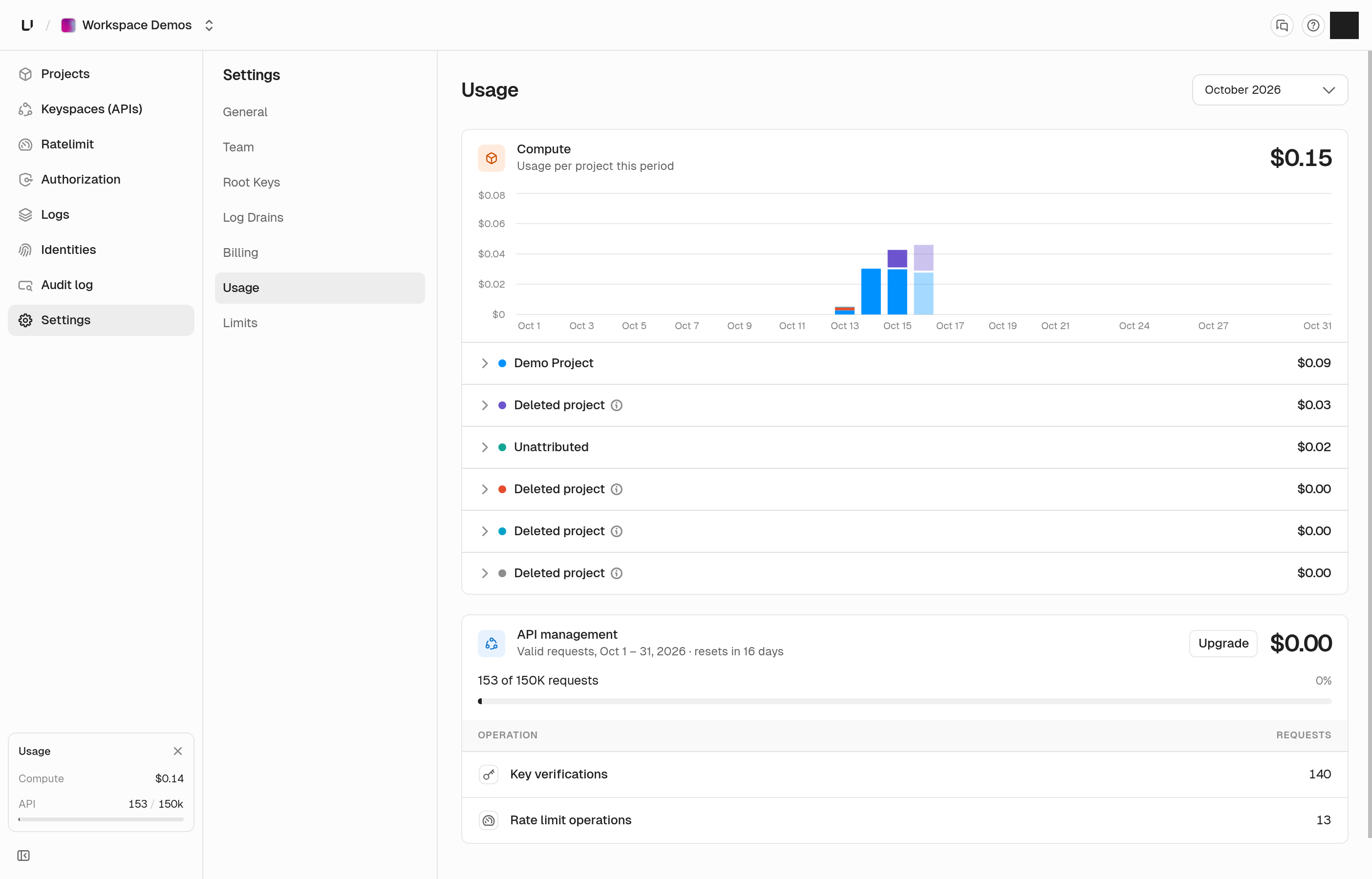
API usage card

Ratelimit namespaces API

You can now create, list, rename, and delete ratelimit namespaces through the API. Deleting a namespace also removes its overrides.

Keys

Key lists in the dashboard load much faster in large keyspaces. They now page with Previous and Next, and they no longer show a total count.

Response headers

API responses no longer include timing headers by default. If you still want them, send X-Unkey-Debug: 1.

GitHub deployments

Deployment links on GitHub now open the correct app, and each deployment reports a status on its commit.

Bug fixes

  • Log and list tables show their rows in Safari again
  • Full-width pages fill the window, with no empty strip on the right or gap under tables
  • The Requests chart tooltip on the API overview is no longer cut off
  • The audit log page no longer times out in busy workspaces
  • The repository list loads when one of your GitHub installations was removed
  • Creating an app with a name that's already taken returns a clear error instead of a server error
  • A gateway policy that names a ratelimit the key doesn't have now returns a 422 instead of a server error
  • A denied key lookup no longer reveals resource IDs or whether the key exists
  • Team members and identities show an error with Retry when they fail to load
  • Selected and hovered items in dialogs are now easier to tell apart
  • The last few calls the dashboard makes for you no longer show up in your API request logs
OCT 10, 2026

product

Root key builder, live build logs, and portal sessions

New features

A builder for root keys

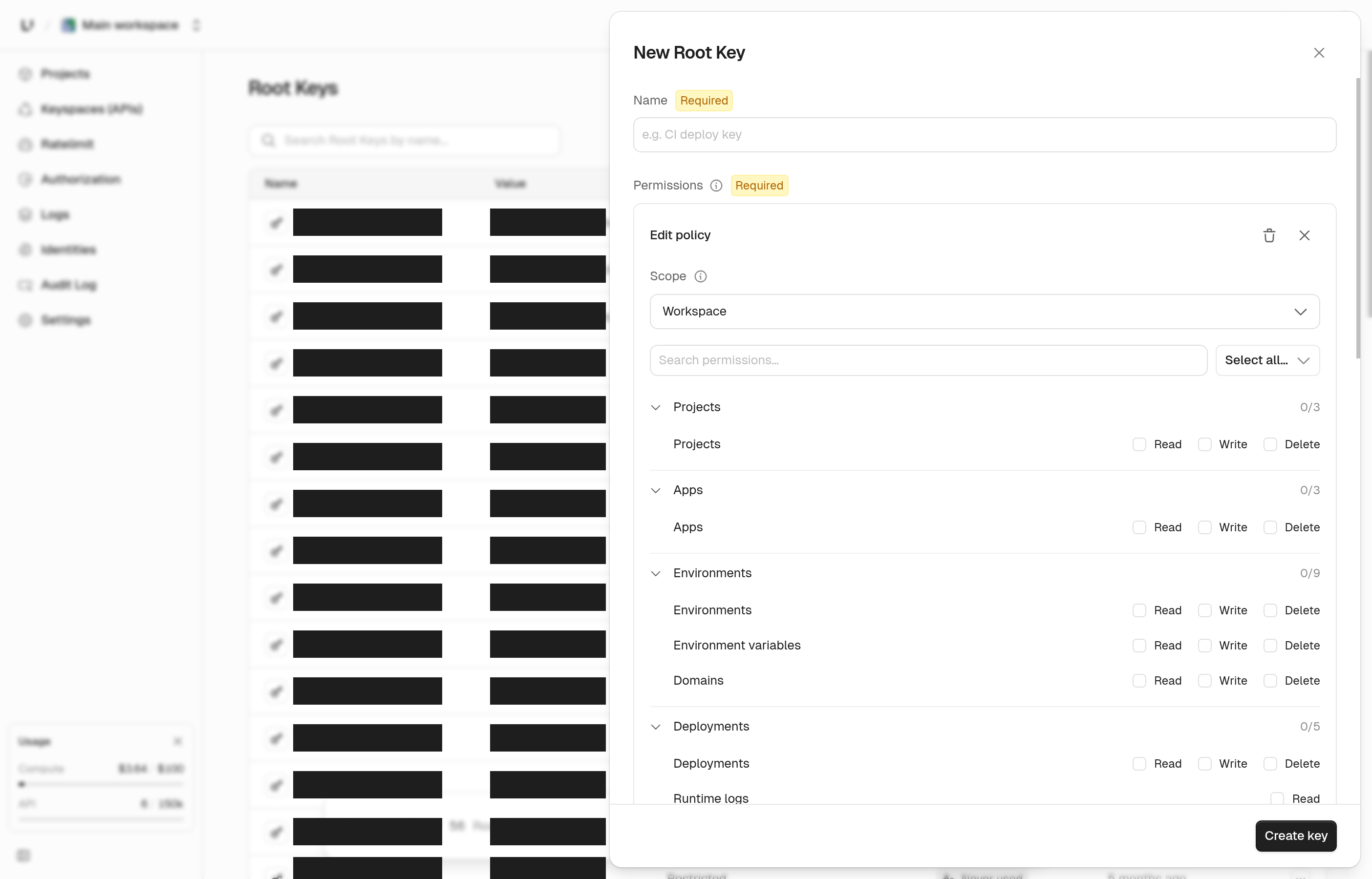
Root keys now have a builder. Click New Root Key and a panel slides in where you name the key and add policy cards. Each policy card picks a scope (the workspace, a project, an app, an environment, a keyspace, or a ratelimit namespace), then the specific resource, then what the key can do with it. The permission list is searchable. Click any row in the table to reopen the same panel and change a key's grants. Rotate and delete are in the panel footer. The table now looks like the apps list, and the whole row is clickable. Narrower keys are easier to get right when you can see what you're granting before you save.

See root key permissions.

Root key builder

Root keys table

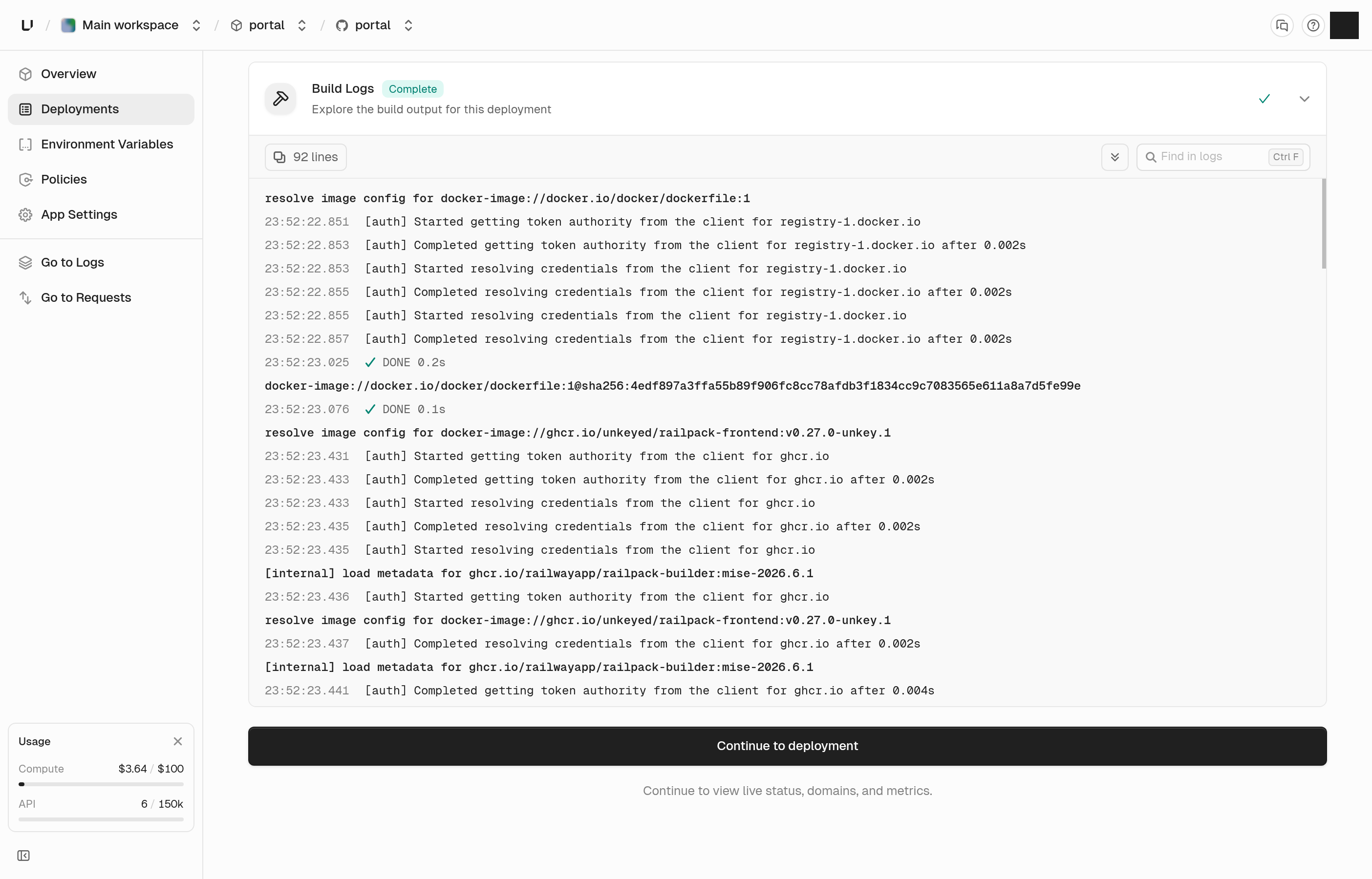
Build logs as one live stream

The build step table is gone. Build logs are now a single stream that fills in as the build prints, so a slow step no longer leaves you looking at a blank screen. A heading marks each new step, and when a step ends you get a closing line: cached, done with how long it took, or the reason it failed. Output sent to stderr is amber and errors are red. Use Jump to error to land on the failure, and Jump to latest to catch up. The view follows the end while a build runs, and long steps fold so you can scroll past them. A noisy step also can't push the logs of the other steps out anymore. The same logs are available through the API.

Build logs

See and sign out customer portal sessions

The customer portal settings now have a Sessions page. It lists the end users who are signed in to your portal, one row each, with how many sessions they have, when the newest started, and when the last one expires. Search by external ID, click a row, and a panel shows each session. Admins can sign a user out with Revoke all sessions. Before this, ending one bad session meant writing backend code. You can also do it through the API, by listing sessions and revoking by external ID. Disabling a portal now signs everyone out too. Before, it only stopped new sessions, and anyone already signed in kept working until their token ran out.

See what portal users can do.

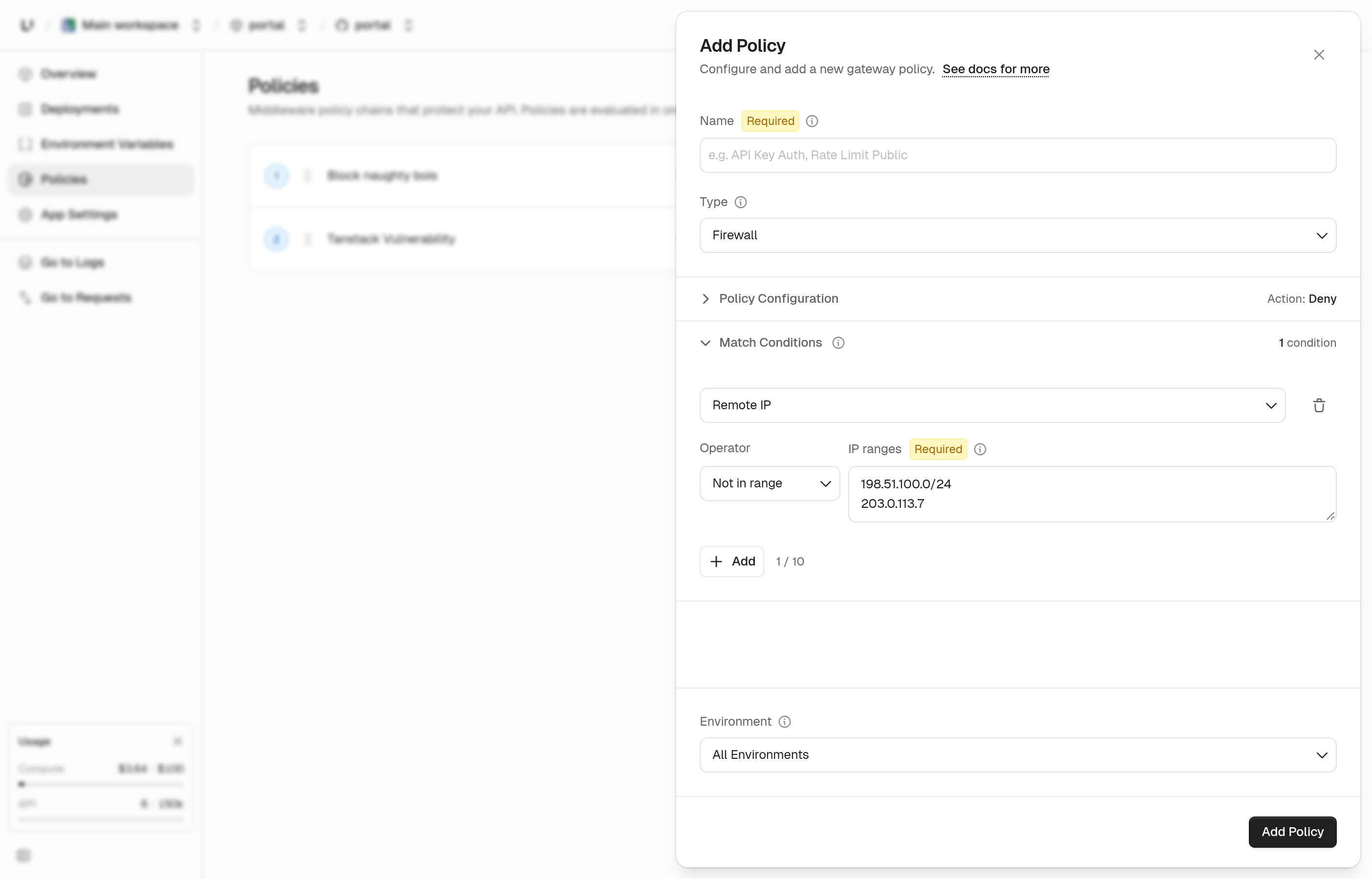
Match on remote IP in gateway policies

You can now add a Remote IP condition when you create a policy in the dashboard. Choose In range or Not in range, then list the IP addresses and CIDR ranges. Use it to block a range, or to let only your own ranges through. It's the same match the API got in our last changelog, now with a form.

See firewall policies.

Remote IP condition

Read your limits and usage through the API

You can now ask the API for the numbers the Limits and Usage pages show. Limits returns each cap on your plan next to what you're using now. Usage returns a month at a time: API operations, Compute, and active keys, with a breakdown by app and environment. It covers the month so far by default, and you can ask for a past month within the last 90 days. If the usage data can't be read, the request fails instead of returning zeros that look real. Use a root key that has permission to read limits or usage.

Updates

Usage

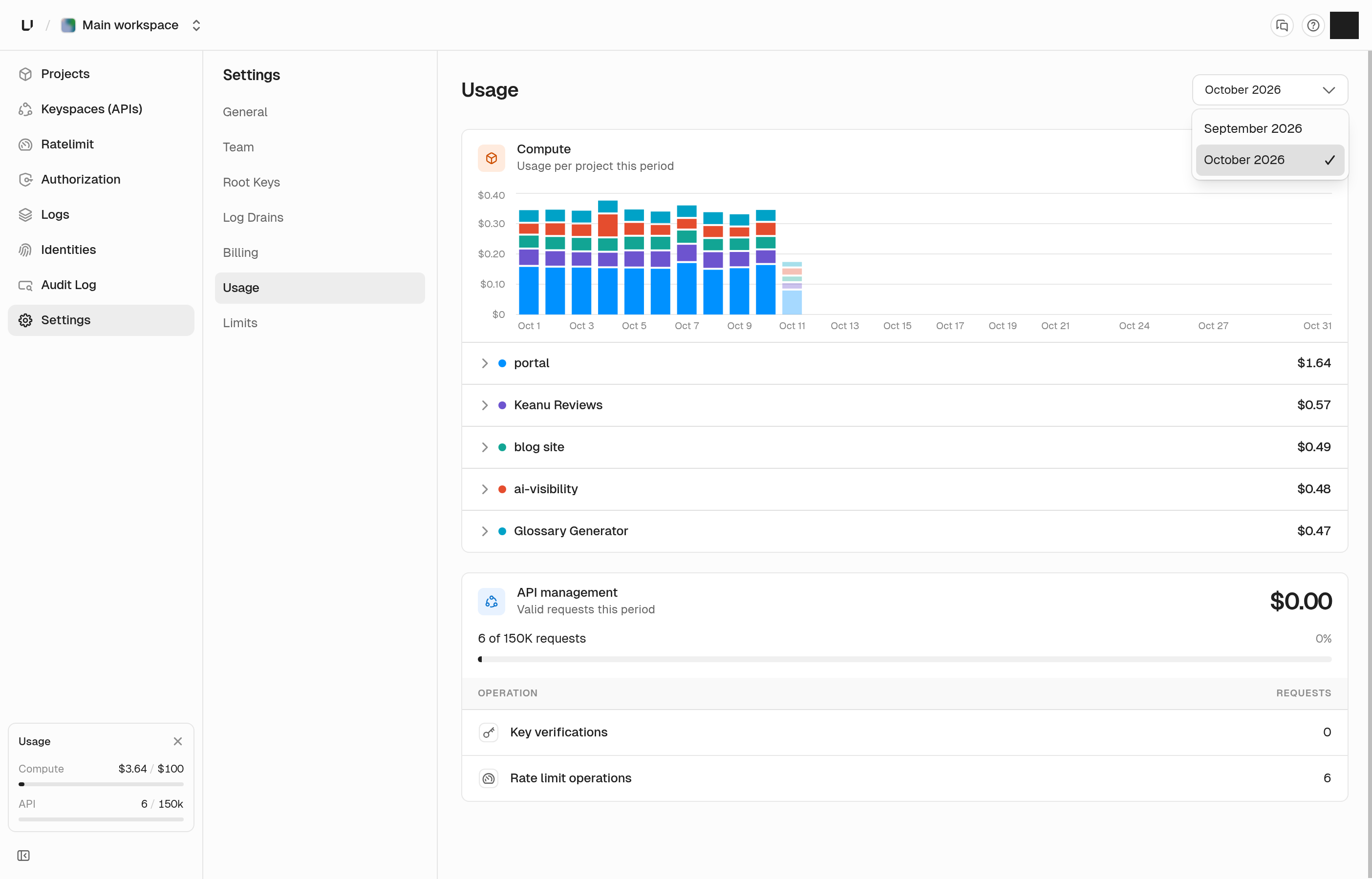
You can pick a billing period on the usage page, so this month and past months are one click apart. The chart now spans the whole month, so the first few days of a month no longer show one wide bar.

Usage period selector

Settings pages

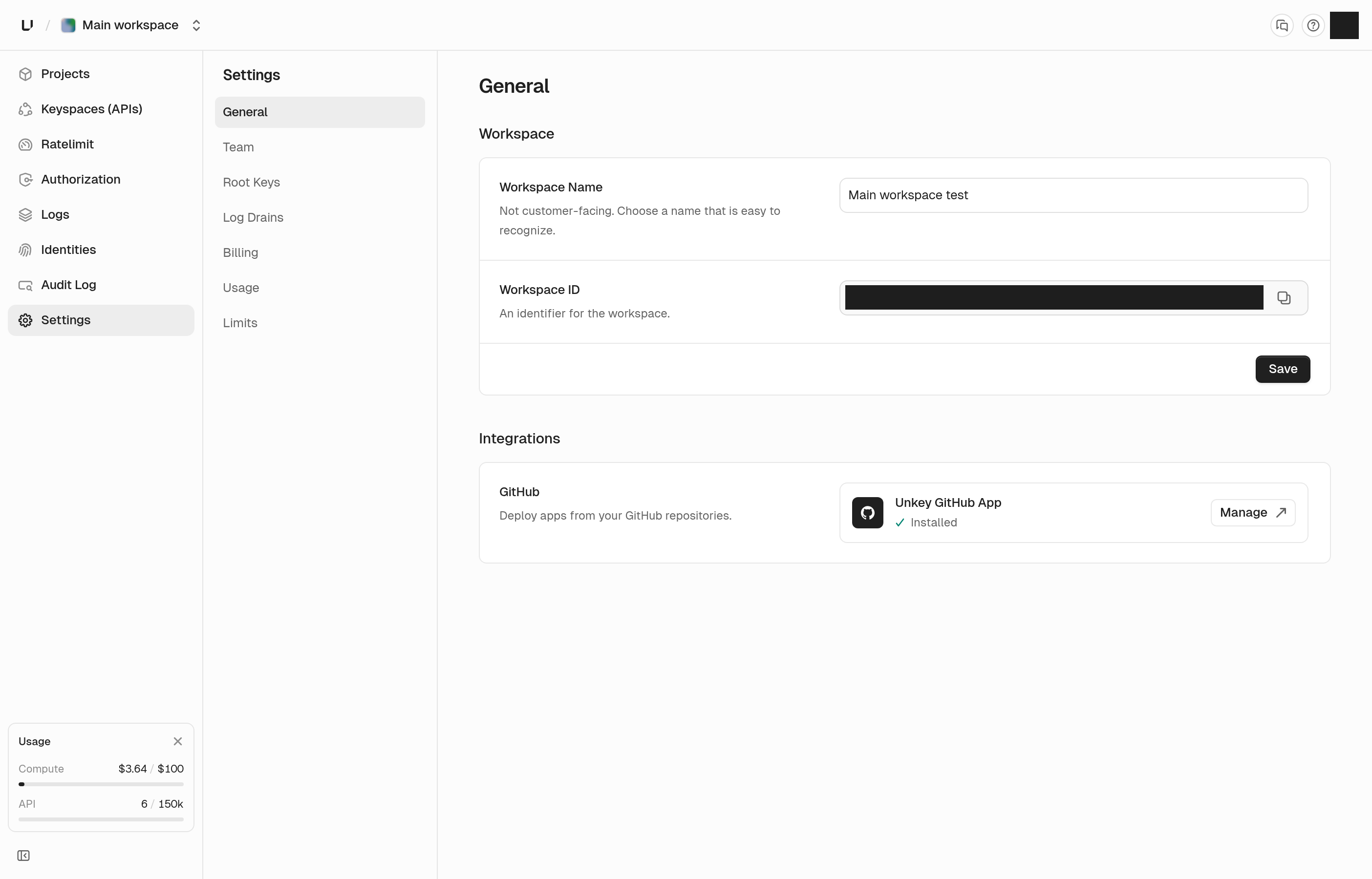
Workspace, project, API, and ratelimit namespace settings share one layout. Each row saves on its own, and Save stays gray until you change something. If a field is invalid, hovering Save tells you to fix it first. ID fields you can copy are the same height as other inputs and have a clearer copy icon.

Settings save footer

Deployments API

Listing deployments takes branch and time range filters. Each deployment now includes the commit message, author, pull request number, what triggered it, and when it finished. Results are newest first, and later pages load faster.

Permissions and roles API

You can edit a permission's name, slug, and description, and a role's name and description, through the API. The permission dialog in the dashboard uses the same call, and a slug that's already taken tells you so.

API errors

A request to an endpoint that doesn't exist, or with a method it doesn't accept, now gets a JSON error with a request ID instead of plain text. Creating a root key with an invalid permission now names the permission and says why it was rejected.

Dashboard links

A link like app.unkey.com/~/settings opens that page in whichever workspace you're signed in to. That lets docs link straight to the dashboard.

Bug fixes

  • The newest production deployment stays live when an older build finishes after it
  • Using an expired root key no longer reveals that the key exists or when it expired
  • Your API request logs no longer include calls the dashboard makes for you
  • Create deployment lets you pick a branch or saved image by clicking anywhere on its row
  • Typing in the time boxes of the time range picker keeps focus, and letters are rejected
  • A start time later than the end time no longer drops the start time in the time range picker
  • The workspace loading spinner no longer flashes on fast loads
  • The build log panel shows a failure to load instead of loading forever, and no longer flashes "No build logs yet"
  • Long key secrets stay inside the create dialogs
  • The custom domain limit warning shows your plan's limit

SEPT 30, 2026

product

Spend charts, log drains, and a local gateway

New features

Compute spend, by day and by project

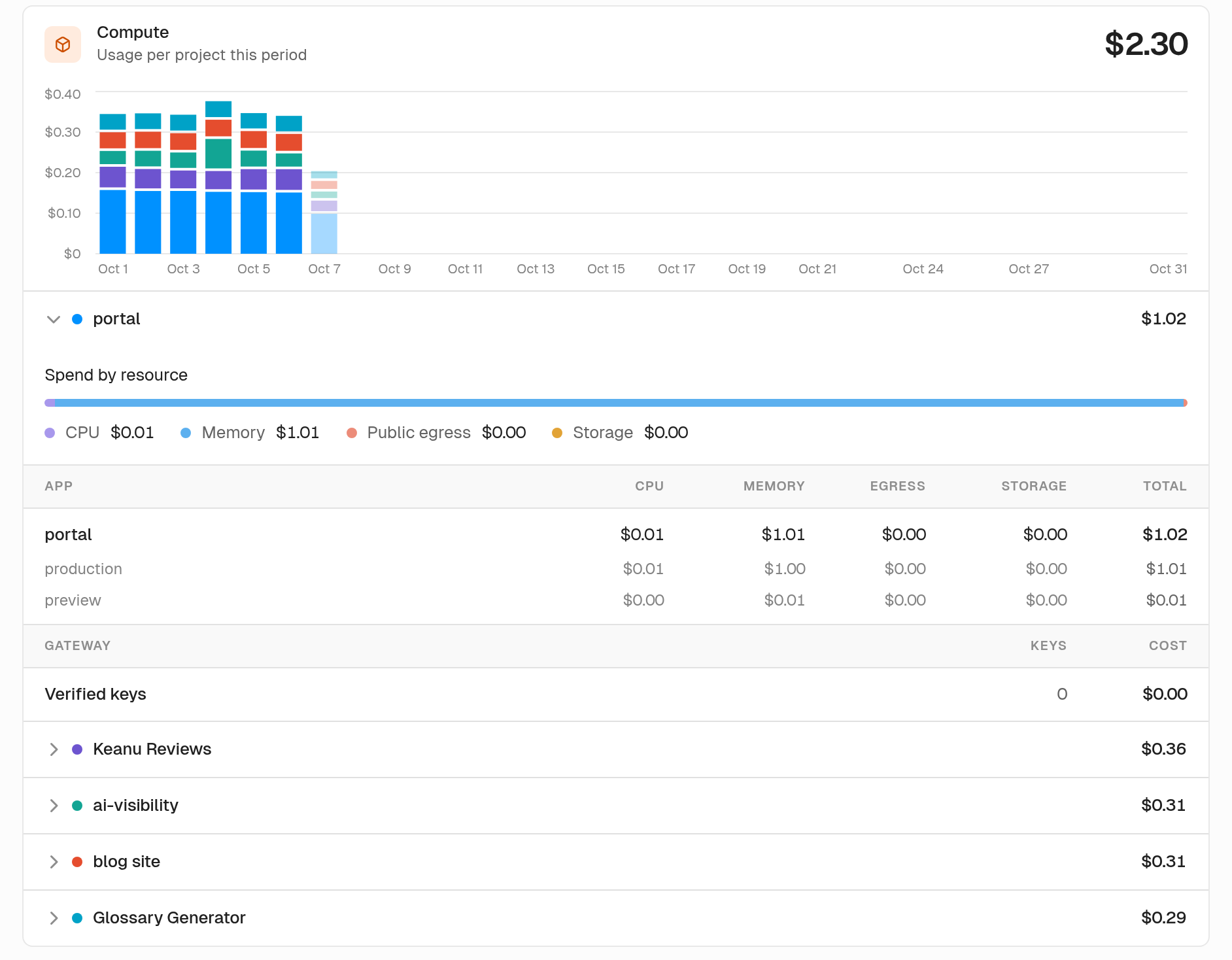
The usage page now shows where your Compute spend went during the month. A stacked daily chart splits cost by project. Hover a day and you'll see that day's projects ranked. Today's bar stays pale until the day is over. Open a project to see spend by resource and a table for each app. Every cell is a cost, and you can hover to see the quantity behind it.

Daily Compute spend by project

Log drains

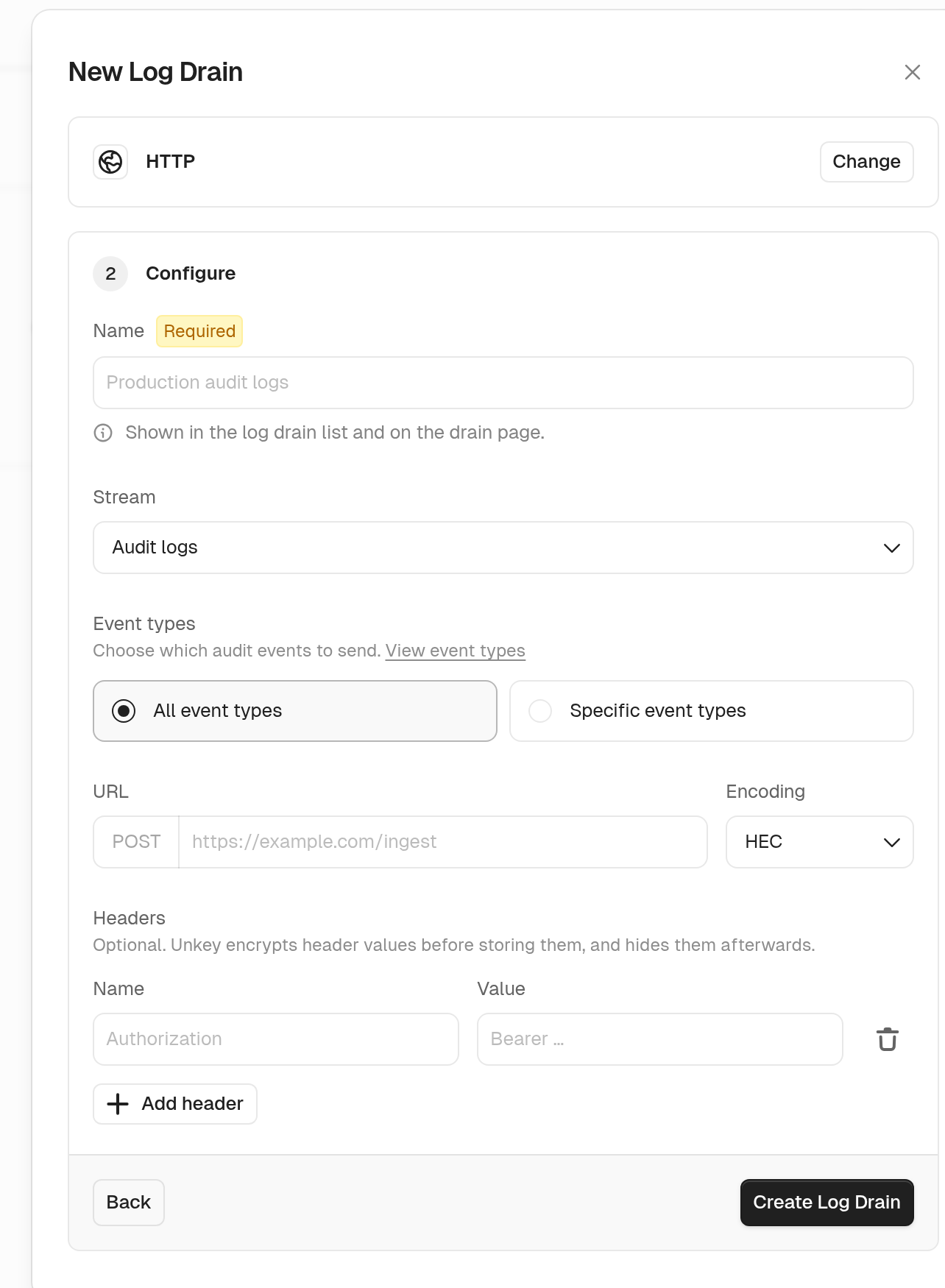
You can now send one stream of workspace events to an HTTPS endpoint or an Axiom dataset. Pick from audit logs, key verifications, gateway requests, runtime logs, or rate limits. You can filter a drain by event type, keyspace, source, status class, severity, namespace, or pass and block results. HTTP drains send JSON, NDJSON, or Splunk HEC, and that includes CrowdStrike NG-SIEM. The settings page shows how many drains you're using against your workspace limit. Every workspace starts at zero, so contact support and we'll raise it for you.

See log drains.

Create a log drain

Run the gateway locally

You can now run the Unkey gateway on your own machine. Routes and policies come from a config file. Keys are verified against Unkey, and rate limits run in memory for that local process. Put it in front of a service on localhost and you get the same checks you run in production.

See local development with the gateway.

A clearer deployments list, and active branches

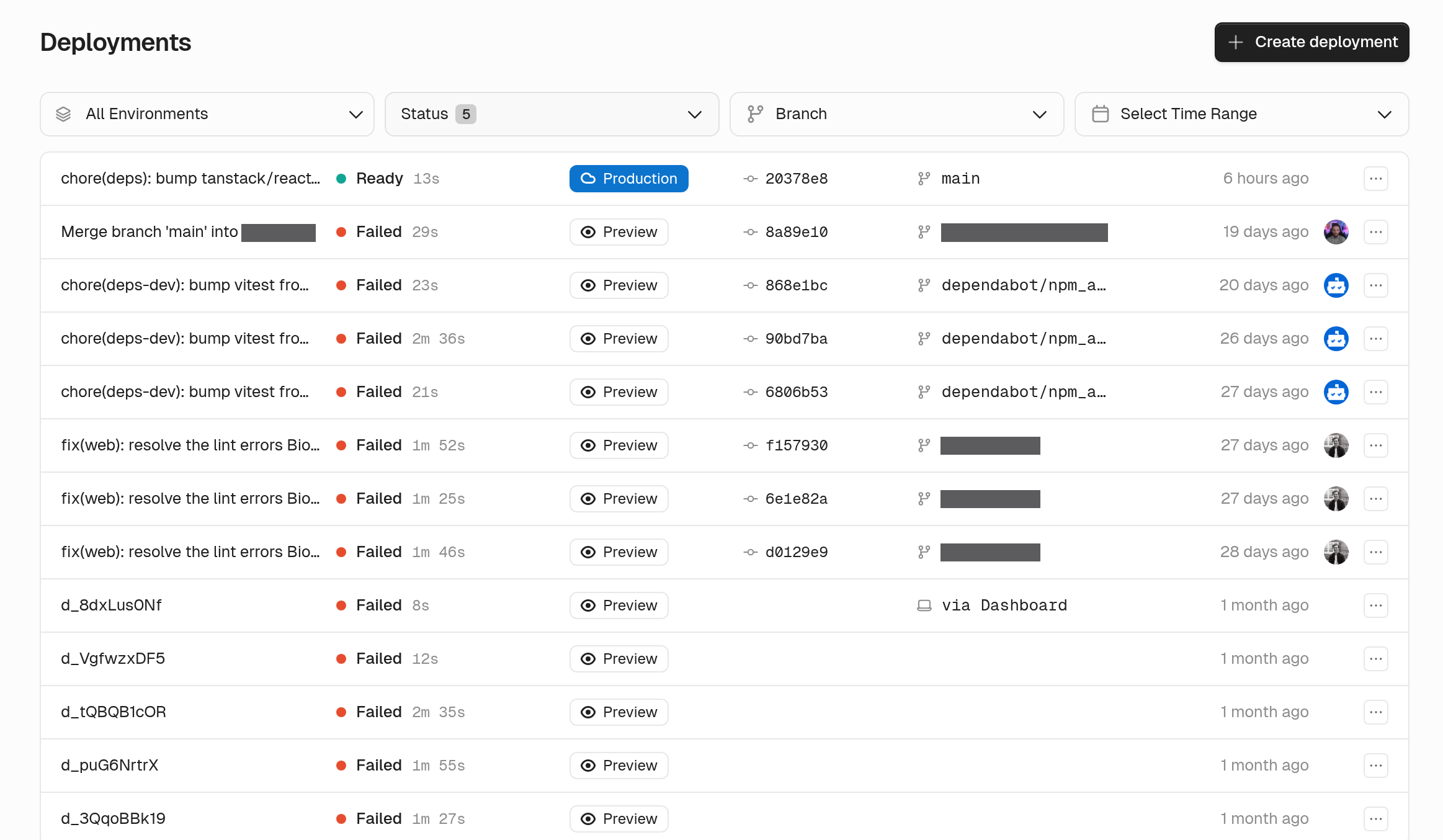
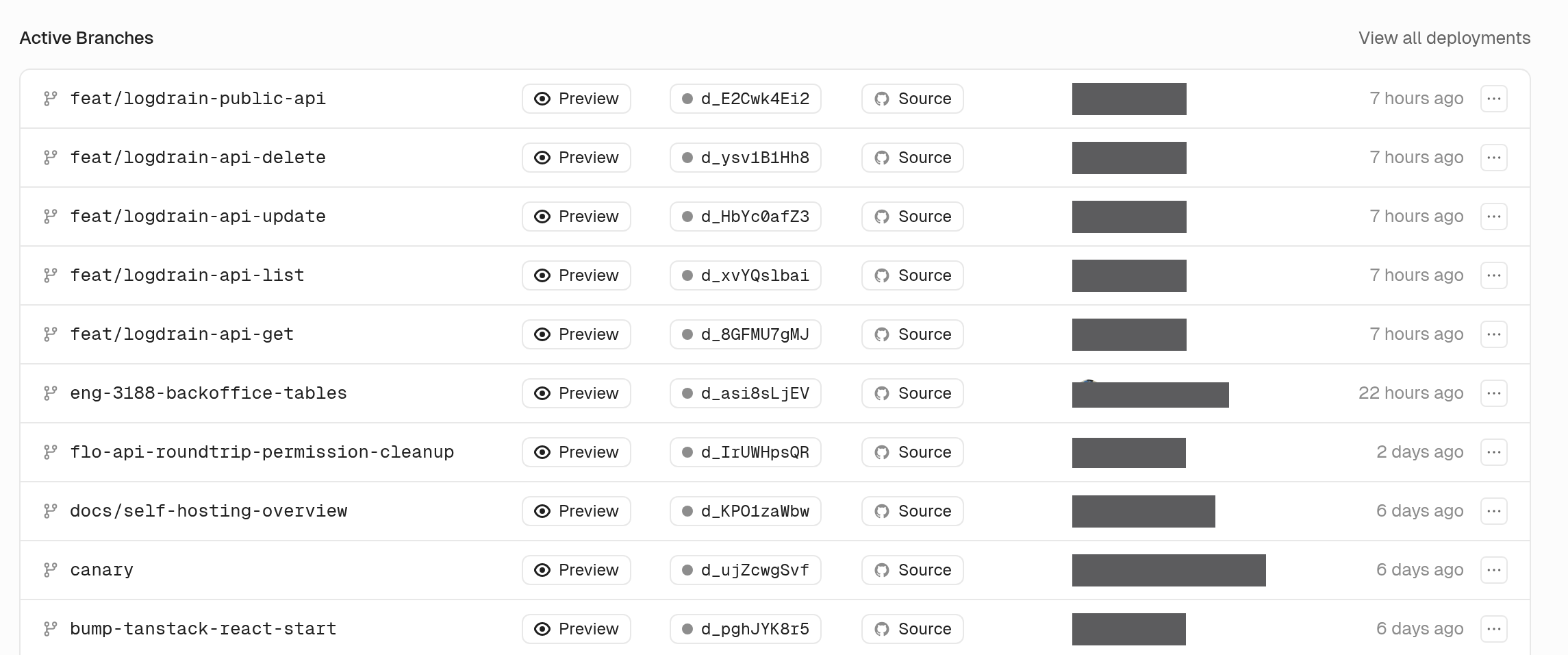
Each deployment is now a single row. The live production release gets a filled Production pill, and older production releases and previews get an outline. Deploys from the CLI, the API, or the dashboard show where they came from. On a Git-connected app, the overview lists your active preview branches, newest first. From there you can stop, wake, redeploy, or cancel each one. Long branch lists load one page at a time.

Deployment rows

Active branches

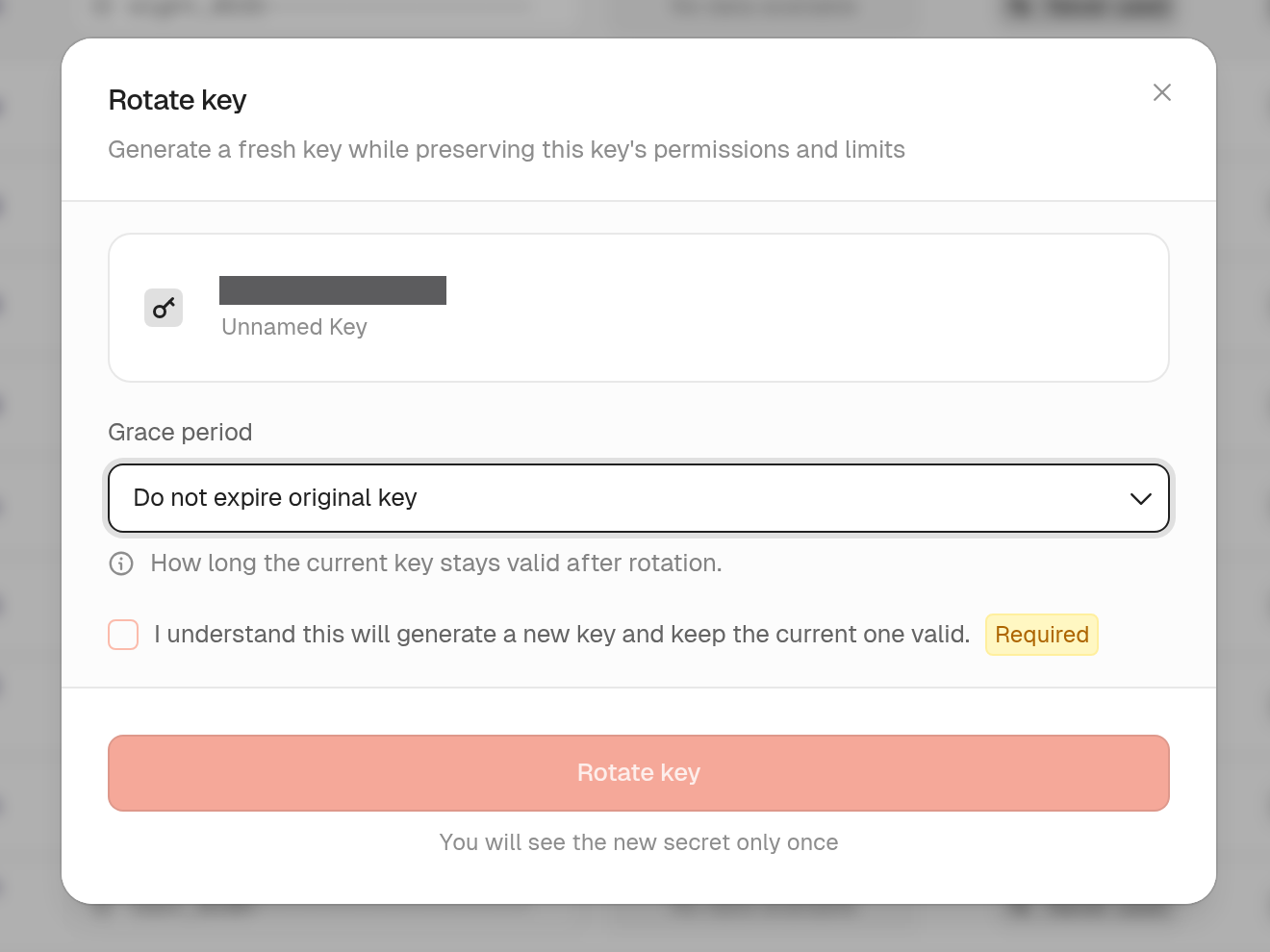
Rotate a key and keep the original

keys.rerollKey now accepts expiration: null. The original key keeps its current expiry. You can still set a grace period if you want the old secret to stop working. The rotate dialog in the dashboard gives you the same choice.

See rerolling keys.

Rotate a key and keep the original

Match gateway policies on client IP

Gateway policies can now match the client IP against in or notIn lists of addresses and CIDR ranges. Use a firewall policy to block a range, or to allow only the ranges you list. The gateway reads the connection address, so a caller can't swap in a different one.

See firewall policies.

Create root keys through the API

rootKeys.createKey lets an admin or another root key create a root key. The new key can't have more permissions than the caller. If the caller has an expiration, the new key needs one too, and it can't outlive the caller.

Verify keys against specific keyspaces

keys.verifyKey now takes an optional keyspaces list. If the key isn't in one of those keyspaces, the result is not found. Reach for it when one root key can verify several keyspaces but a given endpoint should only accept some of them. When the key is found, the result includes its keyspace id.

See verifying keys.

Usage charts in the customer portal

A portal session can now request analytics:read along with keys:read. The keys page then shows that user's own verification counts over time, broken down by outcome. The session only sees its own keyspaces.

See what portal users can do.

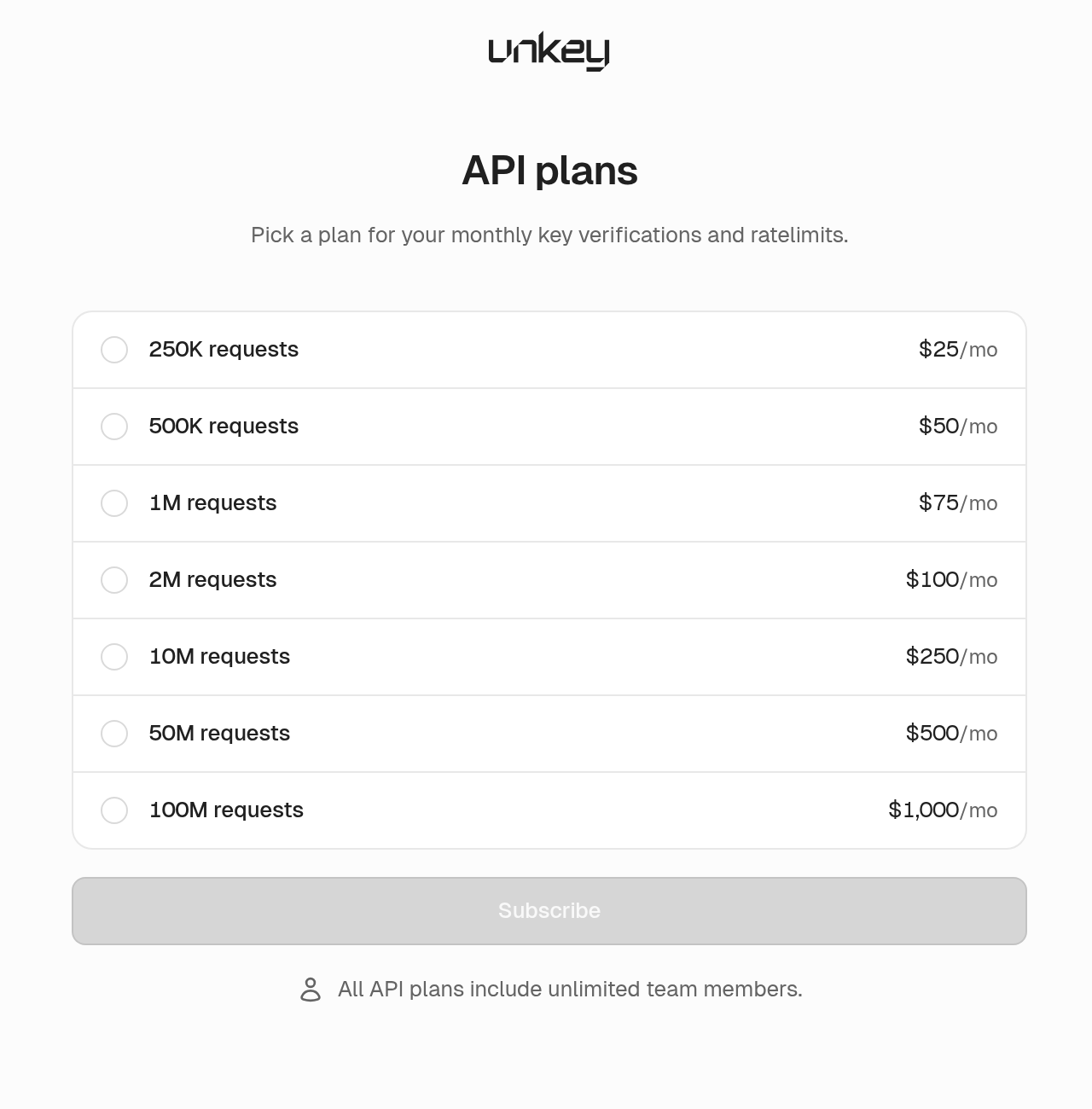
One plans screen

Upgrades and paywalls now open one plans screen for both Compute and API, and you get a confirmation after you buy. Your first API plan takes a single checkout.

Plans

Updates

Projects and apps

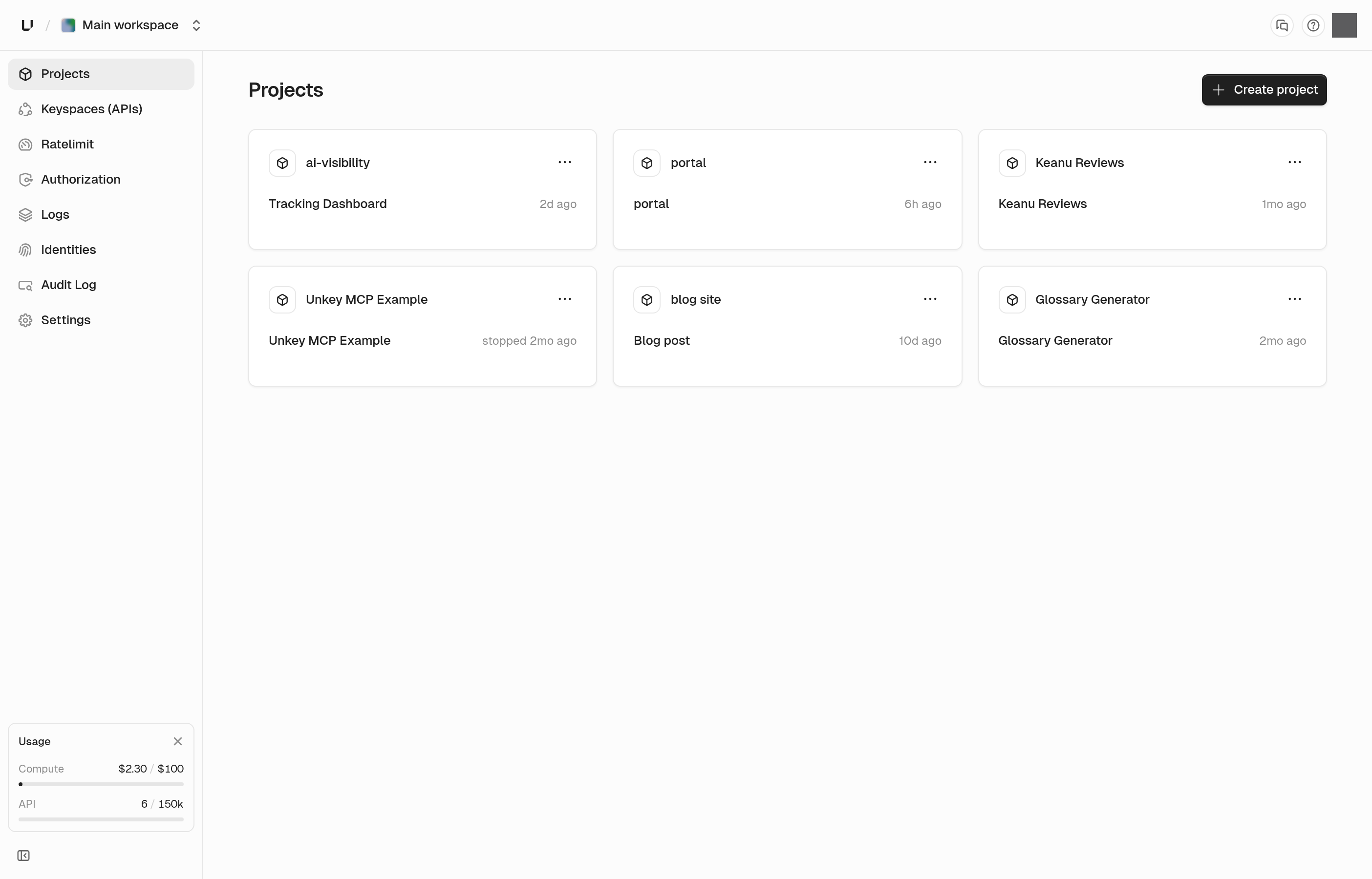
Project cards show each app's current deployment, including builds that are still running or have failed. The production card on the app overview shows the same status. Container-image apps list recent deployments under that card. The apps page has a redesigned card, a list view, and search.

Project cards

Root keys and API keys

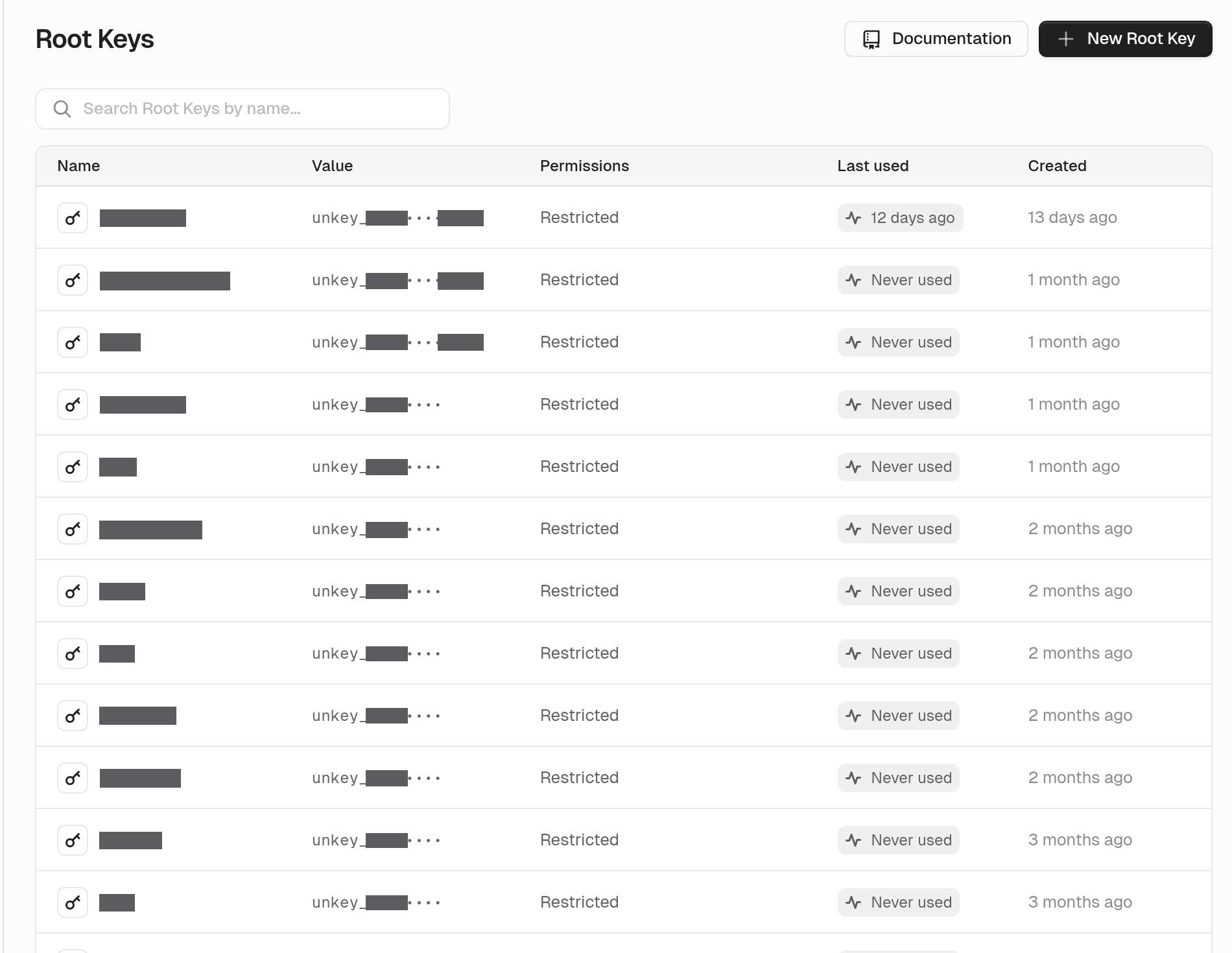
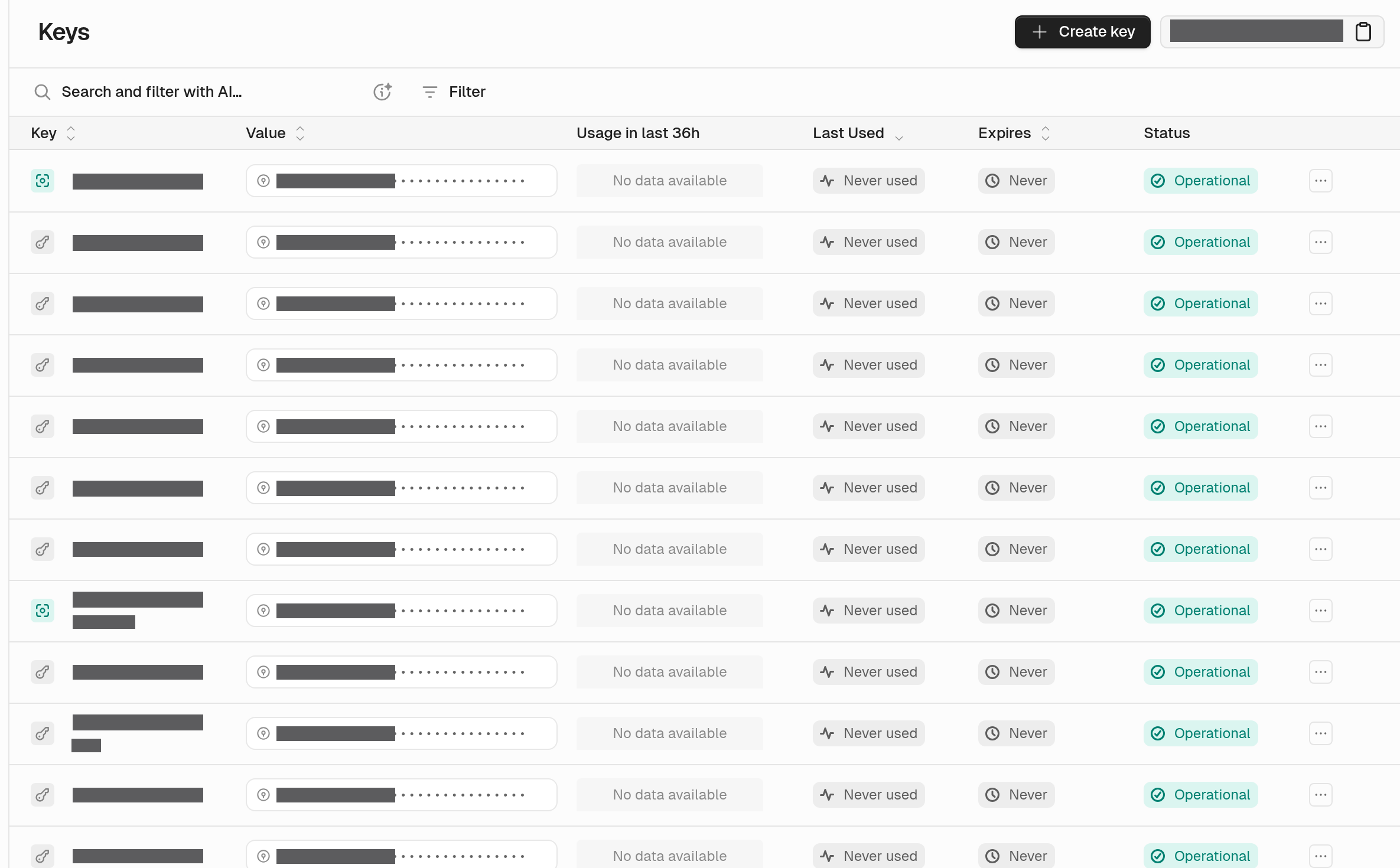
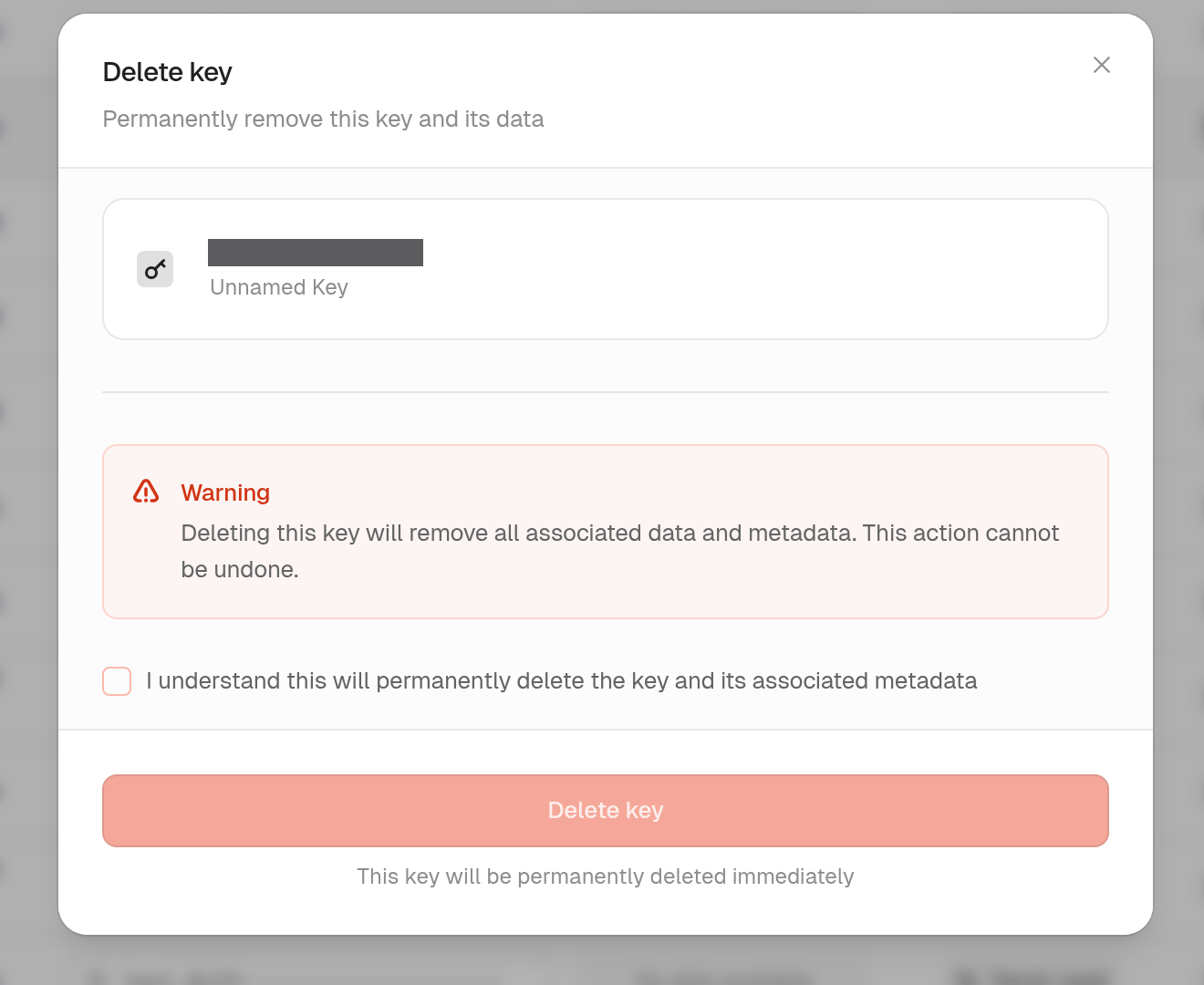
The root keys table shows when each key was last used, with a small usage chart. API key and root key tables show the prefix and the last four characters. If a key was used in the last seven days, we ask you to confirm before deleting it, since it may still be live. That includes bulk deletes and root keys.

Root key usage

Key prefixes

Recently used key warning

Rollback

For 30 minutes after a production deploy, the deployment page reminds you that you can roll back. The dialog names the deployment you're going back to.

Deployments

Skipped deployments are hidden from the default view, which keeps monorepos readable. You can filter to just skipped deployments, separate from cancelled ones. Filters and paging cover your full history.

Domains

You can list custom domains for a workspace, a project, or an app. The dashboard loads a project's domains in one request.

GitHub

You can connect one GitHub account or organization to more than one workspace. Each workspace authorizes the connection separately.

GitHub connection

Project-scoped permissions

Project-scoped root keys can call more of the API: projects, apps, deployments, APIs, GitHub installs, analytics queries, and portals. You can limit access for those operations to a single project.

See root key permissions.

CLI

unkey api can create, get, update, and delete portals. It can also list domains without an environment filter.

Portal

New portal ids start with prt_, and exchange codes start with pec_. Unknown links show a not-found page. We removed preview mode, so creating a session no longer accepts it and the portal no longer shows a preview banner.

Navigation

The top bar is more compact. Tips with buttons or links now open as a card you can read and click.

Team and account

Team and account settings now match the look of the rest of the dashboard.

Bug fixes

  • Deployment filters now include the live production release even when it's older than the newest deployments
  • The last-7-days deployment filter now returns the deployments from that window
  • Promote and rollback update the live deployment badge without a reload
  • Opening a request row loads its details, including rows that just arrived, and gateway rows open gateway details
  • The request log label reads User Agent again
  • Invites no longer offer a viewer role
  • The workspace switcher only lists workspaces that exist in the current environment
  • The usage page labels deleted projects, apps, and environments
  • Creating a project without a Compute plan returns a clear error
  • Gateway key authentication accepts a keyspace owned by the workspace
  • The audit log still lists events when the total count is slow to load
  • The gateway policies page loads once environments have resolved
  • App, deployment, and log pages load for project-scoped root keys
  • A deployment is only marked ready when every region has a running instance
  • A deploy that retries after a partial save now completes
  • Egress is counted again after a deployment is recreated, including after hitting a memory limit
  • Setting a rate-limit override that was deleted brings it back
  • Preview URLs for long branch names resolve, and branches that differ only in the trimmed part stay distinct
  • Creating a role and attaching it to keys in the same step works
  • Saving a key with an external ID that already exists stays responsive when many of those requests arrive at once
  • The CLI no longer prints root keys or other environment values in help text or errors
  • Disconnecting a repository asks you to confirm and names the repository
  • Audit events sent through a log drain include the timestamp only once
  • Swapping a chart's start and end time no longer breaks the chart
  • A brief analytics interruption no longer blanks deployment charts
  • Deployment status updates finish when many instances report at once
  • Relative times keep updating, and the same timestamp reads the same on every screen
  • Tips with copy buttons, badges, or links are readable again
  • Dashboard requests keep their session
  • Signed-out pages render, and a plan downgrade finishes removing members the plan no longer covers

SEPT 4, 2026

product

Custom domains, gateway analytics, and image deploys

New features

Custom domains through the API

New endpoints let you create, get, list, delete, and verify custom domains. You can attach a domain and check DNS the same way you already do from the dashboard.

Always-on gateway request logs

The gateway now writes a base request log on every request. Five extra capture settings stay opt-in, so you can turn up detail when you need it.

Gateway request analytics

New analytics.getGatewayRequests endpoint runs SQL over the requests Unkey routed to your deployments. You can break down paths, status codes, and latency from a trusted backend with a root key.

See gateway request analytics.

Runtime log analytics

New analytics.getRuntimeLogs endpoint runs SQL over deployment stdout and stderr. You can query runtime output the same way you already query gateway traffic.

See runtime log analytics.

Rate-limit analytics over SQL

Rate-limit data is queryable through the analytics API. You can break down limits, rejections, and usage the same way you already query verifications.

See rate-limit analytics.

Per-policy credit cost

Gateway key authentication can override credit cost on a per-policy basis, so expensive routes can cost more than cheap ones without a second key.

Deploy from a container image

The new-app flow accepts a container image as a source, not only a GitHub repo. Build the image yourself and point Unkey at it.

See deploying a pre-built image.

Compound ratelimit identifiers

Ratelimit policies can use a compound identifier. That lets you limit "this user on this route" without standing up a second limiter.

Role permissions through the API

You can set permissions on a role, and attach them when you create one, so the role is usable immediately.

Connect GitHub through the API

New endpoints install the GitHub app and connect repos to apps, so you can wire deployments without clicking through the dashboard.

Explicit production environments

An environment can be marked as production. Production is no longer implied by the name.

More of the API in the CLI

unkey api now covers projects, apps, deployments, gateway policies, analytics, domains, GitHub installs, role permissions, and related workspace operations.

See the CLI.

Project-scoped permissions

Root keys and roles can use a project-scoped permission catalog. Resources and actions are named for the project they apply to, so access can stop at one project instead of the whole workspace.

See root key permissions.

Richer audit events

Audit logs now record more key and rate-limit actions. You get a clearer trail when keys are created, updated, verified, or when rate limits are applied and overridden.

See audit log event types.

Updates

Logs and Requests

App Logs and Requests live in the sidebar. Deployment logs and requests sit behind a more menu with rollback, promote, wake, and stop. Gateway and runtime log filters are tighter.

Deploy flow

A deploy that fails because you hit a quota now sends you to the Limits page. The dashboard suggests root directories and watch paths. Watch paths are validated across the dashboard and API before a deploy starts. Successful deploys get a short celebration, and source is click-to-copy.

Gateway policy permissions

Gateway policy access is split into read and write permissions, so you can grant list access without granting updates. Dashboard copy now says policies, not Sentinel policies.

See gateway policies.

Root key permissions in the dashboard

The dashboard now shows the full root-key permission set when you create or edit a root key.

Account settings

Account settings moved out of the workspace settings rail to their own account route.

Names

API names are no longer validated as slugs. Role names created in the dashboard are valid in OpenAPI.

Bug fixes

  • permissions.setRolePermissions accepts a role id or name, including dotted role names
  • Searching permissions in the dashboard keeps the matching permission details when you assign them
  • Root key usage is attributed to the key owner
  • Oversized login session cookies no longer cause a redirect loop
  • Resuming or upgrading after a canceled Compute plan works again
  • keys.updateKey accepts null ratelimits instead of rejecting the request
  • Production domain filtering on the app overview returns the right domains
  • The usage page resolves the app from the environment, and preview and branch domains render correctly
  • Default projects can no longer be deleted or left in a broken state
  • Frontline distinguishes usage exhaustion from other failures, and WebSocket streaming no longer stalls
  • A transient error no longer causes a deployment change to be skipped
  • Terminal pods are not counted as active instances
  • Stripe: recover missed subscription payments, tear down Compute on cancel, re-arm spend-budget alerts, stop re-billing accumulated egress after a restart, and reset API rate limits on upgrades
  • Dashboard docs links point at pages that exist
  • API signup webhook alerts deliver again
  • Transient integration and ratelimit push failures recover instead of sticking
  • Clipboard writes fail quietly when the browser rejects writeText

AUG 17, 2026

product

Deployments API, gateway policies API, and more

New features

Manage deployments through the API

New /v2/deployments endpoints let you get, list, start, stop, promote, and roll back deployments programmatically. Everything you previously did from the Deployments tab is now scriptable, with a dedicated permission per action and precise error codes when a deployment isn't in a state to be acted on.

See how to use them in our API Reference

Multi-line environment variable values

Environment variables now support multi-line values, so PEM keys, certificate chains, and formatted JSON work end-to-end. The size limit per value is now 16 KB.

See variables.

Manage gateway policies via API

New endpoints let you list and update your gateway policies programmatically, so you can automate authentication, rate limiting, firewall, and validation rules instead of editing them in the dashboard.

See how to use them in our API Reference

Updates

Runtime setting sliders follow your quota

The CPU, memory, storage, and instance sliders in app runtime settings now reflect your workspace's actual quota instead of fixed caps. If your quota was raised, you can reach it from the dashboard.

Better region selection

Region pickers are now a multi-select with removable chips, and no longer overflow when you select four or more regions.

Bug fixes

  • Enabling credits, metadata, ratelimits, or expiration in the key creation dialog registers reliably again.
  • Adding a new environment variable now shows the redeploy prompt, so changes aren't silently left pending.
  • Failed invitation acceptance shows a helpful message instead of raw internal error text.
  • Fixed field alignment in the member invite form.
  • Sign-in now validates the post-authentication redirect URL.
  • The dashboard sends stricter security headers, including CSP and HSTS.
  • Environment variable drafts are no longer persisted to browser storage.
  • Audit log locations are only recorded from validated client IPs.

JUL 16, 2026

operations
product

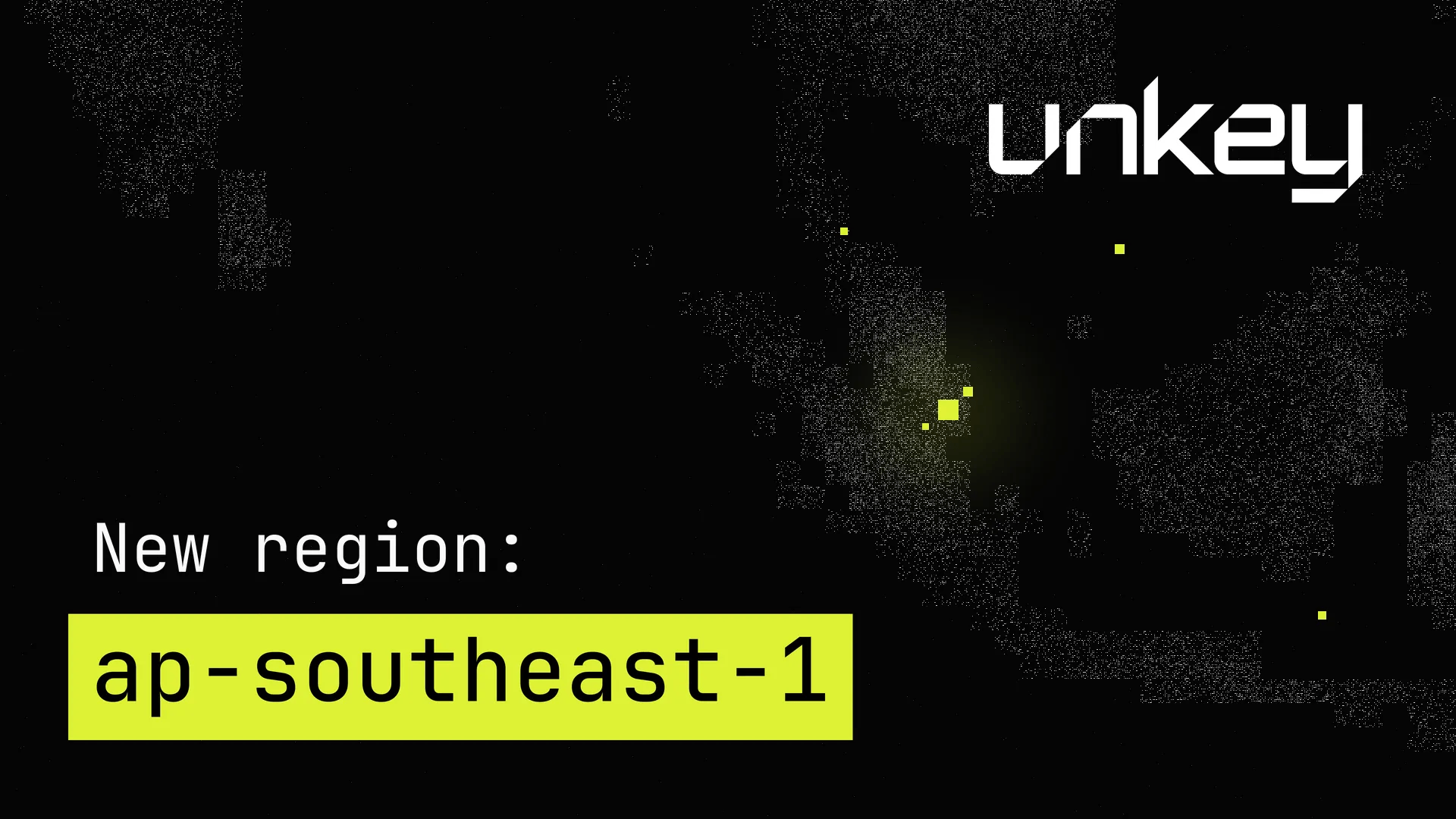
New region: ap-southeast-1

New region: ap-southeast-1

You can now run your deployments in ap-southeast-1 (Singapore).

If your users are in Southeast Asia, Australia, or India, their requests no longer need to cross an ocean. Deploy to Singapore and Unkey routes each request to the nearest region, cutting round-trip latency significantly for the entire region.

To enable it, open your project's Settings, go to Runtime settings → Regions, and select ap-southeast-1. The new region applies on your next deployment. Production and preview environments have their own region configuration, so you can enable it for one without the other. Read more in the regions documentation.

Have feedback or want to see another region next? Email us at support@unkey.com.

JUL 10, 2026

product

July 10, 2026

New features

Secure one-time links for API keys

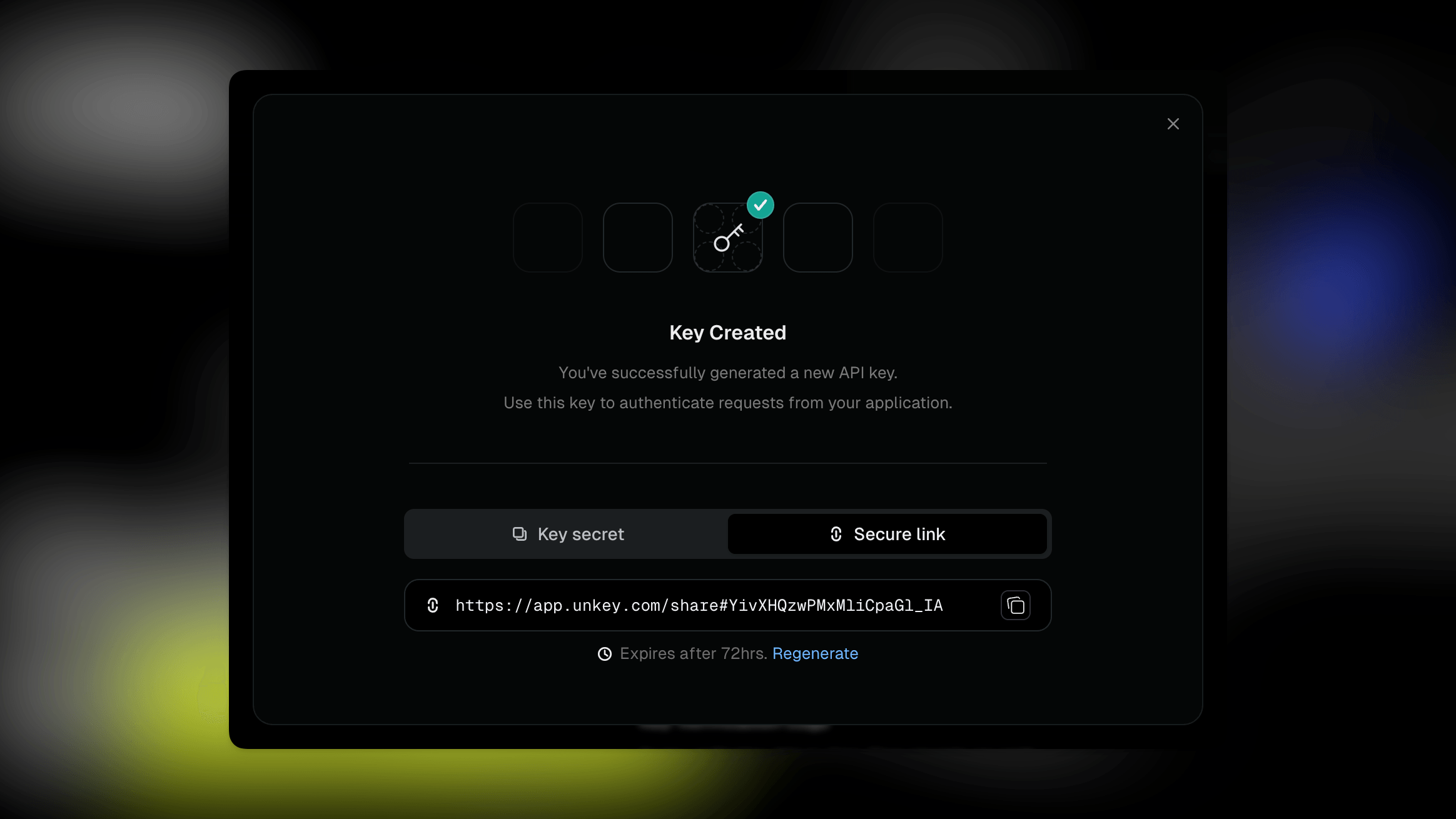
After creating an API key in the dashboard, you can now share the secret with a one-time, time-boxed link. The link reveals the API Key one time, then it is no longer usable.

secure key sharing screenshot

This gives you the ability to safely share keys with team members or customers.

Custom build commands

Automatic builds now support an explicit build command per environment. This is useful for monorepos or apps that need a focused command such as pnpm --filter api build.

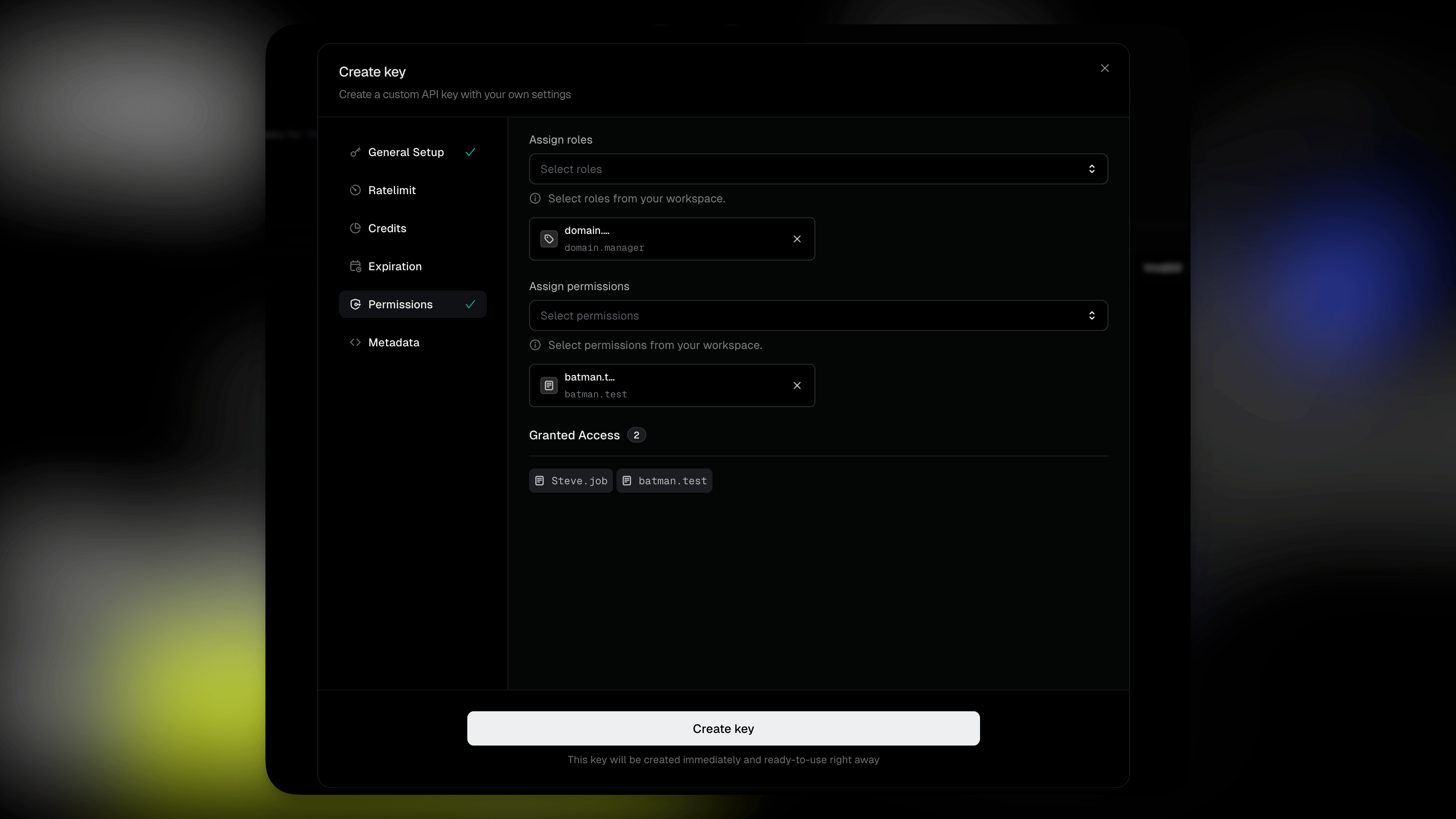
Add roles and permissions while creating a key

The dashboard key creation flow now lets you attach roles and permissions before the key is created. You can issue a key with the right access from the start instead of creating it first and editing it afterward.

permissions and roles on a key screenshot

Updates

Key management is consistent across dashboard and API

Dashboard actions for creating, updating, deleting, rotating, and editing API keys now follow the same public API behavior as programmatic key management. Existing dashboard flows keep the same shape, with more consistent validation and errors.

Gateway key authentication can enforce key rate limits

Gateway API key authentication can now enforce the named rate limits configured on a key, matching the behavior you already get when verifying keys through the API.

Bug fixes

  • Non-admin workspace members can no longer rename a workspace or change billing customer details.
  • GitHub app installation checks now verify ownership before connecting an installation.
  • Role edits no longer risk saving an empty association state before existing keys and permissions finish loading.
  • Deep-linked list pages no longer reset to the first page before data loads.
  • Key creation now validates the minimum byte length before submitting, so errors appear earlier in the dashboard.
  • Dashboard error toasts now show the intended human-readable message instead of raw response bodies.
  • Deleted deployments and domains no longer leave background retries running.
  • Custom build root directories are validated more strictly before a deployment starts.
  • Ratelimit origin handling is less sensitive to tiny transient blips, reducing unnecessary fail-fast behavior.
  • Security-sensitive tokens now use uniform character selection.

JUN 26, 2026

product

June 26, 2026

New features

Stop and start apps, and auto-sleep previews

Apps can now be stopped and started, and preview environments automatically scale to zero when idle so you don't pay for traffic that isn't there. See Deployments.

HTTP API for projects and apps

The Unkey HTTP API now covers projects and apps end to end. New endpoints let you create, get, list, update, and delete projects, and create and get apps — so you can script workspace setup the same way you script keys and identities.

MFA is now avaiable

You can now enroll in multi-factor authentication when signing in to the dashboard, with a unified enrollment flow.

Scope portal-created keys by external ID

Keys created through a portal session are now automatically scoped to the session's external ID, so portal users can only mint keys against their own identity.

Updates

Domain Connect returns you to the app

After completing a Domain Connect DNS setup, you now land back on the app settings page where you added the domain instead of project settings.

Build logs focus on the failing step

When a deployment fails, the build logs viewer now auto-scrolls to the step that errored so you don't have to hunt for it.

Bug fixes

  • Patched two SSRF paths — one through HTTP redirects and one through the proxy to the API.
  • Blocked a cross-tenant deletion path on shared resources.
  • Identity creation no longer permanently blocks reusing an external ID after the previous identity was deleted; soft-deleted rows are now ignored by the duplicate check.
  • Fixed the ratelimit origin circuit breaker so transient origin errors no longer wedge it open.
  • The app overview "requests this week" chart now spans the full labeled time window instead of contracting to ~24h, and its request rate is no longer inflated by an over-eager client-side downsample.
  • List search inputs are debounced and filter IDs are stable, so typing no longer thrashes the URL or re-runs queries on every keystroke.
  • Cleaned up several visual rough edges in the new sleep/stop UI components.
  • Improved Sentry error capture so dashboard exceptions carry more useful context.

JUN 19, 2026

product

June 19, 2026

New features

Status indicator in the help menu

The dashboard's help menu now shows live Unkey status next to a link to the status page, so you can tell at a glance whether an issue is on your side or ours.

Updates

Repo picker shows the source account

The "select a repository" step when creating an app now shows which GitHub account or organization each repo belongs to, so picking the right repo across multiple connected accounts is unambiguous.

Bug fixes

  • Global rate limit counters are now emitted after the remote sync completes, so dashboards reflect the authoritative count instead of a local pre-sync value.
  • Workers reject invalid port, CPU, and memory values up front instead of failing later in the deploy with an opaque error.
  • Deleting a project now redirects you to the projects list instead of leaving you on a dead URL.
  • Loading messages in the dashboard are centered correctly again.
  • Fixed a broken link in the dashboard navigation.

JUN 12, 2026

product

June 12, 2026

New features

Automatic builds, no Dockerfile required

Unkey now builds your application without a Dockerfile. Push a GitHub repository and the build machine detects your language, package manager, and framework, installs dependencies, and produces a container image. Node.js, Python, Go, PHP, Java, Rust, Ruby, Elixir, Deno, .NET, Gleam, C++, static sites, and shell scripts are all supported out of the box.

Most projects need zero configuration. Tool versions come from your repository's standard files, for example lockfiles, engines in package.json, .nvmrc, .python-version, or go.mod. In a monorepo, point the root directory at the service you want to deploy.

Environment variables are available during the build automatically, with no --mount=type=secret plumbing. The build cache is invalidated when a value changes, and values are never written into image layers.

If you need full control over the image, point your app at a Dockerfile and Unkey builds with it instead. The setting is per app and per environment, so existing apps with a configured Dockerfile are unaffected. See Builds.

Project cards show the apps inside

The projects list now uses a redesigned card that summarizes the apps inside each project: an avatar-style stack of app-source icons (GitHub or terminal) with a hover card listing every app and its repo. New projects get a "No apps yet" empty state. See Projects.

Upgraded empty state for new workspaces

A workspace with no projects now sees a full-bleed empty state that explains what Unkey deploys do, alongside a create-project CTA. The search-no-match result keeps its existing inline empty.

Composable page header and secondary nav

Settings pages now use new page composition primitives — PageHeader, PageShell, and SecondaryNav — that render behind the new navigation flag. Migrated pages include General, Team, Root keys, and Billing, with a full width variant available for dense data pages.

Updates

Unkey, not "Unkey Deploy"

Deploy is not a separate product. Living docs, the beta snippet, the CLI progress header, and the Dockerfile AI prompt no longer call it "Unkey Deploy" — Unkey is deploy and deploy is Unkey. Dated changelog entries are left as historical records.

Reworked workspace onboarding

The onboarding and auth pages now scroll on short viewports instead of clipping content, the single-step wizard is a composable card with a skeleton loading state, and the workspace name field autofocuses on pointer devices. The create-project dialog also opens directly from the projects empty state CTA, which previously linked to a missing route.

Build error message matches the docs

The troubleshooting entry for plan-generation failures now uses the same wording the worker surfaces ("Unkey could not determine how to build this app"), so search and recognition line up with what you actually see in the build log.

Environment variable name validation

Variable names are now validated as POSIX shell identifiers (letters, digits, and underscores, not starting with a digit) at variable creation, with a clear error. The same rule is asserted at build time so older variables that don't fit the rule fail the build with a readable message instead of an opaque error.

Registry retries during builds

Transient registry 5xx errors during build solves are now retried instead of failing the deployment terminally, for both automatic and Dockerfile builds.

Missing deployments and projects return 404

The dashboard now renders a 404 boundary when a deployment or project doesn't exist, instead of throwing a runtime error and rendering a 500.

Bug fixes

  • Editing a root key's permissions now bumps the key's "last updated" timestamp, so the dashboard no longer shows a stale value after permission changes.
  • Fork pull request approvals redirect to the correct deployment path.
  • The duplicate copy-workspace button in the sidebar is gone, along with the duplicate user buttons that appeared in some layouts.
  • Filter and breadcrumb popovers render at a consistent height and size, and the projects page no longer has a z-index issue that hid menus behind cards.
  • Cross-keyspace contamination on shared resources is fixed.
  • Worker permissions for forked pull requests are now scoped to the specific repository and guard against external forks.

JUN 5, 2026

product

June 5, 2026

New features

APIs are now Keyspaces

We renamed "APIs" to "Keyspaces" across the dashboard to better reflect what the resource actually is: a logical bucket of API keys. The sidebar entry now reads Keyspaces (APIs), and resource copy in lists, search, settings, toasts, and onboarding has been updated. Keyspace IDs are unchanged and existing API IDs continue to work everywhere. See APIs.

New navigation banner

Workspaces opted into the new navigation beta now see a dismissible "Meet the new Unkey" banner on the projects page that links to the keyspaces rename and the rest of the redesign. Dismissal persists per device.

Ratelimit requests table

The ratelimit namespace overview now uses a full data table for recent requests, with sortable columns, truncated identifiers with hover tooltips, and consistent pagination. See Ratelimiting.

Configure minimum replicas per region

Autoscaling now exposes a minimum instances setting alongside the existing maximum. Set min and max to the same value to pin instance count and disable autoscaling, or set different values to let Unkey scale on CPU load. See Autoscaling.

Identity settings on the logs page

The identity logs page now has a Settings button to edit metadata and ratelimits inline, and deletes revalidate immediately so the UI stays in sync. See Identities.

Project‑scoped permissions

Root keys can now be granted permissions scoped to a specific project, so a key can be limited to acting on a single project's resources instead of the entire workspace. See Root keys.

Updates

Regional failover for routing

When the gateway can't reach a local instance, it now retries other candidates in the same region and falls back to a remote region before failing. Empty routing results now return a clear 503 instead of a silent empty response, so failures are visible.

Deployments and domains scoped by app

Deployments and domains in the dashboard are now scoped under their app, so navigation, links, and breadcrumbs stay consistent when you have multiple apps in a project.

Usage banner in the sidebar

The redesigned sidebar now shows current workspace usage so you can see where you stand against your plan without leaving the page you're on.

Bug fixes

  • The API overview chart no longer drifts between buckets and the time axis on long ranges.
  • The resource utilization chart now renders a clear error state instead of an empty chart when its data fails to load.
  • Role permissions are now correctly scoped to the workspace, preventing permissions from one workspace appearing on roles in another.
  • The ratelimit source label on metrics is now set correctly so dashboards group requests by the right source.
  • Sensitive values in logs and traces are now redacted more aggressively, including arbitrary nested fields.
  • GitHub secret scanning batches now continue processing after a single failure instead of aborting the run.
  • The "Learn more" link on the new‑navigation banner now points at the changelog.

JUN 1, 2026

product

Dashboard upgrades

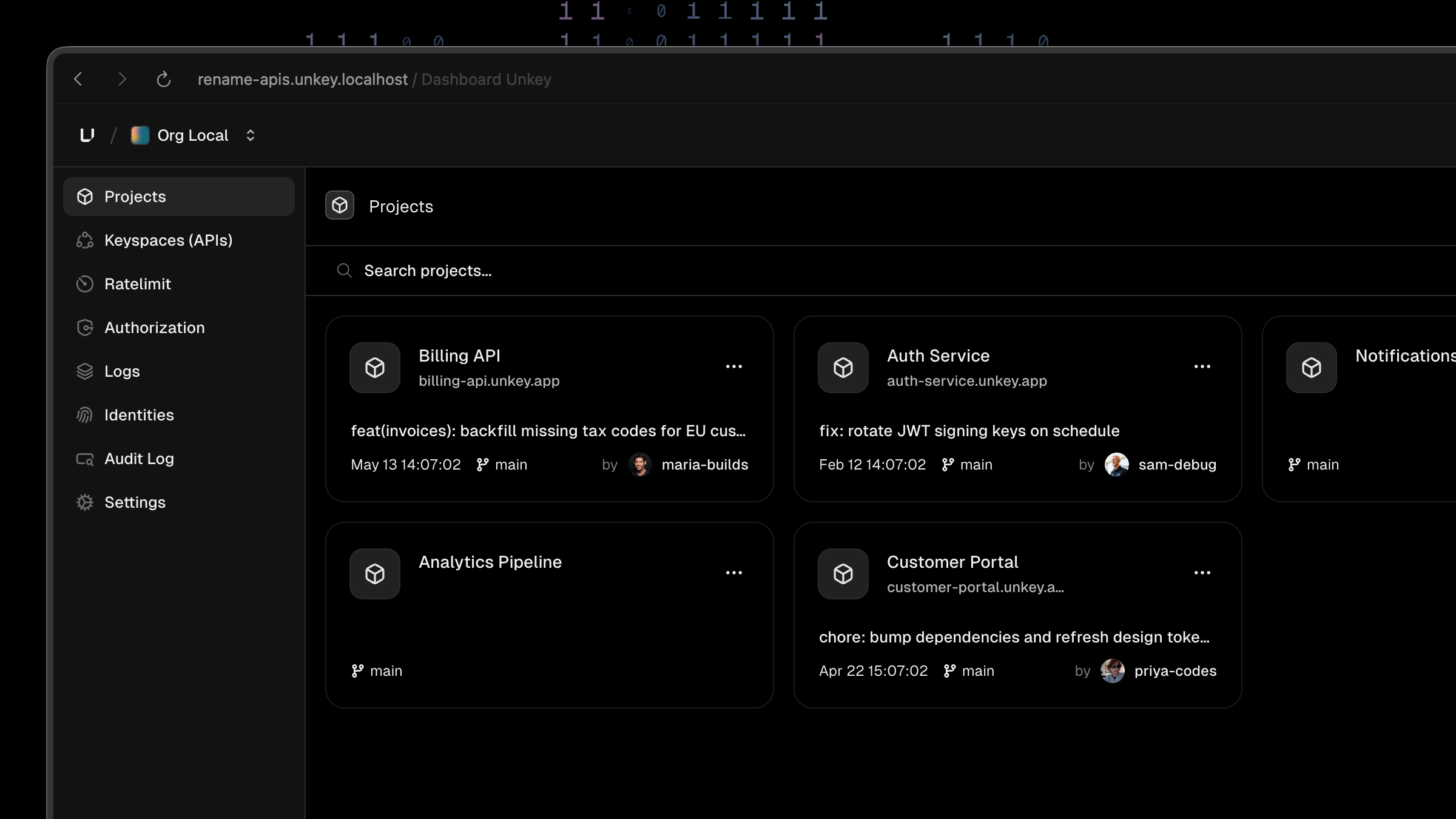
The new Projects-first navigation

We've made two upgrades to the Unkey dashboard: a reorganized navigation, and a clearer name for your APIs.

A new navigation

We've reorganized the sidebar so everything in your workspace is in one place. Your projects, keyspaces, ratelimits, logs, and settings are all a click away.

APIs are now Keyspaces (APIs)

We've renamed APIs to Keyspaces (APIs). A keyspace is the container your keys live in, and the new name says exactly that.

  • You'll find your APIs under Keyspaces (APIs) in the sidebar.

  • Your API ID is unchanged, so your integrations keep working. You can continue to use the same api_… value as before, now shown next to the KeySpace ID on each keyspace's settings page.

Read more in the Keyspaces documentation.

Have feedback on these changes? We'd love to hear from you! Email us at support@unkey.com.

MAY 29, 2026

product

May 29, 2026

New features

Roadmap

We finally added a roadmap of what we are building at Unkey. You can find the roadmap at feedback.unkey.com/roadmap. You can also request features or provide feedback on current features by just navigating to https://feedback.unkey.com and upvote existing planned features to shape how and what we build.

Updates

Faster, more accurate ratelimit convergence

Ratelimit counters now converge across regions noticeably faster. Push-pull sync intervals are tighter, more identifiers are eligible for cross-region propagation, global lookups also factor in the local region's counter as a fallback when Redis is unavailable, and warm counters are periodically refreshed from origin to keep long-window, low-traffic limits accurate. See Share counts across regions.

Pagination metadata on list endpoints

v2.apis.listKeys, v2.identities.listIdentities, v2.permissions.listPermissions, v2.permissions.listRoles, and v2.ratelimit.listOverrides now return standard pagination metadata, so SDK clients can iterate pages without custom cursor handling. See the API reference.

New identities list table

The dashboard's Identities page now uses a full table view with filtering, search, an editable metadata dialog, and per-row actions for editing ratelimits and deleting identities. Columns are sortable and the external ID is easier to scan and copy. See Identities.

Request IDs on gateway errors

Errors returned by our gateway now include the request ID in the error body, making it faster to correlate a failing request with logs and support tickets.

Vercel integration removed

The legacy Vercel integration has been removed. It was unused and is no longer available in the dashboard.

Bug fixes

  • Custom-domain SSL: ACME HTTP-01 challenges now validate against registered custom domains, so certificates can be issued for a domain before its first deployment lands.
  • Key creation now retries automatically on rare duplicate-ID collisions instead of returning an error.
  • Deployment overview: the CPU and memory utilization bars now render with the correct fill and color thresholds.
  • The "last used" sync for keys no longer stalls when a partition exhausts its retries; the job now fails fast and the next scheduled run picks up from the saved cursor, so key lastUsed timestamps stay current.
  • Background deploy jobs are more resilient to transient workflow errors when assigning domains and scaling idle preview deployments down.
  • Dashboard: a refactor of the renderable content list fixes a few cases where conditional text rendered incorrectly.

MAY 22, 2026

product

May 22, 2026

New features

Redesigned dashboard navigation

The dashboard has a new layout which is currently in beta: a fixed top breadcrumb header carries your workspace and resource context (workspace → project → API → namespace), and the sidebar morphs to show the active section's pages. Each crumb has a searchable sibling popover for one-click switching between workspaces, projects, APIs, and namespaces. Audit Log is available from the new sidebar.

CPU and memory on the deployment overview

The deployment overview page now charts CPU and memory alongside the existing throughput and latency views, so you can see resource pressure for a deployment without drilling into a single instance. See Metrics.

More accurate cross-region ratelimiting

Ratelimit usage now converges globally with higher accuracy for longer windows. Identifiers using a meaningful share of their limit are propagated across regions and influence later decisions elsewhere, tightening enforcement for globally distributed traffic. See Share counts across regions.

Jump from a truncated build error to the failed step

When a deployment fails, the Building Image row now includes a View full error link that opens the build logs panel, scrolls to the failed step, and expands it so the full error and logs land in view — no more hunting through the steps list.

Updates

Equal-height project cards

Cards in the projects list now fill their grid row and reserve space for optional fields (domain, commit title, timestamp, author), so every card lands at the same height regardless of which fields are populated. The loading-to-loaded transition no longer shifts layout.

Cleaner workspace switcher

The workspace switcher dropdown has tighter width, refined separator spacing, and a lighter shadow.

Switch component contrast

The dashboard Switch (toggle) has better contrast in dark mode and a more visible off state in both themes.

Bug fixes

  • Audit logs now load correctly in the dashboard.
  • Runtime and request log views render reliably and respect filters.
  • The external ID field now shows the correct UI when set.
  • The permission sheet inside the root-key dialog scrolls and accepts clicks again.
  • The redeploy toast paints above the new top navigation instead of behind it.
  • Routes without a scrollbar no longer show a phantom gutter on the right, and the loading spinner no longer flashes a scrollbar.
  • Trackpad overscroll no longer rubber-bands the top nav and content while the sidebar stays put.
  • The live-tail control in runtime logs is hidden when there isn't enough history to tail.
  • Pending builds are now canceled when a project (or its environment) is deleted, instead of running to completion against a deleted resource.
  • Frontline now generates the correct domain name for new deployments.
  • Projects list cards no longer flash placeholder text for missing optional fields.

MAY 8, 2026

product

May 8, 2026

New features

Rotate API and root keys from the dashboard

You can now rotate any API key or root key from the dashboard with an optional grace period (revoke immediately, 15 minutes, 1 hour, 6 hours, or 24 hours). The replacement key inherits the original's permissions, ratelimits, identity, metadata, and remaining lifetime. Find it under the new lifecycle group in the keys table action menu. See Key rerolling for details.

OpenAPI validation policy

A new OpenAPI validation policy checks incoming requests against your OpenAPI 3.0 or 3.1 spec and rejects malformed requests with a 400 Bad Request before they reach your app. Path parameters, query parameters, headers, and request bodies are all validated. Add it from the policies tab in your Deploy project.

WebSocket support on Deploy

WebSocket servers now run on Deploy out of the box — long-lived connections, no request timeouts, no configuration needed. Bind your server to the port your app exposes and connect with wss://. See WebSockets.

See why a container exited

Deployments now surface container terminations and CrashLoopBackOff transitions in a per-deployment Events section, with a header badge so you can spot the failure at a glance. No more digging through logs to figure out why your pod is returning 503s.

Per-environment auto-deploy toggle

You can now disable automatic deployments on a per-environment basis from app settings. Pushes to mapped branches stop triggering builds while the toggle is off — useful for freezing production during incidents or pausing preview spam on a busy branch. See App settings.

Runtime metrics charts in node details

The deployment Network view now charts CPU, memory, disk, and network for each instance. Open any node to see live runtime metrics alongside the existing throughput and latency views. See Metrics.

Deployment duration timer

Deployment cards now show a live duration indicator under the status badge — ticking for in-progress deployments, frozen at the final time for terminal ones. Pending and awaiting-approval deployments stay clean.

Cross-region convergence for ratelimits

Ratelimit usage now converges across regions for longer windows, so traffic accepted in one region can affect later decisions in another region. This tightens enforcement for high-throughput, globally distributed traffic. See how rate limiting works for the consistency model.

Updates

Sort and filter ratelimits by token usage

The standalone ratelimits overview now includes Passed tokens and Blocked tokens columns alongside the existing total, and you can sort the table by any of them. Useful for spotting which limits are doing the most work and which are absorbing the most denials.

Distinct 4xx and 5xx icons in logs

The logs table now uses a circle-xmark icon for 5xx errors and a triangle-warning for 4xx warnings, instead of using the same warning triangle for both. Easier to scan a noisy log view.

Quality-of-life polish for environment variables

Editing sensitive environment variables, multi-select on sensitive values, and several inline edit interactions in the env-vars editor have been tightened up. Bulk edits route through the vault's bulk encrypt path for noticeably faster saves on large variable sets.

Faster, clearer deployment list

The deployments list got a refresh: tighter network and node detail panels, cleaner latency and RPS metrics, and the Current badge no longer causes a layout shift when it appears. Custom domains are also only shown on the current deployment, instead of every row.

Bug fixes

  • Deployment filters now apply correctly across all filter types and don't drop state on tab switch.
  • The Verify domain action now checks DNS records on the apex domain, instead of failing silently for naked domains.
  • Frontline middleware now runs in the correct order and no longer leaks internal headers downstream.
  • Heimdall stops retrying on netns gone and reconciles stale network entries, fixing intermittent network errors on instance restart.
  • The WorkOS webhook endpoint no longer leaks SDK error strings (URLs, audience IDs, ratelimit hints) to unauthenticated callers; failures now return a generic 400.
  • The OpenAPI diff handler no longer follows external $ref URLs, closing a vector where a tenant could trigger SSRF through spec uploads.
  • Vercel redirects from the marketing site now resolve correctly.
  • Stripe billing flows are more resilient to upstream errors and no longer get stuck on transient failures.
  • Tunneling for local development now connects reliably.
  • GitHub integration setup, app installation, and repo selection issues have been resolved.
  • Existing routes are reassigned cleanly when a deployment changes its host bindings.
  • A deployment list crash on missing deployment data has been fixed.
  • Permissions ownership is now tracked correctly when keys are transferred between identities.
  • WebSocket connections through Frontline are no longer dropped by the request-tracking middleware.

MAY 1, 2026

product

May 1, 2026

New features

Deploy from your terminal with the Unkey CLI

You can now ship containerized apps to Deploy directly from your machine without wiring up a GitHub repo. The new CLI deploy guide walks through unkey deploy, and the CLI vs. GitHub comparison helps you pick the right flow for each project.

Preview deployments for fork pull requests

Pull requests opened from forked repositories now produce preview deployments, with a redesigned approval screen for maintainers. You can review the source repo and branch at a glance before approving the rollout.

Plain-HTTP requests now redirect to HTTPS

Frontline now serves a 308 redirect from http:// to https:// for every request that isn't an ACME challenge. Previously these requests returned 404. No action needed — your existing domains automatically pick up the new behavior.

Skip GitHub during onboarding

You can now skip the GitHub repository step during onboarding and connect a repo later. See the project setup docs for details.

Updates

Standalone ratelimit charts

The standalone ratelimits page now includes charts so you can track usage and tokens consumed over time, with the same filters available on the rest of the analytics views.

Faster runtime logs

Runtime log views in the dashboard are noticeably faster. The deployment-card sidebar also gained a Live/Paused toggle so you can opt in to live tailing instead of polling on every page open.

Cleaner Key Created dialog

The success dialog after creating a key now shows only the secret and the warning to copy it — the extra "Key Details" card and "Create another key" button are gone. This prevents users from copying the key ID by mistake when they meant to copy the secret.

Repository account name shown in pickers

When you have repositories from multiple GitHub accounts connected, the account name is now shown next to each repo in selection menus so you can disambiguate forks and personal vs. org repos.

Healthcheck default tightened to 30s

The default healthcheck interval for new deployments is now 30 seconds (previously 15s). Existing deployments are unchanged.

Ratelimit limit and cost no longer have a hard maximum

The CLI and dashboard no longer enforce upper bounds on ratelimit limit and cost values, so you can configure higher-throughput rules without hitting an artificial cap.

30-day override durations on ratelimits

Ratelimit overrides now accept durations up to 30 days, matching what the API already allowed.

Bug fixes

  • Bulk environment variable creation in the dashboard now succeeds when adding multiple variables at once.
  • Deleting an API now properly soft-deletes its keyspaces, so stale keyspaces no longer linger in listings.
  • Identity update actions in the dashboard now save correctly.
  • Runtime logs respect the selected environment when switching between them.
  • Filters now apply to charts on the overview pages (previously they only filtered the table below).
  • The redeploy flow no longer copies a stale image; GitHub fetches happen up front instead of inside the worker, fixing intermittent redeploy failures.
  • New keys now use the keyspace's configured prefix and byte length defaults instead of falling back to global defaults.
  • Domain reconnect flows now redirect correctly and keep you signed in.
  • Searches with special characters (such as _ or %) in log filters no longer error out.
  • Empty-state cards on the overview show a skeleton while loading instead of flashing "no data".
  • Pasting environment variable files containing newlines no longer produces malformed entries; the editor strips and warns on whitespace in input fields.
  • Various overflow and scroll-bounce issues across dashboard tables are fixed, and the GitHub branch picker handles search input more reliably.

APR 24, 2026

product

April 24, 2026

Unkey's brand new website launched this week at unkey.com, built by the team at Pixel Point. We also announced our $4.5M seed round led by Uncork Capital, with Essence VC, Sunflower Capital, and others joining. It funds the bet behind everything below: making Unkey the fastest path from code to a production API.

New features

Deploy is now in public beta

Unkey Deploy is available to all workspaces. Switch to Deploy from the product switcher in the dashboard to start shipping containerized apps, no invite code or feature flag required. Deploy is free to use during the beta.

Generate a Dockerfile with AI

A new Dockerfile AI prompt gives you a copy-pasteable prompt for generating a Deploy-ready Dockerfile. The prompt bakes in the runtime constraints Deploy expects, listening on PORT, handling SIGTERM, a read-only root filesystem, and using BuildKit secret mounts for build-time variables, and handles monorepo layouts out of the box.

Feedback button on Deploy

Deploy now has a Feedback button next to your avatar on the projects list and project detail pages. Use it to send feedback directly to the team while Deploy is in public beta.

Refreshed brand on auth pages

Sign-in, sign-up, and other authentication pages have been updated with the new Unkey brand mark. A new theme-aware SVG favicon automatically switches between light and dark variants based on your browser theme.

Updates

Redesigned permissions and roles tables

The permissions and roles tables in the dashboard have been rebuilt on the shared DataTable system used elsewhere in the product. Both tables now support page-based pagination and server-side sorting on name, last updated, assigned keys, and assigned permissions. Assigned counts render inline instead of loading lazily per row, so the tables feel instant even at scale.

Faster, more reliable deployment health reporting

The time between a container becoming ready and the deploy workflow unblocking has been cut by up to 40 seconds. Deployments also no longer report transient startup states as failures, and rollout notifications on Slack include richer context so you can see what just shipped at a glance.

Corrected sorting and pagination on API overview

The API overview page now sorts and paginates consistently. Counts are stable across pages, and sort order is deterministic even when multiple keys share the same value.

Build cache retention lowered

The default build cache retention window has been tuned down. Builds still benefit from caching, but stale layers are reclaimed sooner so you're less likely to hit unexpected disk pressure on busy projects.

Query performance improvements

Several dashboard routes have been rewritten to eliminate N+1 queries, including project overview, audit logs, and API keys listings. Pages load faster and with fewer database round trips.

Bug fixes

  • Builds now bust their cache when project variables change, so updated environment values no longer get baked into stale images.
  • Charts on the overview pages now show correct skeleton and empty states while loading, instead of briefly flashing "no data".
  • The keys table now includes deleted keys in historical analytics rows, and deleted keys are no longer navigable.
  • Preview deployments on the first branch of a project now resolve correctly when no project ID is available yet.
  • The broken Delete project entry in the project overflow menu has been removed. Project deletion still works from the project settings page.
  • The sign-in page no longer overflows on mobile and renders the logo at the correct size.
  • Ephemeral disk size limits are now actually enforced on instance pods.
  • Rollout metadata in deployment details now reflects the user who triggered the rollout instead of a previous sender.
  • The copy button in log detail sections is hidden when the content is empty.
  • Healthcheck runtime settings now save correctly.
  • Deployment list column widths are now consistent across rows.

APR 17, 2026

product

April 17, 2026

New features

Cancel in-progress deployments

You can now cancel a deployment that is still building. Open the actions menu on any active deployment in the deployments list and select Cancel build to abort it immediately. This is useful when you've pushed the wrong commit or want to free up build capacity for a more urgent change.

Firewall policy

A new Firewall policy replaces the previous IP rules configuration. Firewall rules let you block requests based on path, method, headers, or query parameters, not just IP address. Rules are evaluated top-to-bottom and denied requests receive a 403 Forbidden response before reaching your application.

Policies dashboard

Gateway policies can now be configured directly from the dashboard. Enable, disable, and reorder policies per environment without editing configuration files. The new UI also supports AI-assisted regex generation for pattern-based rules.

Request body streaming in logs

Request logs now include response body content for requests proxied through the gateway. This gives you deeper visibility into what your API returns without adding logging to your application code.

HTTP/2 cleartext (h2c) upstream support

Deployments can now use HTTP/2 cleartext (h2c) to communicate with your upstream service. Configure the upstream protocol in your app's runtime settings to enable gRPC or HTTP/2 workloads that don't require TLS between the gateway and your application.

Custom status code filters for request logs

The request logs page now supports filtering by individual status codes and status code ranges. Filter by specific codes (e.g., 429), or select any 2xx or 3xx range to narrow down the requests you're investigating.

Updates

Redesigned deployments list

The deployments page now uses a card-based layout with semantic resource icons, replacing the previous table view. Each card shows deployment status, git metadata, and timing at a glance.

Improved audit logs table

The audit logs page now uses paginated navigation with sorting and keyboard shortcuts, replacing the previous infinite scroll. The table loads faster and is consistent with other tables across the dashboard.

Change connected repository without disconnecting

You can now switch your project's connected GitHub repository directly from deployment settings without disconnecting and reconnecting. This preserves your existing configuration while pointing to a new repo.

Dashboard performance improvements

Several N+1 query issues have been resolved across the dashboard:

  • The API overview page no longer makes individual key count queries for each API.
  • Request log hover previews are debounced and batched to reduce API calls.
  • Rate limit timeseries charts load in a single batched request.
  • The deployments list loads significantly faster with optimized queries.

Improved loading states for ratelimits

Data enrichment in the ratelimits logs now shows smoother loading states, reducing visual flickering when pages load additional context.

Bug fixes

  • Rate limit updates no longer cause occasional deadlocks under concurrent writes.
  • Scrollbar rendering is now consistent across all dashboard pages.
  • The environment variable add panel no longer reopens after deleting a variable.
  • Footer key counts now display the correct total.
  • The onboarding wizard step progression works correctly again.
  • API settings schema validation now applies the correct constraints.
  • Ephemeral disk storage configuration now saves correctly from the runtime settings page.
  • Environment selection in filters now allows picking a specific environment and highlights the active selection.
  • Breadcrumb identifiers use a consistent font style across the dashboard.
  • Layout width calculations are now correct across all viewport sizes.

APR 10, 2026

product

April 10, 2026

New features

Ephemeral disk storage

Instances can now use dedicated ephemeral disk volumes for temporary file storage. Configure a volume size (up to 10 GiB) in your app's runtime settings, and Unkey mounts a writable disk at /data on each instance. Your app can read the mount path from the UNKEY_EPHEMERAL_DISK_PATH environment variable.

Use this for workloads that need temporary disk access, media processing, file format conversion, or caching data before uploading to external storage. The volume is created when the instance starts and destroyed when it stops, so treat it as scratch space only. See the app settings documentation for configuration options.

Automatic DNS setup for custom domains

Custom domains now support one-click DNS configuration via the Domain Connect protocol. If your DNS provider supports it, an Automatic setup available card appears when you add a domain. Click Connect, approve the changes at your provider, and Unkey configures the required DNS records automatically. Cloudflare and Vercel DNS are supported today. See the custom domains documentation for details.

Updates

Runtime logs: region and instance filters

The Logs page now includes region and instance filters, making it easier to isolate output from specific instances when debugging multi-region deployments. Instance and region metadata also appear alongside log entries in the deployment progress view.

Improved pagination

Pagination controls across the dashboard have been restyled for better readability and consistency.

Environment name validation

Environment names are now validated at creation time to prevent non-compliant names. Validation rules are shared across the dashboard and API to ensure consistency.

Bug fixes

  • Filter control bar buttons ("Clear filters" and filter navigation) are now clickable and functional. Clearing filters also resets the datetime range.
  • Chart click handlers are now restricted to the plot area only, preventing unintended interactions when clicking outside the chart.
  • Custom domains are now deduplicated correctly, preventing duplicate entries from appearing in the domain list.
  • Traffic now routes only to regions with running instances for a deployment, avoiding requests to regions where no instances are active.
  • Fixed an overflow issue in the value cell on the environment variables page.
  • The promote deployment modal now shows the correct naming and labels.

APR 3, 2026

product

April 3, 2026

New features

Autoscaling for deployments

Deployments now automatically scale based on CPU utilization. When you configure a maximum number of instances in the dashboard, Unkey creates a horizontal pod autoscaler that scales your workload between 1 and your configured maximum. Scaling kicks in at 80% CPU utilization by default, so your service can handle traffic spikes without manual intervention. See the instances documentation for details.

Dedicated environment variables page

Environment variables now have their own dedicated page in the dashboard instead of being nested inside deployment settings. The new page includes a slide-out panel for editing, drag-and-drop reordering, and persistence that protects against accidental data loss if you close a dialog or refresh the page. Variables with the same key across multiple environments are automatically grouped into expandable rows to reduce clutter. You can also change an existing variable's target environment directly, no need to delete and re-create it.

Apex domain support

Custom domains now support apex (root) domains in addition to subdomains. The system automatically detects whether your domain is an apex or subdomain and chooses the appropriate verification method, TXT records for apex domains using CNAME flattening or ALIAS records, and CNAME records for subdomains. See the custom domains documentation for setup instructions.

Bulk delete environment variables

You can now select and delete multiple environment variables at once. Hover over a row to reveal a checkbox, then use shift-click to select a range. This makes cleanup much faster when you have a large number of variables to remove.

Environment variables in onboarding

The project onboarding wizard now includes an environment variables step between deployment configuration and deploy. You can set your variables before your first deployment goes out, so your app has the configuration it needs from the start.

Updates

Improved API keys table

The API keys list in the dashboard has been migrated to the shared DataTable component, bringing consistent sorting, keyboard navigation, and improved loading states across the keys interface.

Deployment status consistency

Deployment status indicators for "skipped" and "waiting for approval" states now correctly reflect the actual deployment progress. Status labels are consistent across the dashboard.

Workspace-scoped custom domain uniqueness

Custom domain uniqueness is now scoped to the workspace level instead of being globally unique. The same domain can be used across different workspaces, while uniqueness is still enforced within each workspace.

Client IP preservation

Requests proxied through the gateway now correctly preserve the original client IP address via the X-Forwarded-For header, so your application receives accurate client location data.

Bug fixes

  • Deep links now redirect correctly after sign-in instead of landing on the default page. The original destination is preserved through the entire authentication flow.
  • Deployment progress logs now display all lines instead of showing only a single line.
  • Fixed alignment issues in the deployment progress step table.
  • Tooltip hovers on dashboard cards no longer flicker or disappear when moving across the card.
  • Fixed an issue where OpenAI structured output validation failed with gpt-4o-mini when using Zod schemas.
  • Redis connection failures during initialization no longer block startup. The system logs a warning and reconnects in the background, failing open to avoid downtime.
Explore the PastOlder posts

Turn your API stack into one workflow. Start for free, integrate in minutes, and scale when you need to.

Start for free
unkey

Build better APIs faster

© 2026 Unkey Inc. All rights reserved.

SOC 2 Type II Certified

Company

  • About
  • Careers
  • Source Code
  • Status Page
  • Roadmap

Resources

  • Blog
  • Case Studies
  • Changelog
  • Docs
  • Glossary
  • Feature Request

Connect

  • X (Twitter)
  • Discord
  • Book a Call

Legal

  • Terms of Service
  • Privacy Policy
  • Trust Center