

deployments.createDeployment. That deployment keeps the image, runtime settings, environment variables, and gateway policies it started with. With auto deploy on and no watch paths, the default branch becomes a production deployment and any other branch becomes a preview. The deployment can enforce API keys and rate limits from API management through its gateway policies.
How a deployment starts
The source you pass decides what gets built. For a GitHub push, auto deploy must be on. If you set watch paths, a changed file must match one of them, or Unkey records the push asskipped.
A is one built version of an in one . You can’t change a deployment once it’s created. It keeps the image, runtime settings, environment variables, and gateway policies it started with, so a change to any of them applies from the next deployment.
Create a deployment
A push to a connected GitHub repository creates a deployment for you. With auto deploy on and no watch paths, Unkey deploys from GitHub on every push. The default branch becomes a production deployment, and any other branch becomes a preview deployment. Watch it on the deployment page. The status moves throughpending, building, and deploying to ready, and the page lists the domains. See Deploy from GitHub and GitHub integration.
To deploy by hand, open the app’s Deployments page and click Create deployment, or click Redeploy on an existing deployment. From the CLI or API, use unkey api deployments create-deployment or deployments.createDeployment with the project, app, and environment. With no source, a git app builds its default branch and an image app deploys its default image. To deploy something else, pass one source:
git: build from the connected repository. Setbranchfor the latest commit on a branch,commitShafor an exact commit, orrepositorywith acommitShato build a fork.oci: run a prebuilt image as it is. Give it a tag or a digest, or you getlatest. The deployment keeps the image the tag pointed to when you deployed, so moving the tag later doesn’t change it.deployment: run an existing deployment again. A git app rebuilds the same commit, and an image app reuses the same image. This is what Redeploy does.
Statuses
A deployment moves through these statuses. Six of them are final:ready, failed, skipped, stopped, superseded, and cancelled. The other seven mean it’s still in progress.
A production deployment that stops being the live one also becomes
stopped, after a 30-minute standby. See Production and preview.
The deployment’s page shows each step with its start and end time as it runs. A deployment from a prebuilt image has no build log. See Build logs.
Why a deployment is waiting
A workspace runs one deployment at a time on every plan, from build through rollout. The next one sits inpending until the one ahead finishes. Deployments from a prebuilt image queue too, even though they don’t build. Production deployments jump ahead of preview deployments, so a hot-fix doesn’t wait behind a backlog of pull request builds.
A deployment that has waited an hour for its turn fails rather than waiting longer. Deploy again once the queue has drained. See Builds.
Why a deployment was superseded or skipped
If you push a second commit to a branch while the first commit’s deployment is stillpending or awaiting_approval, the first one becomes superseded and the newer commit builds instead. Once a deployment has left pending, it finishes even if newer commits arrive.
skipped means we saw the push but didn’t build it. Either auto deploy is off for the environment, or no changed file matched the environment’s watch paths. The deployments list shows the reason.
Awaiting approval
A pull request from a fork runs outside code with your environment variables, so it never builds on its own. It waits inawaiting_approval until a project member approves it in the dashboard. GitHub shows a check named Unkey Deploy Authorization on the commit while it waits. Pushes from people with write access don’t need approval. See GitHub integration.
Cancel a deployment
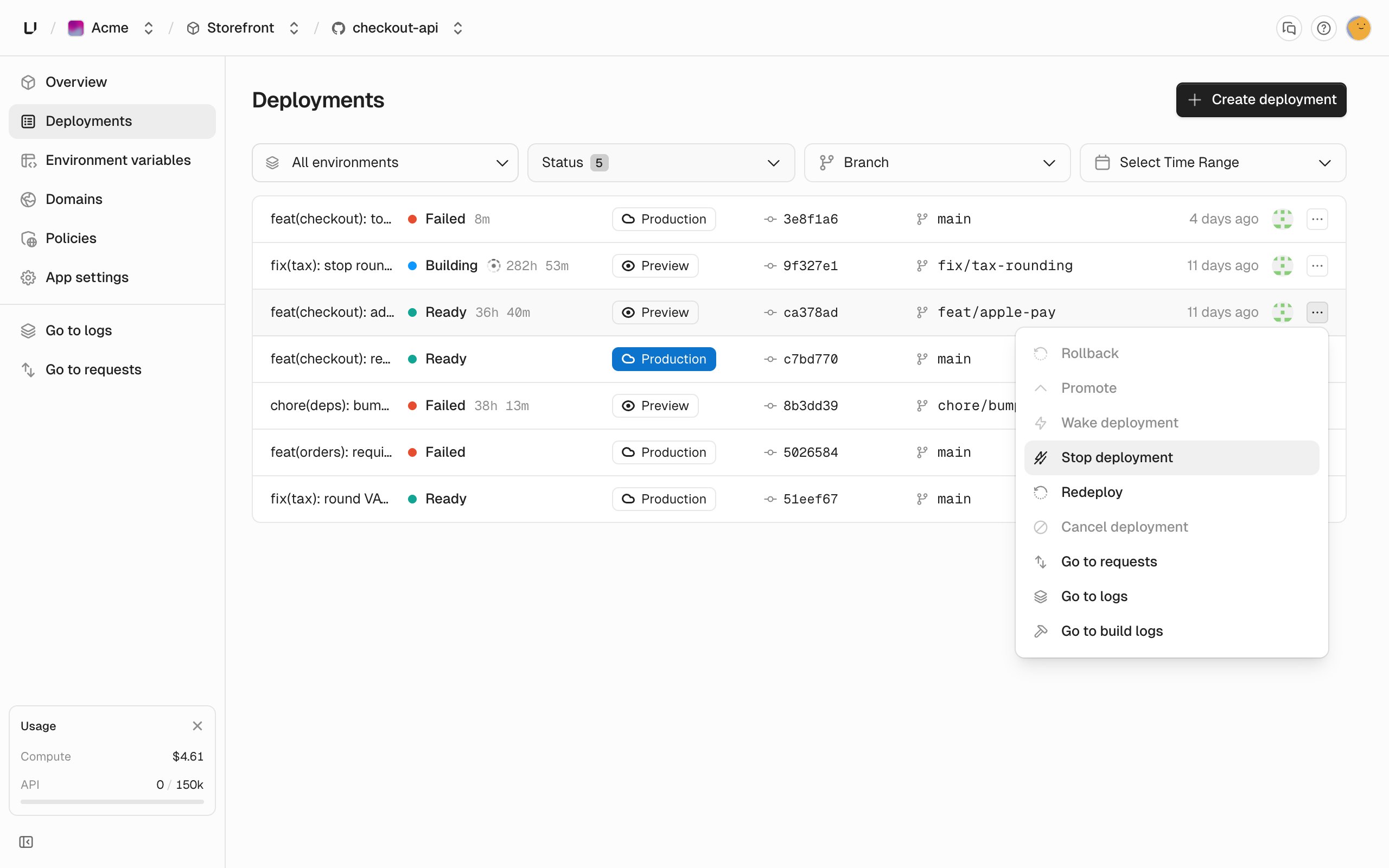
To cancel a deployment that’s still in progress, open its menu in the deployments list and click Cancel deployment. The current step is marked “Cancelled by user”, the deployment ends ascancelled, and the next deployment in the queue can start. A finished deployment can’t be canceled.
Rollouts across regions
Duringdeploying, we wait for each region to reach its minimum number of instances. The deployment goes live once all regions but one are healthy, so one region that fails to start doesn’t block the release. A single-region environment waits for that one region. If enough regions aren’t healthy within 15 minutes, the deployment fails. See Regions.
Why a deployment failed
The deployment’s page shows the step that failed and a message. In the API, afailed deployment has an error object with a code, the step that failed, and a message. The codes are:
For the quota codes, we add what your running deployments already use to this deployment’s CPU, memory, and disk at its maximum instance count in every region, and compare that to your workspace limits. So a wide autoscaling range counts at its maximum. Scale down or remove a deployment to make room.
What you can do with a deployment
You can promote and roll back production deployments, and stop and start preview deployments. See Production and preview. The dashboard also offers Redeploy for any deployment that’sready, stopped, failed, superseded, or cancelled, and Cancel deployment for anything in progress.
In the API, a deployment’s availableActions field lists the actions that will work right now, so you can check before you call.
When the deployment isn’t serving
What callers get depends on why:- The deployment is stopped:
503withdeployment_offline. - It should be running, but no instance is up yet:
503withno_running_instances. - The workspace hit its Compute spend budget with the stop option on: every deployment returns
402withspend_limit_reacheduntil you raise or remove the budget.